lead
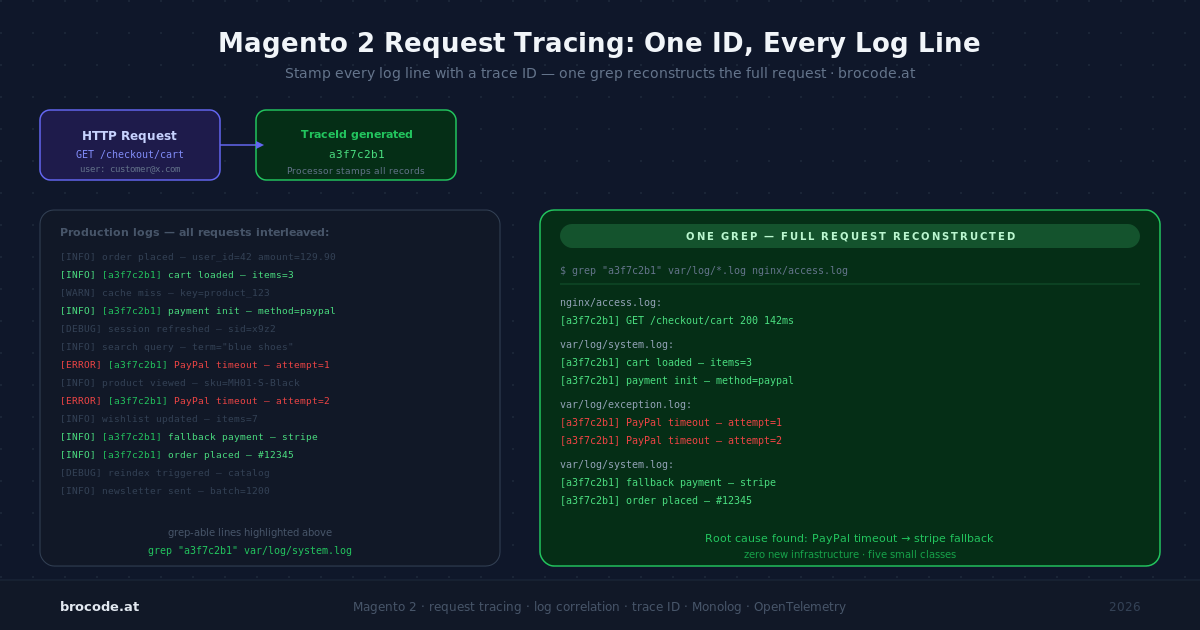
On a quiet development box, var/log/system.log reads like a story. On a production store under load, it reads like several stories shuffled together. A dozen requests are in flight at once, every one of them writing to the same file, and the line you care about — the exception that only fires for one customer, on one product, once an hour — is buried between log entries from unrelated requests that happened to land in the same millisecond.
The fix is older than Magento and almost embarrassingly simple: stamp every log line produced during a request with the same unique ID, then filter on it. This is request tracing (also called log correlation), and Magento’s logging stack supports it cleanly once you know where the seams are. This article builds a working trace-ID system for Magento 2.4.4–2.4.8+: it stamps every log line, honours trace context handed in by upstream services (OpenTelemetry, service meshes, SAP, Dynatrace), forwards the ID onward on outbound calls, and extends up the stack into Nginx/Apache and down into OpenSearch — then ends with where this leads if you outgrow the homegrown version. Everything here is packaged as a complete, installable reference module, BroCode_LogTracing: the article explains the why, the module is the copy-paste what.
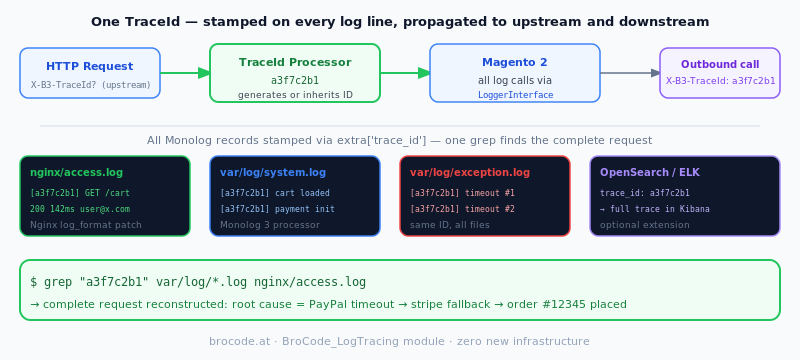
TL;DR — Stamp every log line produced during a request with one shared trace ID, then reconstruct the whole request with a single grep across system.log, exception.log and the nginx access log. It costs five small classes and no new infrastructure. One version fact governs the build: Magento 2.4.8 moved from Monolog 2 to Monolog 3, which replaced the array-shaped log record with an immutable LogRecord object and breaks processors written for the old shape. Reach for OpenTelemetry when you need timing, not correlation.
baseline: What Changed in 2.4.8 — Monolog 2 → Monolog 3
Before any code, one version fact governs everything that follows. Magento 2.4.8 (April 2025) bumped its logging library from monolog/monolog ^2.7 to ^3.6. This is not a cosmetic change. Monolog 3 replaced the array-shaped log record with an immutable Monolog\LogRecord object, and that breaks the processor and handler signatures that almost every Magento logging tutorial online still uses.
In Monolog 2, a processor looked like this:
// Monolog 2 — WRONG on Magento 2.4.8
public function __invoke(array $record): array
{
    $record['extra']['trace_id'] = '...';
    return $record;
}
In Monolog 3, the record is an object whose properties are read-only — except extra, which exists precisely so processors can write to it:
// Monolog 3 — correct on Magento 2.4.8
public function __invoke(\Monolog\LogRecord $record): \Monolog\LogRecord
{
    $record->extra['trace_id'] = '...';
    return $record;
}
LogRecord does implement ArrayAccess for backward compatibility, so old code that reads $record['message'] keeps working. But $record['extra']['trace_id'] = $x will silently fail to mutate anything, because array access on an object property returns a copy, not a reference. If you copy a five-year-old Magento logging snippet and your trace IDs never appear, this is why. Use the object form.
It is worth understanding the two arbitrary-data buckets on a record, because the choice matters:
contextis the third argument to every PSR-3 method —$logger->info('Order placed', ['order_id' => 42]). It is user-land data, supplied at the call site.extrais internal, populated only by processors. Monolog deliberately keeps the two separate so a processor can never clobber data a developer passed incontext.
A trace ID is cross-cutting metadata that no individual __() or $logger->info() call should have to know about. That makes it textbook extra, injected by a processor, applied to every record automatically.
How Magento Wires Monolog
Magento’s logger is Magento\Framework\Logger\Monolog, which extends Monolog\Logger and adds one behaviour: it inspects each record to special-case exceptions. Crucially, it does not override the parent constructor, whose signature is:
public function __construct(
    string $name,
    array $handlers = [],
    array $processors = [],
    ?DateTimeZone $timezone = null
)
That third parameter, $processors, is the entire hook we need — and because Magento builds the logger through the object manager, we can populate it from di.xml without touching a single core file.
The default handler wiring lives in app/etc/di.xml:
<type name="Magento\Framework\Logger\Monolog">
    <arguments>
        <argument name="handlers" xsi:type="array">
            <item name="system" xsi:type="object">Magento\Framework\Logger\Handler\System</item>
            <item name="debug"  xsi:type="object">Magento\Framework\Logger\Handler\Debug</item>
        </argument>
    </arguments>
</type>
system writes to var/log/system.log, debug to var/log/debug.log. Both handler classes extend Magento\Framework\Logger\Handler\Base, which sets a LineFormatter in its constructor. Three layers, then, in the order a record travels through them:
1. Logger receives the record and runs every registered processor over it.
2. Each handler decides whether it cares about the record’s level and, if so, writes it.
3. A formatter turns the record object into the final string written to disk.
A trace ID needs to touch the first and third of those: a processor to stamp it on, and a formatter willing to print it.
working_example: The Core Build — a Trace ID on Every Line
Three small pieces: a service that owns the ID, a processor that stamps it, and one line of di.xml to register the processor. I’ll use the vendor prefix Brocode and module RequestTrace; rename to taste.
1. The trace ID holder
The ID must be generated once and reused for the rest of the request. In Magento’s DI, a normal class is a shared instance — the object manager hands back the same object every time it’s requested within a request — so a private field is all the memoisation we need.
<?php
namespace Brocode\RequestTrace\Service;

class TraceId
{
    /**
     * Inbound headers that may already carry a trace ID, in priority order.
     * Nginx sets REQUEST_ID; load balancers set X-Request-Id or X-Amzn-Trace-Id.
     */
    private const SOURCES = ['HTTP_X_REQUEST_ID', 'HTTP_X_AMZN_TRACE_ID', 'REQUEST_ID'];

    private ?string $id = null;

    public function get(): string
    {
        if ($this->id !== null) {
            return $this->id;
        }

        foreach (self::SOURCES as $key) {
            if (!empty($_SERVER[$key])) {
                return $this->id = $this->normalise((string) $_SERVER[$key]);
            }
        }

        // Nothing upstream — mint one. 16 random bytes = 32 hex chars,
        // the same shape as Nginx's $request_id.
        return $this->id = bin2hex(random_bytes(16));
    }

    private function normalise(string $raw): string
    {
        // X-Amzn-Trace-Id arrives as "Root=1-abc...;Parent=...;Sampled=1"
        if (str_contains($raw, 'Root=')) {
            preg_match('/Root=([^;]+)/', $raw, $m);
            $raw = $m[1] ?? $raw;
        }
        // Keep it filename- and grep-friendly.
        return substr((string) preg_replace('/[^A-Za-z0-9\-]/', '', $raw), 0, 64);
    }
}
One deliberate choice deserves explanation: this reads $_SERVER directly instead of injecting Magento\Framework\App\RequestInterface. That is not laziness. The logger is constructed extremely early in the bootstrap, and the HTTP request object has a dependency graph of its own that can, in some areas, attempt to log during construction. Inject the request into anything on the logging path and you risk a circular dependency that manifests as a baffling "infinite recursion" or a half-built object. A superglobal read has no dependencies and is available the instant PHP starts. Prefer it here.
That three-source list is the deliberately minimal version, enough to follow the rest of the build. We expand it later (Honouring trace context from upstream services) so Magento joins a trace that a calling service, a mesh, or SAP already started rather than minting a fresh ID.
2. The processor
<?php
namespace Brocode\RequestTrace\Logger;

use Brocode\RequestTrace\Service\TraceId;
use Monolog\LogRecord;
use Monolog\Processor\ProcessorInterface;

class TraceIdProcessor implements ProcessorInterface
{
    public function __construct(
        private readonly TraceId $traceId
    ) {
    }

    public function __invoke(LogRecord $record): LogRecord
    {
        $record->extra['trace_id'] = $this->traceId->get();
        return $record;
    }
}
This runs for every record on every handler, so keep it trivial — which it is, because the holder memoises after the first call. The Symfony docs put a blunt comment on their equivalent processor: "this method is called for each log record; optimize it to not hurt performance." Heed it: no database calls, no file reads, no object construction inside __invoke.
3. Register the processor
In your module’s etc/di.xml:
<?xml version="1.0"?>
<config xmlns:xsi="http://www.w3.org/2001/XMLSchema-instance"
        xsi:noNamespaceSchemaLocation="urn:magento:framework:ObjectManager/etc/config.xsd">
    <type name="Magento\Framework\Logger\Monolog">
        <arguments>
            <argument name="processors" xsi:type="array">
                <item name="trace_id" xsi:type="object">Brocode\RequestTrace\Logger\TraceIdProcessor</item>
            </argument>
        </arguments>
    </type>
</config>
Attaching the processor to the concrete Magento\Framework\Logger\Monolog type means it propagates to the virtual loggers that third-party modules build on top of it (custom loggers are nearly always declared as <virtualType ... type="Magento\Framework\Logger\Monolog">, and virtual types inherit their parent type’s arguments unless they explicitly override processors). One registration, trace IDs on the main log and most module logs.
Run bin/magento setup:di:compile if you’re in a compiled mode, clear cache, and you’re stamping.
Making the ID Visible
Here is a pleasant surprise. Magento’s Base handler builds its LineFormatter with the default format string, which already ends in %extra%. So the moment the processor is registered, your existing log lines gain a trailing JSON blob:
[2026-06-06T09:14:22.120384+00:00] main.INFO: Saved order 100000042 [] {"trace_id":"9f2c1ad4e0b74f3a8c5d6e7f"}For grep, that is already enough:
grep '"trace_id":"9f2c1ad4e0b74f3a8c5d6e7f"' var/log/*.logIf you want the ID promoted to a dedicated leading column instead of buried in the extra blob, supply your own format string. The clean way is a thin handler subclass that overrides the formatter, then swap it in for the defaults:
<?php
namespace Brocode\RequestTrace\Logger\Handler;

use Magento\Framework\Logger\Handler\Base;
use Monolog\Formatter\LineFormatter;

class TracedSystem extends Base
{
    /** @var string */
    protected $fileName = '/var/log/system.log';

    public function getFormatter(): \Monolog\Formatter\FormatterInterface
    {
        return new LineFormatter(
            "[%datetime%] [%extra.trace_id%] %channel%.%level_name%: %message% %context%\n",
            'Y-m-d H:i:s',
            true,   // allowInlineLineBreaks
            true    // ignoreEmptyContextAndExtra
        );
    }
}
<type name="Magento\Framework\Logger\Monolog">
<arguments>
<argument name="handlers" xsi:type="array">
<item name="system" xsi:type="object">Brocode\RequestTrace\Logger\Handler\TracedSystem</item>
</argument>
</arguments>
</type>Now every line opens with the ID:
[2026-06-06 09:14:22] [9f2c1ad4e0b74f3a8c5d6e7f] main.INFO: Saved order 100000042Which is nicer to read, nicer to awk, and nicer to index. Whether the extra two classes are worth it depends on how often a human reads these files versus a machine; for pure machine ingestion, the default %extra% blob is arguably better because it’s structured.
Extending the Trace Beyond PHP
A trace ID that only covers PHP misses half the picture. A request touches the edge proxy, PHP-FPM, the database, the cache, and — on a modern catalogue — OpenSearch. The real value comes when one ID stitches all of those together.
Inbound: let the edge mint the ID
Nginx has had a built-in $request_id variable (32 hex characters from 16 random bytes) since 1.11.0. Generate the ID at the edge and hand it to PHP, and the same value appears in both the Nginx access log and every Magento log line for that request:
# nginx: in the location block that proxies to PHP-FPM
location ~ ^/(index|get|static|errors)\.php(/|$) {
    # ... existing fastcgi config ...
    fastcgi_param REQUEST_ID $request_id;
}

# nginx: surface it in the access log
log_format traced '$remote_addr - $request_time "$request" $status rid=$request_id';
access_log /var/log/nginx/access.log traced;
The TraceId holder checks $_SERVER['REQUEST_ID'], so this needs zero PHP changes.
Apache has no $request_id, but mod_unique_id stamps every request with a UNIQUE_ID. The catch: raw environment variables aren’t reliably forwarded to PHP-FPM over mod_proxy_fcgi, whereas request headers always are. So the robust approach — which works identically under mod_php and PHP-FPM — is to expose UNIQUE_ID as the X-Request-Id header, and only when an upstream proxy hasn’t already set one:
# apache: enable once — a2enmod unique_id headers
RequestHeader setifempty X-Request-Id "%{UNIQUE_ID}e"

LogFormat "%h %l %u %t \"%r\" %>s %b rid=%{X-Request-Id}i" traced
CustomLog ${APACHE_LOG_DIR}/access.log traced
setifempty (Apache 2.4.7+) preserves an upstream ID rather than clobbering it. The holder reads $_SERVER['HTTP_X_REQUEST_ID'] first, so it picks this up with no PHP change either.
Either way, a 502 in the web-server log and the PHP fatal that caused it now share an ID, and a single grep across both logs reconstructs the request.
If a load balancer or Varnish sits in front, generate the ID even earlier and pass it down as an X-Request-Id header (Varnish can do this in VCL with set req.http.X-Request-Id = ...); both the Nginx and Apache snippets above leave an existing header untouched, and the holder’s HTTP_X_REQUEST_ID source picks it up.
Inbound from other services: traceparent, B3, SAP, Dynatrace
Letting the edge mint an ID handles the standalone store. But Magento rarely runs alone — it sits among services that may already be tracing: an upstream app instrumented with OpenTelemetry, an Istio/Envoy mesh, an SAP backend on an integration bus, a Dynatrace-monitored estate. When one of those calls in, it sends its own trace context in a header. The right move is to adopt that ID so Magento’s logs join the existing trace, rather than starting a fresh, disconnected one.
That means widening the resolver’s source list and, for the structured headers, pulling out the right field:
private const SOURCES = [
    'HTTP_TRACEPARENT',            // W3C Trace Context — OTel, modern Dynatrace, SAP Cloud
    'HTTP_X_B3_TRACEID',           // B3 — Zipkin, Istio/Envoy
    'HTTP_B3',                     // B3 single-header form (Envoy)
    'HTTP_SAP_PASSPORT',           // SAP end-to-end trace passport
    'HTTP_X_CORRELATION_ID',       // SAP BTP / CPI / CAP, and general
    'HTTP_X_DYNATRACE',            // Dynatrace request tag
    'HTTP_X_REQUEST_ID',           // generic correlation id
    'HTTP_X_AMZN_TRACE_ID',        // AWS ALB / X-Ray
    'HTTP_X_CLOUD_TRACE_CONTEXT',  // Google Cloud LB
    'REQUEST_ID',                  // Nginx per-node
    'UNIQUE_ID',                   // Apache per-node
];
The ordering is a deliberate default: real distributed-trace context (traceparent, B3) beats a generic correlation header, which beats a per-node web-server ID, which beats minting one. A match dispatches each carrier to an extractor; the structured ones each have a parsing subtlety worth getting right.
traceparent is the one most people get wrong. It is not an opaque ID — it is version-traceid-spanid-flags, and only the 32-hex trace-id is shared across the whole trace. The span-id changes at every hop, so using the raw header would give a different value per service and defeat correlation:
private function fromTraceparent(string $raw): string
{
    // 00-4bf92f3577b34da6a3ce929d0e0e4736-00f067aa0ba902b7-01
    $traceId = explode('-', trim($raw))[1] ?? '';
    if (preg_match('/^[0-9a-f]{32}$/i', $traceId) && $traceId !== str_repeat('0', 32)) {
        return strtolower($traceId);   // the trace-id field only
    }
    return '';                          // malformed/all-zero → try the next source
}
SAP Passport is the awkward one. SAP’s end-to-end trace ships a sap-passport header that is a hex-encoded binary blob (it opens with the TH marker, 2a54482a) embedding the transaction and root-context GUIDs SAP logs against. The field offsets are version-sensitive, so a clean structural parse isn’t realistic in a few lines — the honest approach is a best-effort extraction that validates the envelope and pulls a plausible GUID, falling through to the next source if nothing valid turns up:
private function fromSapPassport(string $raw): string
{
    $hex = strtolower(trim($raw));
    if (!ctype_xdigit($hex) || !str_starts_with($hex, '2a54482a')) {
        return '';
    }
    foreach ([16, 48, 80] as $offset) {            // probed GUID positions
        $guid = substr($hex, $offset, 32);
        if (strlen($guid) === 32 && $guid !== str_repeat('0', 32)) {
            return $guid;
        }
    }
    return '';
}
Two things make this safe despite the guesswork. First, the fallthrough: a wrong offset yields '' and the resolver moves on — SAP landscapes almost always also send X-Correlation-ID or traceparent, both parsed cleanly and ranked above the generic headers. Second, the original passport is forwarded verbatim on outbound calls (next section), so SAP-side correlation keeps working regardless of what Magento chose for its own log ID.
Dynatrace is mostly a non-event: modern OneAgent propagates W3C traceparent, which is already first in the list, so the Dynatrace trace-id is captured automatically. X-Dynatrace is honoured only as a fallback for the legacy request-tag header.
The remaining carriers are one-liners: AWS X-Ray’s X-Amzn-Trace-Id needs its Root= field; Google Cloud’s X-Cloud-Trace-Context is traceid/spanid;o=1, so keep the part before the slash; B3, X-Correlation-ID, and the generic headers are used as-is after sanitising. The companion module ships all of these in its TraceId resolver; the table below is the whole recognised set.
| Header | Source | Field used |
|---|---|---|
traceparent | W3C / OTel / Dynatrace | 32-hex trace-id |
X-B3-TraceId, b3 | B3 / Istio / Envoy | trace-id |
SAP-PASSPORT | SAP E2E trace | embedded GUID (best-effort) |
X-Correlation-ID | SAP BTP/CPI/CAP, general | full value |
X-Dynatrace | Dynatrace tag | full value |
X-Request-Id | generic / edge | full value |
X-Amzn-Trace-Id | AWS X-Ray | Root= field |
X-Cloud-Trace-Context | Google Cloud | trace-id before / |
REQUEST_ID / UNIQUE_ID | Nginx / Apache | per-node fallback |
A note on clusters
The same single ID flows across multiple Magento nodes as long as one component — the load balancer, ideally — mints it and every node honours the inbound header instead of minting its own. That covers the synchronous path: LB → whichever web node handles the request → its downstream calls (forwarded automatically for Magento’s cURL client, see below). The per-node $request_id / UNIQUE_ID fallback only fires when nothing upstream supplied an ID.
The asynchronous path is the exception that doesn’t happen for free: a request that enqueues a message finishes, and a consumer on another node picks it up later as a new PHP process with a new ID. To keep one trace end to end, stash the ID in the message payload at publish time and have the consumer adopt it before doing any work. And none of this is legible across nodes unless logs are centralised — in a cluster the trace ID is a join key in OpenSearch or your log store, not something you grep on a single box.
Outbound: carry the ID to OpenSearch and APIs
When Magento calls a downstream service — an OpenSearch cluster, a payment gateway, a PIM, an SAP endpoint — the ID should travel with it so the other system’s logs correlate too. You can add the header by hand at each call site, but the better move is to automate it for Magento’s own HTTP client so no call site has to remember.
The wrinkle is that Magento\Framework\HTTP\Client\Curl::makeRequest() — where the request is actually assembled — is protected, and Magento plugins only intercept public, non-final methods. So you can’t plug makeRequest. The public entry points get() and post() (which every request funnels through) are pluggable, and addHeader() is public, so a before plugin on those injects the headers just before the request fires:
class CurlForwardPlugin
{
    public function __construct(private readonly TraceId $traceId) {}

    public function beforeGet(Curl $subject, $uri): void
    {
        $this->forward($subject);
    }

    public function beforePost(Curl $subject, $uri, $params): void
    {
        $this->forward($subject);
    }

    private function forward(Curl $subject): void
    {
        foreach ($this->traceId->propagationHeaders() as $name => $value) {
            $subject->addHeader($name, $value); // keyed by name → idempotent
        }
    }
}
propagationHeaders() returns more than the bare ID. It always sends X-Request-Id: <trace-id>, and it forwards any inbound distributed-trace context verbatim — traceparent (and tracestate), SAP-PASSPORT, X-Dynatrace, B3 — so a downstream SAP, Dynatrace, or OTel system continues the same trace rather than seeing a brand-new request:
public function propagationHeaders(): array
{
    $headers = ['X-Request-Id' => $this->get()];
    foreach (self::PROPAGATE as $server => $name) {       // e.g. HTTP_TRACEPARENT => 'traceparent'
        if (!empty($_SERVER[$server])) {
            $headers[$name] = (string) $_SERVER[$server];
        }
    }
    return $headers;
}
One honesty note: forwarding traceparent verbatim keeps the trace-id continuous but does not open a child span — the downstream sees the same parent. That’s correct, dependency-free behaviour for log correlation; genuine span propagation is OpenTelemetry’s job. For an OpenSearch-backed search stack this is already worthwhile: a slow query in the OpenSearch slow log ties back to the exact Magento request and customer that triggered it.
This covers Magento\Framework\HTTP\Client\Curl. Code using Guzzle, Laminas\Http\Client, or the lower-level HTTP\Adapter\Curl isn’t auto-covered — there, spread propagationHeaders() onto the request yourself:
$this->httpClient->request('POST', $endpoint, [
    'headers' => $this->traceId->propagationHeaders(),
    'body'    => $payload,
]);
CLI, cron, and queue consumers
A trace ID is just as useful outside the web context. A bin/magento command, a cron job, or a message-queue consumer each runs as its own PHP process, so the TraceId holder naturally mints a fresh ID per run — every line a long-running indexer writes shares one ID, and two overlapping cron runs no longer interleave indistinguishably. No extra work needed; the design already covers it.
Reading the Trace
Once IDs are flowing, retrieval is the easy part.
Find everything for one request across every log file:
grep -rh '9f2c1ad4e0b74f3a8c5d6e7f' var/log/ | sortPull the ID out of a known error line, then expand to the full request:
ID=$(grep 'Some specific exception' var/log/exception.log | grep -oP 'trace_id":"\K[^"]+' | head -1)
grep -rh "$ID" var/log/
At any real volume, though, grep stops scaling and you ship logs to a search backend. If you’re already running OpenSearch for catalogue search, you have a log store sitting right there: point Filebeat or Fluent Bit at var/log/, parse the JSON extra, and extra.trace_id becomes a filterable field in OpenSearch Dashboards. One click on a trace ID then shows the entire request — web log, app log, slow query — on a single timeline.
tradeoff: Log Tracing vs OpenTelemetry
What this article builds and what OpenTelemetry does are often spoken of in the same breath, which causes confusion, because they answer different questions. Before comparing them, three terms that the field uses loosely but which have distinct meanings:
- Correlation ID — the broadest. A single identifier that ties together everything belonging to one logical unit of work. That unit can be one HTTP request, but it can also be longer-lived: a checkout spanning three requests, or a monthly billing job that retries over 30 days. It lives as long as the context does.
- Trace ID — request-scoped. Born when a request enters the system, dead when the response leaves. Its job is to label every log line and span produced during that one request so they can be reassembled.
- Span ID — the finest grain. One timed operation inside a trace — a database query, an OpenSearch call, a controller action — with a start time, a duration, and a parent span. Spans are what turn a flat list of log lines into a timed tree.
The trace_id this article stamps is, strictly, a request-scoped correlation ID. It puts every log line under one label so you can answer "which request did this line belong to?" It does not record durations, parent/child relationships, or the order of operations — there are no spans. That is the exact boundary where homegrown log tracing ends and OpenTelemetry begins.
What OpenTelemetry adds
OpenTelemetry is the vendor-neutral standard for distributed tracing: propagating a trace across service boundaries and recording spans within each service, so the result is a single timed tree spanning every hop a request touched. Propagation rides on the W3C Trace Context standard, a traceparent header carrying the trace ID, the parent span ID, and sampling flags:
traceparent: 00-4bf92f3577b34da6a3ce929d0e0e4736-00f067aa0ba902b7-01
             │  └─ 32-hex trace id ────────────┘ └─ 16-hex span ┘ └ flags
             └ version
OpenTelemetry for PHP delivers this through a C extension (opentelemetry, installed via PECL/PIE, PHP 8.0+) plus auto-instrumentation packages that hook database, HTTP-client, and framework calls at the engine level — no application code changes. Notably for the topic at hand, the opentelemetry-php/contrib-auto-psr3 package injects the active trace and span IDs into the context of any PSR-3 logger — and Magento’s logger is PSR-3. In effect it automates the processor we wrote by hand, except the IDs it stamps line up with real distributed spans rather than being a flat per-request label. If you adopt OTel later, your hand-rolled processor is the thing it replaces.
That cheap interim step — reading an incoming traceparent and adopting its trace-id without running the OTel SDK — is exactly what the resolver above already does. If an upstream service or a mesh sidecar is tracing, Magento’s logs carry the same trace-id the backend shows, so they align with the distributed trace even though Magento emits no spans of its own. B3, AWS X-Ray, Google Cloud, and SAP are handled the same way: pull each one’s trace-id field. It’s a genuinely useful halfway house — your logs join whatever tracing already exists — without committing to the collector, exporter, and backend that full OpenTelemetry needs.
The honest comparison
| Log trace (this article) | OpenTelemetry | |
|---|---|---|
| Question answered | Which request did this line belong to? | Why was this request slow, and which leg caused it? |
| Data model | Flat label on each log line | Timed tree of parent/child spans |
| Durations / timings | None | Per-span — the whole point |
| Cross-service propagation | Header forwarding, no spans (auto for the cURL client) | Automatic via traceparent, with spans |
| New infrastructure | None — writes to var/log | Collector + exporter + backend (Jaeger, Tempo, Grafana, an APM) |
| Code/setup cost | A handful of small classes, one di.xml | PHP extension, SDK, config, a backend to run |
| Runtime overhead | Negligible | Low but real; sampling usually needed at volume |
| Storage | Your existing log files | A separate trace store, retained and queried apart |
| Good fit | Single store, debugging "what happened here?" | Multiple services, latency analysis, existing OTel estate |
The middle ground worth knowing
Two points sit between "grep a log file" and "stand up an OTel collector."
An off-the-shelf correlation module. If you want request correlation working today without writing the classes above, ampersand/magento2-log-correlation-id is a maintained module that does essentially what this article describes — it attaches an X-Log-Correlation-Id to the request, the Monolog context, and (optionally) New Relic transactions, generating one or honouring an upstream header. The reason to build it yourself anyway is understanding and control: you own the header precedence, the edge-to-OpenSearch path, and the formatter, and you carry no dependency you don’t need. But for a team that just wants correlation and already runs New Relic, installing the module is the pragmatic call — and it’s worth saying so plainly.
An APM with a trace view. New Relic, Datadog, and similar tools give you span-level traces — the why was it slow picture — without running an OpenTelemetry collector yourself; their agent does the instrumentation and they store the traces. This is often how teams get distributed tracing before they ever touch raw OpenTelemetry: the trace tree arrives as a managed feature, at the cost of vendor lock-in and a per-host bill.
The progression
Read top to bottom; stop at the first row that answers the question you actually have.
1. Per-request log correlation (this article, or the Ampersand module) — when "which request?" is the hard part. Most single-store deployments never go further.
2. APM with tracing (New Relic / Datadog) — when "why was it slow?" arrives and you’d rather buy the answer than build it.
3. OpenTelemetry — when you run several services, want vendor-neutral traces, or already run OTel elsewhere and want Magento to join the same distributed traces.
The mistake is jumping to step 3 because it’s the impressive answer when the question on the table is still step 1. Start with the correlation ID; it costs almost nothing and solves the problem most stores actually have.
verification: Pitfalls and the Cheatsheet
A short list of the things that actually bite:
Copying Monolog 2 processor code. The single most common failure. $record['extra'][...] = $x does nothing on 2.4.8. Mutate $record->extra[...] on the object and return it.
Injecting the request object into the logging path. Tempting, and a fast route to a circular dependency during bootstrap. Read $_SERVER instead.
Expecting extra to print without a willing formatter. It shows up by default because Magento’s LineFormatter includes %extra%. If you replace a handler’s formatter with a custom format string and forget %extra.trace_id% (or %extra%), the ID is stamped on the record but never written.
Forgetting it’s per-process, not per-page-view, for async work. That’s a feature for CLI and consumers, but be aware: if a single queue consumer process handles thousands of messages, they’ll all share one trace ID unless you reset it per message. For per-message granularity, expose a reset() on the holder and call it at the top of each message.
Using a whole traceparent as the ID. It’s version-traceid-spanid-flags; only the 32-hex trace-id is shared across the trace. Take that field, not the raw header, or every hop logs a different value.
Trying to plug Curl::makeRequest(). It’s protected, so the plugin silently never fires. Attach to the public get()/post() instead — everything funnels through them.
Treating SAP Passport parsing as exact. It’s a version-sensitive binary format; the offset-based extraction is best-effort. Lean on the X-Correlation-ID / traceparent that SAP also sends, and forward the raw passport onward so SAP-side correlation survives a wrong guess.
Expecting forwarded traceparent to create spans. Verbatim forwarding keeps the trace-id continuous but doesn’t open a child span. That’s fine for log correlation; if you need the span tree, that’s OpenTelemetry.
Assuming third-party loggers are covered. Attaching the processor to the base Monolog type covers virtual types that inherit it — including the Adobe-recommended custom logger pattern, which uses virtual types directly of Monolog. Two less-common cases slip through. First, a module that constructs Monolog by some other means — or explicitly overrides processors — won’t pick it up. Second, and less obvious: Magento’s DI resolves <type> arguments by class name, not PHP inheritance. If a module ships its own logger subclass (class FooBarLogger extends Monolog) and virtual types are built on that, they resolve against <type name="FooBarLogger">, not against <type name="Monolog"> — so the processor is absent. Fix for both cases: add a <type> entry for the specific base class in your project’s di.xml:
<type name="Vendor\Module\Logger\FooBarLogger">
    <arguments>
        <argument name="processors" xsi:type="array">
            <item name="trace_id" xsi:type="object">BroCode\LogTracing\Logger\TraceIdProcessor</item>
        </argument>
    </arguments>
</type>
This covers every virtual type built on FooBarLogger in one shot. Check var/log/<thatmodule>.log for the ID to confirm.
The Companion Module
Everything above ships as one installable module, BroCode_LogTracing, so you can read the why here and drop the what into app/code:
Service/TraceId— the resolver, with all the upstream parsers (traceparent, B3, SAP Passport, Dynatrace, AWS, GCP, edge), plusset()to adopt an ID from a queue message andreset()for per-message consumers, and a guarded New Relic hook.Logger/TraceIdProcessor— Monolog 2/3 dual-compatible processor (is_object()dispatch).Logger/Handler/Traced{System,Debug}— the dedicated-column handlers (optional; delete them to keep the ID in%extra%).Plugin/ResponseHeaderPlugin— echoesX-Request-Idback on the response.Plugin/CurlForwardPlugin— forwards the ID and inbound trace context on outbound cURL calls.etc/di.xml— wires the processor, handlers, and plugins.
Supports Magento 2.4.4–2.4.8+ (Monolog 2 and Monolog 3). No external dependencies.
The Cheatsheet
The moving parts:
| Part | Class | Job |
|---|---|---|
| Holder | Service\TraceId | Resolve the ID once (parse upstream headers or mint), memoise; propagationHeaders() for outbound |
| Processor | Logger\TraceIdProcessor | Stamp extra['trace_id'] on every record |
| Handlers | Logger\Handler\Traced{System,Debug} | Optional: print the ID as a leading column |
| Response plugin | Plugin\ResponseHeaderPlugin | Echo X-Request-Id on the response |
| cURL plugin | Plugin\CurlForwardPlugin | Forward ID + trace context on outbound get()/post() |
| Registration | etc/di.xml | Wire processor, handlers, and plugins |
Monolog 2 vs 3 (the bit that breaks tutorials):
| Monolog 2 (≤ 2.4.7) | Monolog 3 (2.4.8+) | |
|---|---|---|
| Record type | array | Monolog\LogRecord object |
| Processor signature | __invoke(array $record): array | __invoke(LogRecord $record): LogRecord |
| Write extra | $record['extra']['k'] = $v | $record->extra['k'] = $v |
The ID’s journey, edge to disk:
flowchart TD
    US["upstream service<br/>traceparent / b3 / SAP-PASSPORT"]
    LB["LB / Varnish<br/>X-Request-Id"]
    NX["Nginx<br/>$request_id → fastcgi_param REQUEST_ID"]
    AP["Apache<br/>UNIQUE_ID → RequestHeader X-Request-Id"]

    SRV["$_SERVER<br/>HTTP_TRACEPARENT · HTTP_SAP_PASSPORT · HTTP_X_REQUEST_ID · …"]

    US --> SRV
    LB --> SRV
    NX --> SRV
    AP --> SRV

    SRV --> TID["Service\TraceId::get()"]

    TID --> LOG["Logger processor<br/>extra.trace_id"]
    TID --> HDR["X-Request-Id<br/>response header"]
    TID --> FILE["var/log/*.log<br/>via %extra%"]
    TID --> CURL["outbound cURL<br/>propagationHeaders()"]
Commands:
# After adding the module
bin/magento setup:upgrade
bin/magento setup:di:compile        # if in production/compiled mode
bin/magento cache:flush

# Find one request everywhere
grep -rh '<trace-id>' var/log/

# Pull the ID from an error, then expand
grep -oP 'trace_id":"\K[^"]+' var/log/exception.log | head -1
Useful paths:
app/code/Brocode/LogTracing/Service/TraceId.php             # resolver + propagationHeaders()
app/code/Brocode/LogTracing/Logger/TraceIdProcessor.php     # the processor
app/code/Brocode/LogTracing/Logger/Handler/Traced*.php      # leading-column handlers (optional)
app/code/Brocode/LogTracing/Plugin/ResponseHeaderPlugin.php # X-Request-Id on the response
app/code/Brocode/LogTracing/Plugin/CurlForwardPlugin.php    # forward on outbound cURL
app/code/Brocode/LogTracing/etc/di.xml                      # wiring
var/log/system.log, debug.log, exception.log                # where IDs land
Decision: how far up the tracing ladder?
| Question you’re asking | Reach for |
|---|---|
| Which request did this line belong to? | Correlation ID (this article) |
| Want it working today, no custom code? | ampersand/magento2-log-correlation-id |
| Why was this request slow, and which leg? | APM trace view (New Relic / Datadog) |
| Vendor-neutral traces across several services? | OpenTelemetry + W3C Trace Context |
| Single store, just want clean debugging? | Correlation ID — stop here |