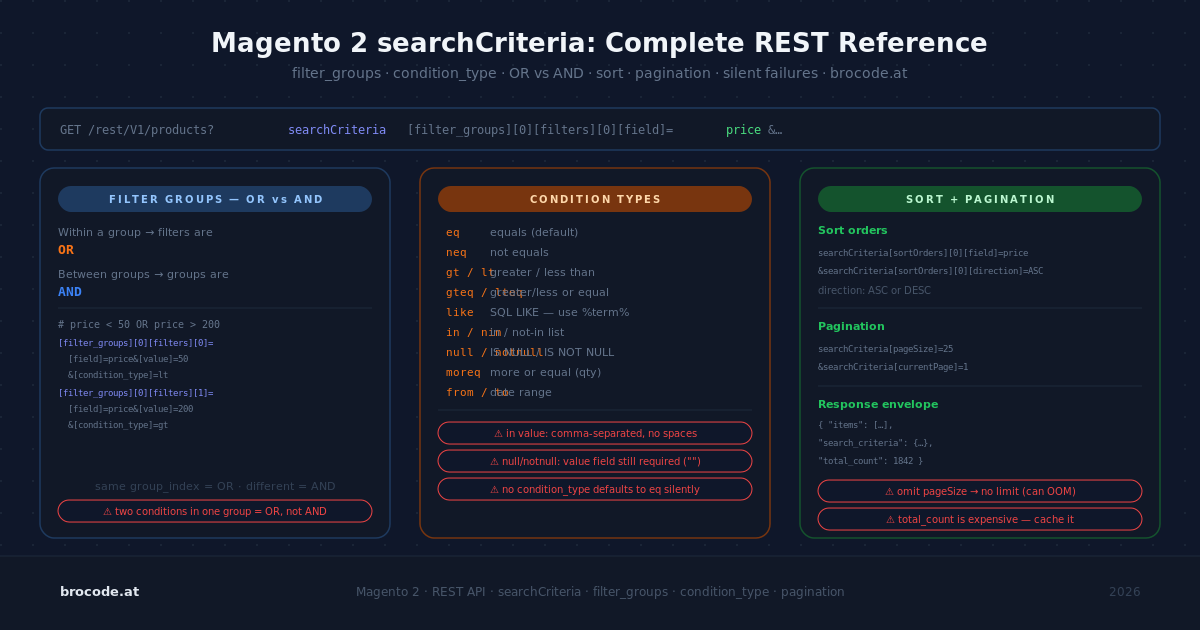
Every Magento REST integration eventually hits the bracket-syntax wall. You try GET /rest/V1/products?field=status&value=1, get back the full catalogue, check the docs, and discover you needed searchCriteria[filter_groups][0][filters][0][field]=status. Then you wonder what filter_groups plural means, when to use which index, and why your OR condition is silently ANDing. This article leads with the mental model, covers every condition type, walks through copy-paste examples for every common pattern, and ends with the silent failures that burn most developers at least once.
The mental model: one rule for AND and OR
Before any syntax, the logic rule:
- Multiple
filterswithin the samefilter_groupsindex → OR - Multiple
filter_groupsat different indices → AND
That’s it. Every query is a combination of these two rules. You cannot OR across different filter groups — (A AND B) OR (X AND Y) is not expressible. If you need that shape, you need two separate requests or a custom search endpoint.
The parameter triplet for every filter:
searchCriteria[filter_groups][<group>][filters][<filter>][field]=<field_name>
searchCriteria[filter_groups][<group>][filters][<filter>][value]=<value>
searchCriteria[filter_groups][<group>][filters][<filter>][condition_type]=<operator>
condition_type is optional when the operator is eq — the default.
All condition types
| Condition | Meaning | Notes |
|---|---|---|
eq | Equals | Default; omit condition_type |
neq | Not equal | |
like | SQL LIKE | Use %25 in URLs for % wildcard |
nlike | Not like | |
in | In set | Comma-separated list in value |
nin | Not in set | Comma-separated list in value |
null | Is null | |
notnull | Is not null | |
lt | Less than | |
lteq | Less than or equal | |
gt | Greater than | |
gteq | Greater than or equal | |
moreq | More or equal | Alias for gteq in some contexts |
from | Range start | Must be paired with to in a separate filter group |
to | Range end | Must be paired with from in a separate filter group |
finset | Value is member of a set field | For multi-select attributes stored as comma-separated values |
nfinset | Value is not a member of a set field |
Copy-paste examples
Every getList endpoint requires at least one searchCriteria parameter to function. Without it, Magento’s web API layer cannot instantiate the SearchCriteriaInterface object the repository method expects, and the request fails with a 400 or an internal error depending on the version. The minimum viable call is any single parameter — searchCriteria[currentPage]=1 and searchCriteria[pageSize]=20 are the most readable choices:
GET /rest/V1/products?searchCriteria[currentPage]=1&searchCriteria[pageSize]=20This fetches the first page of all products with no filters applied. Add filters on top of this baseline as needed.
Simple equality — active products
GET /rest/V1/products?
  searchCriteria[filter_groups][0][filters][0][field]=status&
  searchCriteria[filter_groups][0][filters][0][value]=1
condition_type omitted — defaults to eq.
Timestamp — invoices created after a date
GET /rest/V1/invoices?
  searchCriteria[filter_groups][0][filters][0][field]=created_at&
  searchCriteria[filter_groups][0][filters][0][value]=2024-01-01 00:00:00&
  searchCriteria[filter_groups][0][filters][0][condition_type]=gt
in — fetch specific product IDs
GET /rest/V1/products?
  searchCriteria[filter_groups][0][filters][0][field]=entity_id&
  searchCriteria[filter_groups][0][filters][0][value]=1,2,3,4,5&
  searchCriteria[filter_groups][0][filters][0][condition_type]=in
OR — names matching either of two patterns
GET /rest/V1/products?
  searchCriteria[filter_groups][0][filters][0][field]=name&
  searchCriteria[filter_groups][0][filters][0][value]=%25Jacket%25&
  searchCriteria[filter_groups][0][filters][0][condition_type]=like&
  searchCriteria[filter_groups][0][filters][1][field]=name&
  searchCriteria[filter_groups][0][filters][1][value]=%25Coat%25&
  searchCriteria[filter_groups][0][filters][1][condition_type]=like
Both filters share filter_groups[0] → OR. %25 decodes to % (SQL wildcard).
AND — two independent conditions
GET /rest/V1/products?
  searchCriteria[filter_groups][0][filters][0][field]=sku&
  searchCriteria[filter_groups][0][filters][0][value]=WSH%2531%25&
  searchCriteria[filter_groups][0][filters][0][condition_type]=like&
  searchCriteria[filter_groups][1][filters][0][field]=price&
  searchCriteria[filter_groups][1][filters][0][value]=30&
  searchCriteria[filter_groups][1][filters][0][condition_type]=lt
filter_groups[0] AND filter_groups[1] — different group indices = AND.
Price range — from and to must go in separate groups
GET /rest/V1/products?
  searchCriteria[filter_groups][0][filters][0][field]=price&
  searchCriteria[filter_groups][0][filters][0][value]=40&
  searchCriteria[filter_groups][0][filters][0][condition_type]=from&
  searchCriteria[filter_groups][1][filters][0][field]=price&
  searchCriteria[filter_groups][1][filters][0][value]=49.99&
  searchCriteria[filter_groups][1][filters][0][condition_type]=to
from and to are separate filters in separate groups so they AND together. Putting both in the same group produces no results — the filters OR, and a product can’t have a price that satisfies both an upper and lower bound in an OR relationship.
Combined OR + AND
Women’s shorts OR pants, size 29, price $40–$49.99:
GET /rest/V1/products?
  searchCriteria[filter_groups][0][filters][0][field]=sku&
  searchCriteria[filter_groups][0][filters][0][value]=WSH%2529%25&
  searchCriteria[filter_groups][0][filters][0][condition_type]=like&
  searchCriteria[filter_groups][0][filters][1][field]=sku&
  searchCriteria[filter_groups][0][filters][1][value]=WP%2529%25&
  searchCriteria[filter_groups][0][filters][1][condition_type]=like&
  searchCriteria[filter_groups][1][filters][0][field]=price&
  searchCriteria[filter_groups][1][filters][0][value]=40&
  searchCriteria[filter_groups][1][filters][0][condition_type]=from&
  searchCriteria[filter_groups][2][filters][0][field]=price&
  searchCriteria[filter_groups][2][filters][0][value]=49.99&
  searchCriteria[filter_groups][2][filters][0][condition_type]=to
finset — multi-value attribute membership
GET /rest/V1/products?
  searchCriteria[filter_groups][0][filters][0][field]=category_gear&
  searchCriteria[filter_groups][0][filters][0][value]=86&
  searchCriteria[filter_groups][0][filters][0][condition_type]=finset
Checks whether 86 is a member of a comma-separated set stored in the field. Used for multi-select attributes.
Pagination and sorting
GET /rest/V1/products?
  searchCriteria[filter_groups][0][filters][0][field]=status&
  searchCriteria[filter_groups][0][filters][0][value]=1&
  searchCriteria[pageSize]=20&
  searchCriteria[currentPage]=1&
  searchCriteria[sortOrders][0][field]=price&
  searchCriteria[sortOrders][0][direction]=ASC
Always read total_count from the response to know how many pages remain. Do not rely on an empty items array to detect end-of-data — see the pagination bug below.
PHP equivalent — SearchCriteriaBuilder
The same AND/OR logic applies when querying from PHP via a repository. Here is a working example using SearchCriteriaBuilder and FilterGroupBuilder — the PHP equivalent of the URL patterns above. SearchCriteriaBuilder maps directly onto the URL syntax — which is also where the camelCase trap originates: the builder methods are setConditionType() and addFilter(), but the serialised URL parameters become condition_type and filter_groups.
use Magento\Catalog\Api\ProductRepositoryInterface;
use Magento\Framework\Api\FilterBuilder;
use Magento\Framework\Api\Search\FilterGroupBuilder;
use Magento\Framework\Api\SearchCriteriaBuilder;

class ProductQuery
{
    public function __construct(
        private readonly ProductRepositoryInterface $productRepository,
        private readonly SearchCriteriaBuilder $searchCriteriaBuilder,
        private readonly FilterBuilder $filterBuilder,
        private readonly FilterGroupBuilder $filterGroupBuilder,
    ) {}

    /** OR: names matching either pattern — same filter group */
    public function findByNamePattern(): array
    {
        $jacketFilter = $this->filterBuilder
            ->setField('name')->setValue('%Jacket%')->setConditionType('like')->create();
        $coatFilter = $this->filterBuilder
            ->setField('name')->setValue('%Coat%')->setConditionType('like')->create();

        // Both filters in one group → OR
        $orGroup = $this->filterGroupBuilder->setFilters([$jacketFilter, $coatFilter])->create();

        $searchCriteria = $this->searchCriteriaBuilder->setFilterGroups([$orGroup])->create();

        return $this->productRepository->getList($searchCriteria)->getItems();
    }

    /** AND: SKU pattern AND price below threshold — separate filter groups */
    public function findCheapBySku(): array
    {
        $skuFilter = $this->filterBuilder
            ->setField('sku')->setValue('WSH%')->setConditionType('like')->create();
        $priceFilter = $this->filterBuilder
            ->setField('price')->setValue(30)->setConditionType('lt')->create();

        // Each filter in its own group → AND
        $skuGroup   = $this->filterGroupBuilder->setFilters([$skuFilter])->create();
        $priceGroup = $this->filterGroupBuilder->setFilters([$priceFilter])->create();

        $searchCriteria = $this->searchCriteriaBuilder->setFilterGroups([$skuGroup, $priceGroup])->create();

        return $this->productRepository->getList($searchCriteria)->getItems();
    }
}
The shorthand $this->searchCriteriaBuilder->addFilter('status', 1)->create() is fine for simple equality chains — addFilter() appends each call to a new filter group, so multiple addFilter() calls AND together. Use FilterGroupBuilder explicitly when you need OR (multiple filters in one group) or when the intent needs to be readable.
The fields parameter — trim the response
Any GET response can be scoped to only the fields you need by appending fields=. This is distinct from searchCriteria and works on single-resource and collection endpoints alike.
# Scalar fields on a single resource
GET /rest/V1/products/24-MB01?fields=sku,price,name

# Selected subfields on a collection
GET /rest/V1/orders?
  searchCriteria[filter_groups][0][filters][0][field]=status&
  searchCriteria[filter_groups][0][filters][0][value]=pending&
  fields=items[increment_id,entity_id,grand_total]

# Nested subobject — partial selection
GET /rest/V1/products/MT12?fields=name,sku,extension_attributes[category_links,stock_item[item_id,qty]]
The tradeoff is real but often misunderstood: fields is a response filter, not a query optimizer. Magento loads the full collection, hydrates every field, serialises the complete entity graph, then strips the response down before writing it to the HTTP body. What it saves is wire bytes and client-side parsing time — on a product with 80+ custom attributes and media gallery entries, that can be a 100–1000× reduction in payload size. What it does not save is database rows loaded, PHP memory, or CPU for serialisation.
In practice this matters most for MCP tool responses. Returning a full product object into a model’s context window is wasteful and buries the fields the model actually needs. Always add fields= to any collection read in an MCP tool.
Silent failures — read these before you debug
1. No searchCriteria parameter at all
Calling a collection endpoint with zero searchCriteria parameters causes the request to fail — Magento’s web API layer needs at least one key present to construct the SearchCriteriaInterface object. The error surfaces as a 400 or an internal exception depending on the Magento version, which can be confusing because the endpoint is otherwise valid. Always include at minimum searchCriteria[currentPage]=1.
2. camelCase vs underscores
The URL parameter uses underscores: filter_groups, condition_type. The PHP array representation uses camelCase: filterGroups, conditionType. Many code examples show the PHP form. Pasting the camelCase version into a URL produces either a silent no-filter (all results returned) or a 400, depending on the version.
3. Custom attributes cause "Column not found"
Filtering by EAV custom attributes via field=<attribute_code> only works if the attribute is in the flat product table. For attributes not in the flat table, the SQL tries e.<attribute_code> and gets SQLSTATE[42S22]: Column not found. Workarounds: query via /rest/V1/search using OpenSearch, filter in PHP after getList (expensive), or rebuild the flat catalogue index with the attribute included.
4. category_ids doesn’t work as a filter
field=category_ids causes a PDO exception — it’s a virtual field assembled from a relation table, not a column. Use /rest/V1/categories/{id}/products or GraphQL categoryList for category-scoped product retrieval.
5. currentPage past the end returns stale data
When currentPage × pageSize exceeds the total result count, Magento may return items from the last valid page rather than an empty set. Paginate defensively:
$data = json_decode($response->getBody(), true);
$totalCount = $data['total_count'];
$fetched = count($data['items']);
if ($fetched === 0 || $offset >= $totalCount) {
    break;
}
6. Customer address fields are not top-level
customers/search cannot filter by address fields (telephone, city, postcode) because they live in a child addresses array. The docs note: "You can only search top-level attributes." GitHub issue #35586, still open.
7. Store code in the URL does not scope the collection by website
/rest/sv2/V1/products returns all products in the instance, not just those assigned to sv2’s website. Filtering by website_id or store_id as a searchCriteria field returns "Invalid attribute name". Post-filter on extension_attributes.website_ids in the response instead.
For MCP tooling specifically: never rely on a store-scoped URL to give you a website-scoped collection. Document this in the tool description so the model knows what the field means and doesn’t expect automatic scoping.
Verification
The fastest way to confirm a query is behaving as expected: add &searchCriteria[pageSize]=1 and check that total_count matches what you’d see in the Admin grid for the same filter. If total_count is higher than expected, the filter isn’t being applied — usually the camelCase trap. If it’s lower, check for the store-scope limitation or a missing flat-table entry for the attribute.
Related reading
- Magento 2 REST API Gaps — What’s Missing and How to Fill It
- MCP for Magento 2: Run Your Store by Conversation
- Adobe Developer Docs: Performing searches — canonical reference, updated June 2025
- Adobe Developer Docs: Retrieve filtered responses —
fieldsparameter reference
Leave a Reply