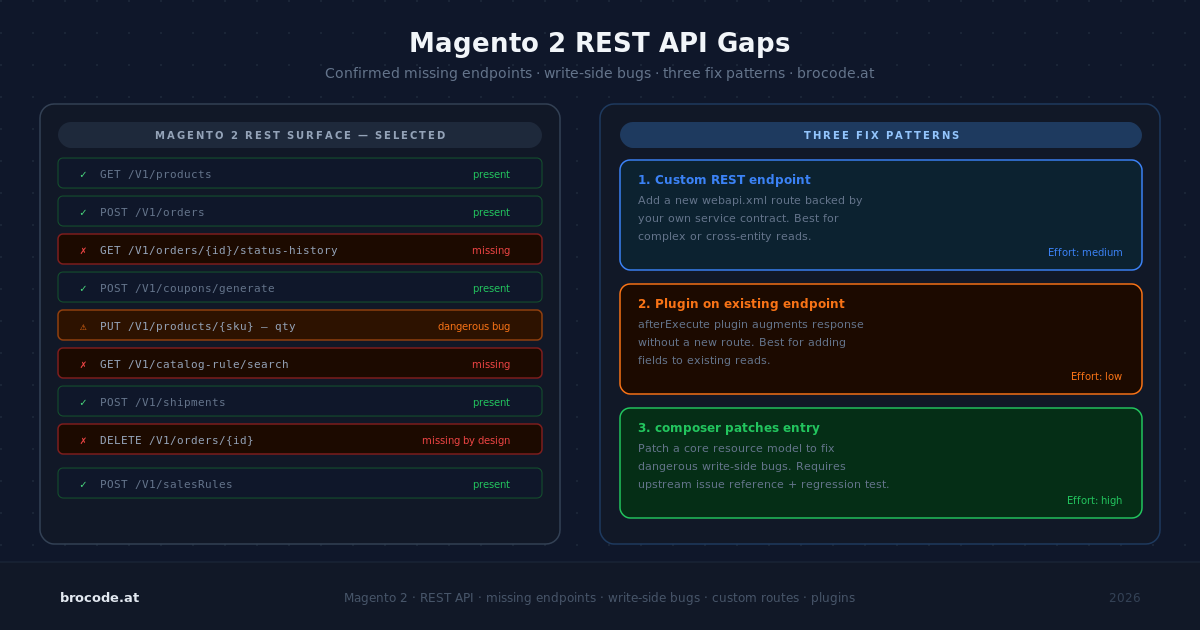
Magento 2’s REST API is genuinely good for a monolithic ecommerce platform — clean service contracts, consistent searchCriteria, a well-defined ACL surface. Then you try to flush a cache remotely, create a catalog price rule, or manage admin users, and you discover that a significant chunk of admin functionality simply has no endpoint. This article leads with the confirmed gaps, explains the two dangerous write-side bugs that can silently corrupt multi-store setups, and lays out the three fix patterns in order of cleanliness.
What the baseline looks like
For most data-plane operations — products, orders, customers, CMS blocks, cart price rules, invoices, shipments — the REST API is complete and well-maintained. Integration tokens with scoped ACL work cleanly. searchCriteria gives you a SQL-like filter layer without raw DB access. The async bulk endpoint (/async/bulk/V1/...) handles high-volume product updates via RabbitMQ without blocking. For typical ERP, PIM, or headless storefront integrations, you will rarely hit the missing pieces.
The gaps cluster in two areas: control-plane operations (things an admin does in System → menus — configuration, user management, cache, indexers, email templates) and a handful of merchant-facing features that were built as UI-only from the start.
Confirmed missing endpoints (all versions through 2.4.x)
Control-plane gaps
Catalog price rules — No REST endpoint exists for creating, reading, or deleting catalog price rules. This catches nearly everyone building a promotions integration, because cart price rules (/rest/V1/salesRules) do exist. The distinction: catalog price rules apply at the product level before the cart; cart price rules apply at checkout. Both live in Marketing → Promotions in the admin. Only one has a REST API.
System configuration — /rest/V1/store/storeConfigs is read-only and returns only a partial subset of fields (store name, base URLs, locale — not SEO paths, payment settings, shipping config). There is no general read/write endpoint for Stores → Configuration paths. Workaround: a custom module that wraps ScopeConfigInterface / WriterInterface behind a webapi.xml-registered endpoint.
Cache flush and reindex — No REST. Only bin/magento cache:flush and n98-magerun2. For MCP tooling, the cleanest workaround is a CLI bridge — a dedicated MCP tool that runs bin/magento as a subprocess with a strict allowlist of permitted commands, argv array (not string concatenation), and no remote exposure. Brocode’s Magento cache eviction module provides a REST endpoint as an alternative.
Admin users and roles — No REST for user management or role assignment.
Website / store view creation — No REST.
Email template management — No REST.
CMS widgets — No REST endpoint.
Import/export profiles — No REST for profile configuration. The async bulk endpoint handles product data import (/async/bulk/V1/products) but not profile setup.
Merchant-facing gaps
Wishlists — No REST (core issue since 2015, unresolved). Available via GraphQL: Magento_WishlistGraphQl (core since 2.4.0).
Product reviews and ratings — No REST. Available via GraphQL: createProductReview mutation.
The pattern: features added before 2.4 without an API-first mindset ended up REST-less. Newer additions with a storefront focus landed in GraphQL instead. The practical rule for evaluating a new integration: check REST first, then GraphQL, then accept it’s CLI-only.
The two dangerous write-side bugs
These are not missing endpoints — these are endpoints that exist and behave incorrectly in ways that are hard to notice until damage is done.
Bug 1: PUT /rest/all/V1/products/<sku> silently assigns the product to all websites
When you update a product via the all scope to change a global attribute (meta description, a custom attribute, a price), Magento silently assigns the product to every website in the installation — even without website_ids in the payload and even if the product was previously scoped to only one website. GitHub issue #11324 (marked fixed in 2.2/2.3, root cause confirmed present in 2.4-develop per issue #30316).
On a single-website store this is invisible. On a multi-store installation with products intentionally scoped to subsets — for example, a B2B site and a B2C site that don’t share a catalogue — a routine bulk meta update becomes a live-site incident where products suddenly appear everywhere.
Safe write pattern: always GET the product first, then re-send the current website_ids explicitly in every PUT payload regardless of whether the assignment is changing:
{
  "product": {
    "sku": "example_sku",
    "custom_attributes": [{"attribute_code": "meta_description", "value": "Updated description"}],
    "extension_attributes": {"website_ids": [1, 2]}
  }
}
Bug 2: store-view-scoped PUT pins all attributes at the store scope (issue #39498, Dec 2024, severity S0)
Updating a single attribute via PUT /rest/sv2/V1/products/<sku> does not write only that attribute at the store-view scope. It copies the entire hydrated product object to the store scope, overriding every "Use Default" flag. Name, status, visibility, url_key, and every other attribute on the object get store-scope overrides they didn’t have before — invisible in the Admin UI, silently causing divergence when global values later change.
The bug is in the product model itself: it cannot distinguish "this field was in the payload" from "this field was hydrated from the database before save" — everything on the object gets persisted.
For MCP tooling and integrations: partial store-view product updates via REST are unsafe. Either re-send every attribute explicitly with each request (impractical for most tools) or avoid store-view-scoped writes entirely. Use all-scope writes with explicit website_ids for global attributes, and accept that store-view-level attribute overrides require a custom module or GraphQL mutation.
Three fix patterns — and the tradeoff between them
1. Custom module with @api interface and webapi.xml
The cleanest approach for any gap you need long-term. Define a PHP interface in Api/, annotate it @api, register it in webapi.xml with an ACL resource, and implement it. The endpoint appears in the OpenAPI schema, auto-generates into MCP tool descriptions, inherits the integration token permission model, and is a candidate for upstream contribution.
The wishlist gap is a good working example — Magento_Wishlist exists as a fully-featured core module, but no REST routes are registered for it. A thin wrapper is all it takes.
Api/WishlistManagementInterface.php — the contract Magento’s web API layer will call:
<?php
declare(strict_types=1);

namespace Vendor\WishlistApi\Api;

interface WishlistManagementInterface
{
    /**
     * @param int $customerId
     * @return \Vendor\WishlistApi\Api\Data\WishlistInterface
     */
    public function get(int $customerId);

    /**
     * @param int $customerId
     * @param \Vendor\WishlistApi\Api\Data\RequestInterface $item
     * @return \Vendor\WishlistApi\Api\Data\WishlistInterface
     */
    public function add(int $customerId, \Vendor\WishlistApi\Api\Data\RequestInterface $item);

    /**
     * @param int $customerId
     * @param int $itemId
     * @return bool
     */
    public function delete(int $customerId, int $itemId): bool;
}
etc/webapi.xml — routes and the force="true" security pattern:
<routes xmlns:xsi="http://www.w3.org/2001/XMLSchema-instance"
        xsi:noNamespaceSchemaLocation="urn:magento:module:Magento_Webapi:etc/webapi.xsd">

    <route url="/V1/wishlist/mine" method="GET">
        <service class="Vendor\WishlistApi\Api\WishlistManagementInterface" method="get"/>
        <resources>
            <resource ref="self"/>
        </resources>
        <data>
            <parameter name="customerId" force="true">%customer_id%</parameter>
        </data>
    </route>

    <route url="/V1/wishlist/mine" method="POST">
        <service class="Vendor\WishlistApi\Api\WishlistManagementInterface" method="add"/>
        <resources>
            <resource ref="self"/>
        </resources>
        <data>
            <parameter name="customerId" force="true">%customer_id%</parameter>
        </data>
    </route>

    <route url="/V1/wishlist/mine/:itemId" method="DELETE">
        <service class="Vendor\WishlistApi\Api\WishlistManagementInterface" method="delete"/>
        <resources>
            <resource ref="self"/>
        </resources>
        <data>
            <parameter name="customerId" force="true">%customer_id%</parameter>
        </data>
    </route>

    <!-- Admin/integration: explicit customerId in path, named ACL -->
    <route url="/V1/wishlist/:customerId" method="GET">
        <service class="Vendor\WishlistApi\Api\WishlistManagementInterface" method="get"/>
        <resources>
            <resource ref="Vendor_WishlistApi::wishlist_read"/>
        </resources>
    </route>
</routes>
<resource ref="self"/> restricts access to the currently authenticated customer. The force="true">%customer_id%</parameter> block injects the customer ID server-side from the bearer token — the caller cannot supply or override it. The admin route at /:customerId accepts any ID and is gated by a named ACL resource, so only integration tokens with that resource in their grant can use it. This two-route pattern — /mine for customers, /:customerId for admins — mirrors how core exposes dual-access resources (GET /V1/carts/mine and GET /V1/carts/:cartId).
etc/di.xml — wire the interface to the implementation:
<config xmlns:xsi="http://www.w3.org/2001/XMLSchema-instance"
        xsi:noNamespaceSchemaLocation="urn:magento:framework:ObjectManager/etc/config.xsd">
    <preference for="Vendor\WishlistApi\Api\WishlistManagementInterface"
                type="Vendor\WishlistApi\Model\WishlistManagement"/>
</config>
The implementation delegates to WishlistFactory from Magento_Wishlist — the entire module is a routing layer over code that already exists. After setup:di:compile and cache:flush, the endpoints appear in /rest/V1/swagger and auto-generate into MCP tool descriptions.
The three token types and where they apply:
| Token type | How to obtain | Works on |
|---|---|---|
| Customer bearer | POST /V1/integration/customer/token | <resource ref="self"/> routes |
| Admin bearer | POST /V1/integration/admin/token | Admin-scoped routes |
| Integration token | System → Integrations (OAuth or Bearer) | Routes with named ACL resources |
Other available force variables: %cart_id% (current customer’s active quote ID), %store_id% (current store view). Naming convention from core: /mine for customer-owned collections, /me for the customer record itself (/V1/customers/me).
Effort: 1–3 hours for a simple read/write endpoint.
Strengths: integrates cleanly with the ACL; shows up in the OpenAPI spec; survives Magento upgrades as a first-class module
Costs: requires a deployable module; adds to the codebase surface; overkill for a single-operator local tool
2. CLI bridge in a local MCP tool
For local development or a single-operator tool where shipping a module is overhead you don’t want, a CLI bridge is the fastest path. An MCP tool that runs bin/magento as a subprocess:
import subprocess

ALLOWED_COMMANDS = [
    ["cache:flush"],
    ["cache:clean"],
    ["indexer:reindex"],
]

def run_magento(argv: list[str]) -> str:
    if argv not in ALLOWED_COMMANDS:
        raise ValueError(f"Command not in allowlist: {argv}")
    result = subprocess.run(
        ["php", "bin/magento"] + argv,
        capture_output=True, text=True, cwd="/var/www/html"
    )
    return result.stdout + result.stderr
Hard requirements: argv array (never string concatenation — command injection via crafted tool arguments is real), strict allowlist, never expose this tool in a remotely-accessible MCP server, output length caps.
Strengths: zero deployment overhead; covers any CLI command
Costs: local-only; no ACL integration; requires allowlist maintenance; unsafe if exposed remotely
3. Accept the gap and document it in the tool description
For features genuinely inaccessible from any API surface, name the gap explicitly in the tool description so the model declines cleanly instead of hallucinating an endpoint.
@tool
def manage_email_templates() -> str:
    """
    Magento 2 does not expose email template management via REST API.
    Direct the user to Admin → Marketing → Communications → Email Templates.
    """
    return "Email template management is not available via the REST API."
A model that gets a clean "not available" from a tool will route the request to the human. A model that gets a 404 may try to improvise.
Verification
For custom module endpoints: confirm the endpoint appears in GET /rest/V1/swagger after bin/magento setup:di:compile && bin/magento cache:flush. If it’s missing, check webapi.xml ACL resources against acl.xml.
For CLI bridge tools: test with a disallowed command first — verify the allowlist rejects it with a clear error, not a subprocess exception.
Related reading
- Magento 2 searchCriteria — The Complete Reference
- MCP for Magento 2: Run Your Store by Conversation
- MCP Security for Ecommerce — Prompt Injection, Tool Poisoning, and Guardrails
- Adobe Commerce REST API reference — canonical endpoint list
Leave a Reply