WordPress and MCP: A Content API That Talks Back
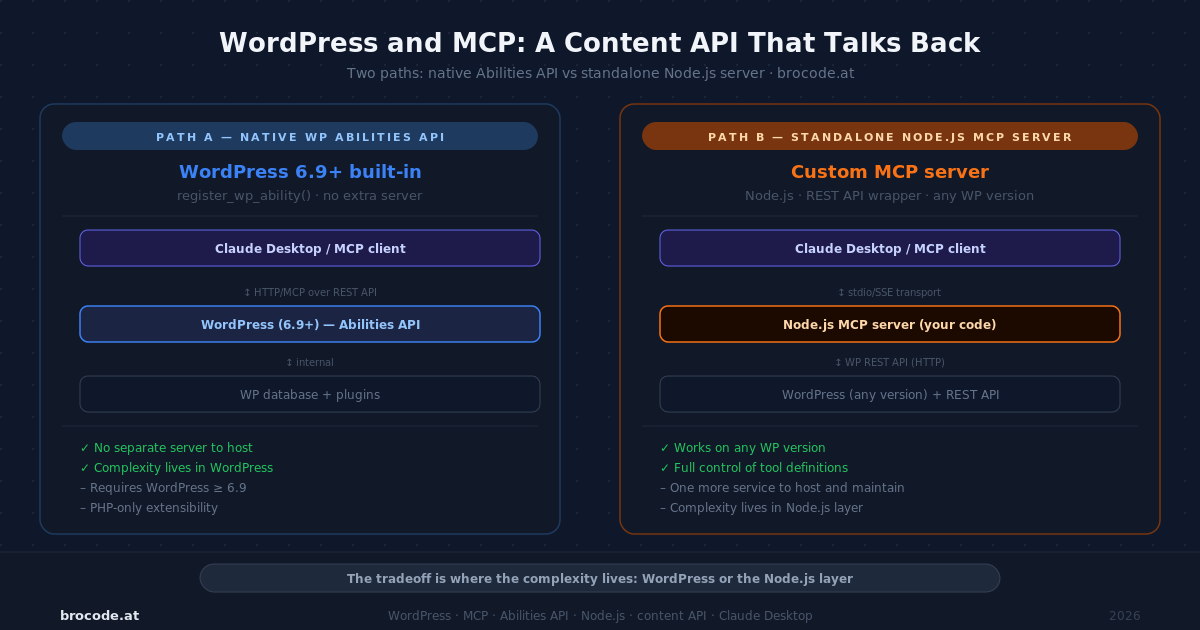
The Magento MCP articles on this site describe a thin wrapper around an existing REST surface — a Node.js server that translates tool calls from a model into GET /rest/V1/products and POST /rest/V1/cmsBlock. WordPress lands in a different position. It shipped a first-class MCP integration in 2025–2026 via the Abilities API and the official WordPress/mcp-adapter plugin. But "official support" and "the right architectural choice for a specific publishing workflow" are not the same thing. This article leads with both approaches — WordPress’s native Abilities API path and the standalone external server path used by brocode-content-mcp — because the tradeoff between them is the most useful thing to understand before choosing.
Why now
WordPress 6.9 (December 2025) shipped the PHP layer of the Abilities API: a first-class, cross-context registration system for discrete capabilities. WordPress 7.0 (May 2026) completed the picture with the JavaScript layer (@wordpress/abilities, @wordpress/core-abilities) and the WP AI Client for outbound AI provider calls. The canonical bridge between registered abilities and MCP clients is the WordPress/mcp-adapter plugin — the official successor to the archived Automattic/wordpress-mcp plugin, which was deprecated in January 2026.
The timing matters: until WordPress 6.9, doing MCP with WordPress meant either the external-server approach or third-party plugins with their own auth schemes. From 6.9 onwards, there is a blessed native path with a stable API and core maintenance behind it. Both paths now have clear precedent.
The baseline: Path A — Abilities API and the native WordPress approach
A WordPress ability is the registration unit for MCP. Each ability defines an id in namespace:name form, a natural-language description the model reads to decide when to call it, an args schema, an execute_callback, and a capability check that gates access using WordPress’s role system.
add_action( 'wp_register_abilities', function( $registry ) {
    $registry->register( [
        'id'          => 'brocode/list-posts',
        'label'       => 'List published posts',
        'description' => 'Returns published posts with ID, title, excerpt, and URL. ' .
                         'Supports optional filtering by category slug and post count.',
        'args'        => [
            'category' => [
                'type'        => 'string',
                'description' => 'Category slug. Omit for all categories.',
                'required'    => false,
            ],
            'count' => [
                'type'        => 'integer',
                'description' => 'Posts to return. Default 10, max 50.',
                'required'    => false,
                'default'     => 10,
            ],
        ],
        'capability'      => 'read',
        'execute_callback' => 'brocode_mcp_list_posts',
    ] );
} );
Install the WordPress/mcp-adapter plugin and every registered ability automatically becomes an MCP tool — no additional step. Two transports are available:
| Transport | Use case |
|---|---|
stdio via WP-CLI (wp mcp start) | Local dev, single operator, DDEV environment |
Streamable HTTP (/wp-json/wp/v2/wpmcp/stream) | Remote clients, Claude Desktop pointing at a staged site |
The capability field (read, edit_posts, manage_options) maps directly to WordPress roles — the same permission system that controls what a user account can do in the admin. An ability gated at read works for any authenticated user; one gated at manage_options requires admin rights.
The Abilities API and the mcp-adapter are two separate things. The Abilities API is a WordPress core feature — PHP layer in WP 6.9, JavaScript layer in WP 7.0 — that gives plugins and themes a standard registration point for discrete capabilities. Those capabilities are discoverable from PHP, JavaScript, and the REST API regardless of whether MCP is involved. The WordPress/mcp-adapter is a separate plugin that reads those registered abilities and bridges them to the MCP protocol. Without the Abilities API there is nothing to bridge; without the adapter, registered abilities are not visible to MCP clients. The two ship and update independently.
This is the native WordPress path: write PHP, register abilities, install the adapter, configure Claude Desktop. No external process required.
The baseline: Path B — Standalone external server
brocode-content-mcp is a Node.js/TypeScript MCP server that sits outside WordPress entirely. It wraps the standard WordPress REST API (/wp/v2/posts, /wp/v2/brocode_repo, /wp/v2/pages, and custom plugin endpoints) using Application Password auth. It runs as a stdio process with two instances — one pointing at the local DDEV site, one at production — registered independently in Claude Code.
The architecture is the same pattern as the Magento MCP admin server: a TypeScript process that holds credentials, translates tool calls into REST calls, and optionally does pre/post processing (markdown-to-Gutenberg conversion, SEO checks, content validation) before the API call happens. WordPress is an API target, not the host of the MCP logic.
The tools it exposes, drawn directly from the server’s tool registry:
Content management:
create_article/update_article— create or patch a post; accepts markdown and converts to Gutenberg blocks automaticallyget_article— read a post by ID or slug before overwritingcreate_module/update_module— same operations on thebrocode_repocustom post typeupdate_page— update a WordPress page (different REST endpoint from posts)
Taxonomy and media:
resolve_or_create_term— find or create a taxonomy term by slugupload_media— upload a file to the WP media library
Site operations:
flush_rewrite_rules— flush WP rewrite rules via a custom plugin endpointclear_cache— clear full page cache (Cache Enabler, W3TC, WP Super Cache)manage_plugin— activate, deactivate, or delete a plugin without WP-CLIoptimize_images— trigger WebP/AVIF sidecar generation on demand
Pre-flight utilities:
markdown_to_blocks— convert markdown to Gutenberg block markup (dry run, no API call)seo_assess— run local SEO heuristic checks against a draft before publishingset_yoast_meta— set Yoast focus keyword, title, and meta description via plugin REST endpoint
Several of these tools have no equivalent in the Abilities API pattern — they exist because the external server can run arbitrary logic between the model’s request and the WordPress write. markdown_to_blocks converts structured markdown to the Gutenberg block format before the API call; seo_assess runs a keyword density and structure check locally, without a round-trip; clear_cache knows which cache plugins are present and calls the right one. None of that is "wrapping a WordPress REST endpoint" — it is editorial workflow logic that happens to end with a WordPress write.
The tradeoff between the two paths
graph LR
    CC(["Claude Code /\nClaude Desktop"])

    subgraph ExtProc ["External process — Path B"]
        BN["brocode-content-mcp\nNode.js · stdio"]
        BP["pre-process:\nmarkdown → blocks\nSEO · validation"]
    end

    subgraph WP ["WordPress"]
        BREST["REST API\n/wp/v2/*  /brocode/v1/*"]
        AP["mcp-adapter plugin"]
        AR["Abilities Registry"]
        AC["execute_callback (PHP)"]
        WPI["WP internals"]
        DB[(Database)]
    end

    CC -- "stdio — Path B" --> BN
    BN --> BP
    BP -- "HTTP + App Password" --> BREST
    BREST --> DB

    CC -- "stdio / Streamable HTTP — Path A" --> AP
    AP --> AR
    AR --> AC
    AC --> WPI
    WPI --> DB
Abilities API is the right choice when:
- You are building a feature for WordPress users who will install a plugin
- The operation maps cleanly to a PHP callback with simple args
- You want automatic discoverability from the REST API and admin UI, not just MCP
- You are extending an existing plugin’s functionality
External server is the right choice when:
- You need pre/post processing that does not belong in a WordPress plugin (format conversion, validation, orchestration across multiple API calls)
- You are managing content on behalf of a single operator with a known workflow (editorial pipeline, not general plugin distribution)
- You want the MCP logic under version control alongside the content, not inside WordPress
- You need dual environments (local DDEV + production) with the same tools but different targets
| Dimension | mcp-adapter (Abilities API) | brocode-content-mcp |
|---|---|---|
| Logic host | WordPress PHP plugin | External Node.js process |
| Extension language | PHP | TypeScript + full npm ecosystem |
| Transports | stdio (wp mcp start) + Streamable HTTP | stdio only |
| Discoverability | REST API, admin UI, and MCP | MCP clients only |
| Pre/post processing | PHP inside execute_callback | Unrestricted — format conversion, validation, multi-step orchestration |
| Distribution | Plugin any WP site can install | Operator tool; extend via ToolExtension |
| After a code change | No rebuild — PHP loaded per request | npm run build + session restart |
| Multi-environment | Separate WP install per environment | Same binary, different WP_BASE_URL |
| Custom plugin endpoints | Register the same way as core abilities | Requires a matching REST route on the WP side |
The tradeoff is not "which is more powerful" — a well-written PHP plugin can do anything the Node.js server can. The tradeoff is where the complexity lives. Abilities API puts it inside WordPress (a PHP callback, WP hooks, plugin activation). External server puts it outside (a TypeScript process, a config file, a registered stdio command). For a single-author site with a bespoke editorial workflow, outside is cleaner. For a plugin intended for distribution, inside is the only option.
Both paths use the same authentication layer.
Authentication: Application Passwords
WordPress Application Passwords (core since 5.6) are the standard credential for MCP clients on both paths. Generate one in Users → Profile → Application Passwords, name it for the integration (e.g. "Claude MCP"), and use it as HTTP Basic auth. The external server receives them via environment variables:
WP_BASE_URL=https://wp-brocode.ddev.site
WP_USER=admin
WP_APP_PASSWORD=xxxx xxxx xxxx xxxx xxxx xxxx
The server constructs the auth header directly:
this.authHeader = `Basic ${Buffer.from(
  `${config.wpUser}:${config.wpAppPassword}`,
  "utf8",
).toString("base64")}`;
For the Abilities API path, the Application Password goes into the Authorization header on the Streamable HTTP request — or, for the wp mcp start stdio approach, the WP-CLI process runs as the WordPress user whose Application Password was generated.
The permission model on both paths is the same: the Application Password inherits the WordPress user’s role capabilities. The ability’s capability field narrows this for a specific operation, but the credential carries the full role. The mitigation is the same one from the Magento series: create a WordPress user specifically for the MCP integration and assign it the minimum role needed. An author-level user who can publish their own posts but not edit others’ is the right credential for a single-author content assistant. An editor-level user is the right ceiling for a tool with update access to any post.
Working example: registering brocode-content-mcp in Claude Code
Here is a working example of the actual registration used in this setup. Claude Code registers MCP servers via claude mcp add, not via settings.json. Each environment gets its own server name:
claude mcp add brocode-content-local \
  --env WP_BASE_URL=https://wp-brocode.ddev.site \
  --env WP_USER=admin \
  --env WP_APP_PASSWORD="xxxx xxxx xxxx xxxx xxxx xxxx" \
  -- node /home/development/brocode/brocode-content-mcp/dist/server.js

claude mcp add brocode-content-prod \
  --env WP_BASE_URL=https://brocode.at \
  --env WP_USER=admin \
  --env WP_APP_PASSWORD="xxxx xxxx xxxx xxxx xxxx xxxx" \
  -- node /home/development/brocode/brocode-content-mcp/dist/server.js
After any rebuild (npm run build in the source directory), Claude Code requires a session restart to pick up the rebuilt binary — it does not hot-reload the subprocess.
For the Abilities API path with Streamable HTTP, Claude Desktop configuration looks like:
{
  "mcpServers": {
    "brocode-wp": {
      "type": "http",
      "url": "https://your-site.com/wp-json/wp/v2/wpmcp/stream",
      "headers": {
        "Authorization": "Basic <base64(username:app_password)>"
      }
    }
  }
}
Verify the endpoint path against the installed version of WordPress/mcp-adapter — it may differ between releases.
Extending brocode-content-mcp with a new tool
A site-specific extension package has a minimal layout — only the entry point and the extension file:
events-platform-mcp/
├── src/
│   ├── server.ts        ← entry point: createServer([brocodePlugin, eventsExtension])
│   └── extensions/
│       └── events.ts    ← ToolExtension: tools[] + handlers{}
├── package.json         ← "brocode-content-mcp": "file:../brocode-content-mcp"
└── tsconfig.json
When adding a site-specific tool, touch one file: src/extensions/events.ts — add the tool definition to tools and the handler to handlers. Handlers receive WpClient and contentService via context, so any existing public method is callable without touching the core package.
To add a feature to the core itself (a new generic WP tool reusable across all sites), the touch points shift: add the REST method to WpClient in the core, then the tool definition and handler to the appropriate src/extensions/ file there. The factory wraps every handler return with ok() uniformly — handlers return raw data.
Here is a complete example adding list_drafts, a tool that returns all draft posts with their slug and last-modified date:
Step 1 — add a method to src/wp/client.ts:
async listDrafts(perPage = 20): Promise<JsonRecord[]> {
  return this.request<JsonRecord[]>(
    this.withQuery("/wp/v2/posts", {
      status: "draft",
      per_page: String(perPage),
      _fields: "id,slug,title,modified",
      context: "edit",
    }),
    { method: "GET" },
  );
}
withQuery and request are private on WpClient but accessible from within the class — this is the standard pattern for all existing methods.
Step 2 — add the tool and handler to an extension file:
In the extension’s tools array:
{
  name: "list_drafts",
  description:
    "List all draft posts with ID, slug, title, and last-modified date. " +
    "Use before creating new content to see what is already in progress.",
  inputSchema: {
    type: "object",
    properties: {
      per_page: {
        type: "integer",
        description: "Max results to return. Default 20.",
      },
    },
  },
},
In the extension’s handlers record:
list_drafts: async (args, { client }) => {
  const parsed = parseArgs(
    z.object({ per_page: z.number().int().max(100).default(20) }),
    args,
  );
  return client.listDrafts(parsed.per_page);
},
Run npm run build, restart the Claude Code session, and list_drafts appears alongside the existing tools. The same pattern scales to any WP REST endpoint: swap /wp/v2/posts for /wp/v2/comments, /wp/v2/brocode_repo, or a custom plugin route, and adjust the _fields projection and return shape.
Reuse across sites.
A second site’s MCP server depends on this package via file:../brocode-content-mcp and imports only what it needs. brocode-content-mcp exposes named entry points for each extension layer:
// events-platform-mcp/src/server.ts
import { createServer } from "brocode-content-mcp/createServer";
import { brocodePluginExtension } from "brocode-content-mcp/extensions/brocodePlugin";
import { eventsExtension } from "./extensions/events.js";

createServer([brocodePluginExtension, eventsExtension], { name: "events-platform-mcp" });
eventsExtension adds only the three tribe_events tools for The Events Calendar plugin. Core tools and services come from the package unchanged. brocodePlugin is imported separately because the second site runs the same brocode-utility-endpoints plugin but not the brocode_repo CPT.
What to skip
Don’t use the archived Automattic/wordpress-mcp plugin. It was deprecated in January 2026 in favour of WordPress/mcp-adapter. Tutorials that reference JWT-based tokens or the old plugin’s wp_mcp filter hook describe an approach the WordPress project no longer maintains.
Don’t expose admin-level Application Passwords to the MCP integration. manage_options covers site configuration, plugin activation, and user management. The blast radius difference between a confused contributor account and a confused admin account is a recoverable editorial mistake versus a compromised site. Scope the credential to the role the workflow actually requires.
Don’t use the stdio transport for a public-facing integration. stdio is a single-operator, local-only transport. A customer-facing chatbot, a shared editorial tool, or any multi-user deployment requires Streamable HTTP with per-session credentials. The design principles from Part 3 of the Magento series — never let the model name whose data to fetch, bind credentials to the session — apply here equally.
Verification
Before shipping any WordPress MCP integration to production:
- [ ] Confirm the WordPress user’s Application Password is scoped to the minimum role required — contributor, author, or editor, not admin
- [ ] List the tools visible in Claude Desktop / Claude Code after connecting; confirm only expected abilities or tools appear for that user’s role
- [ ] For the Abilities API path: verify
wp_register_abilities(or current hook name) fires on your WordPress version — the Abilities API PHP layer requires WP 6.9+ - [ ] For the external server path: confirm
WP_ALLOW_INSECURE_TLSisfalseon production (settrueonly on local DDEV where the cert is self-signed) - [ ] Run
scan_internal_links(external server) or equivalent before publishing any draft — catchddev.siteURLs that leaked into content intended for production - [ ] Confirm that no tool in the set can publish directly to production from an unreviewed model output — draft and pending statuses are the right ceiling for a content-drafting assistant
Related
- Magento 2 and MCP: Run Your Store by Conversation — the same MCP-over-REST-API pattern applied to Magento’s service contracts
- Magento 2 MCP, Part 3: A Storefront Chatbot — per-session credential scoping and the customer-facing variant
- MCP Security for Ecommerce — prompt injection, tool poisoning, and the guardrail checklist that applies to WordPress MCP as well as Magento
- WordPress/mcp-adapter — official WordPress MCP Adapter (WP 6.9+)
- brocode-content-mcp — the standalone external server shown in the working example
Leave a Reply