lead
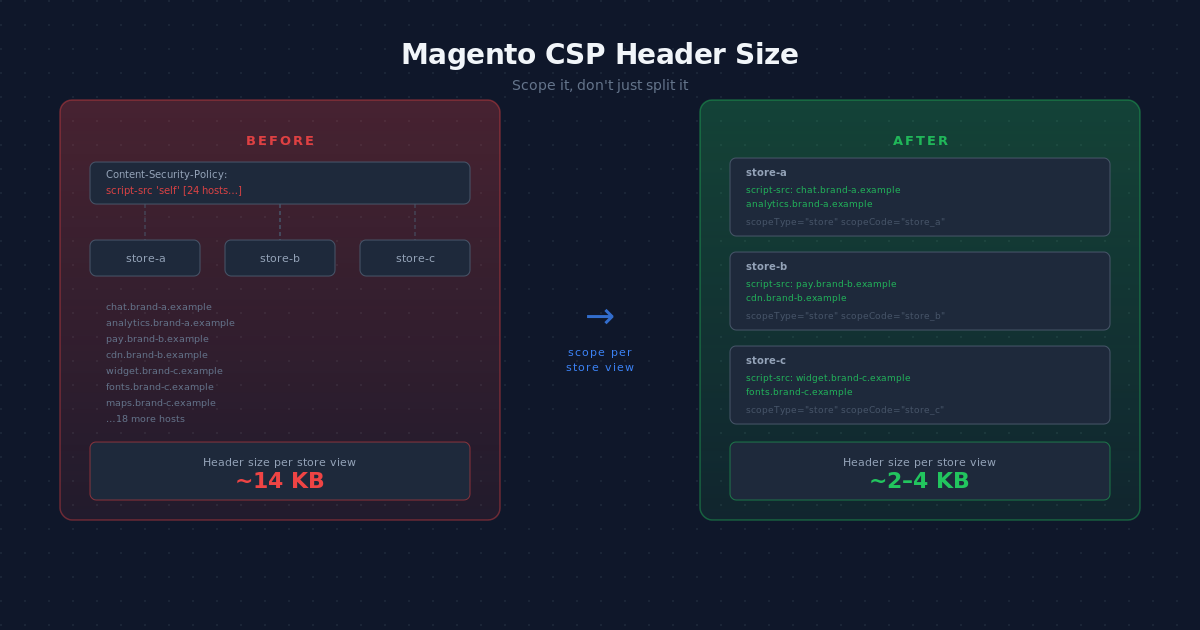
This article leads with the mental model, because the fix follows from it: in a multi-website Magento 2 install the Content-Security-Policy header did not grow too large by accident. Every store view carries every other store view’s third-party hosts, so a single brand’s payment iframe, chat widget, and analytics domains ride along on store views that never load them. If you have just hit upstream sent too big header and a 502, this is for the developer or tech lead who wants to cut CSP header size at the source rather than keep raising the buffer.
Why this matters now
Three things push the header up at once. From 2.4.7 you can no longer disable Magento_Csp, so the header is always present. PCI-DSS 4.0, live since April 2025, pushes more stores to enforce CSP on payment pages. And auto-CSP tooling adds detected hosts for you, which is convenient and inflates the header further. A multi-website store feels all three at the same scope multiplier.
baseline: raise the server buffer
The baseline every result on the internet reaches for is to raise the buffer. On nginx in front of PHP-FPM you bump fastcgi_buffer_size to something like 128k; behind a proxy you raise proxy_buffer_size; on Varnish you raise http_resp_hdr_len from its 8k default.
# nginx, in the location that passes to PHP-FPM
fastcgi_buffer_size 128k;
fastcgi_buffers 16 16k;
This is the correct first move to stop the bleeding, and it is honest to say so. It is also a band-aid. The header keeps growing as you add brands and third parties, so you raise the limit again later. Raising the buffer treats the symptom; it never reduces a single byte.
tradeoff
Four approaches deal with an oversized header, and the tradeoff between them is about where the bytes go, not whether the error clears.
Raise the buffer
Covered above. Zero code, fixes nothing structural. Use it to buy time, not as the answer.
Strengths: instant, no module, no risk to the policy.
Costs: hides unbounded growth; you will hit the new ceiling; total bytes unchanged.
Split the header
basecom/magento2-csp-split-header splits one oversized header into several by directive, so each header field stays under the server limit. It plugs into the SimplePolicyHeaderRenderer and re-emits the policy across multiple Content-Security-Policy headers, which browsers enforce together.
Strengths: keeps each field small, minimal config, valid per spec.
Costs: total bytes on the wire are the same or slightly larger; it fixes a per-field limit, not a total-size limit (Varnish still needs a larger http_resp_hdr_len). The module itself tells you to remove unnecessary modules if splitting is not enough.
Consolidate and optimise
hryvinskyi/magento2-csp is the most complete option and the one this article positions against directly. It deduplicates entries, consolidates shared values into default-src, collapses three or more subdomains into a wildcard, and strips redundant schemes and paths, reporting a 40 to 70 percent header reduction. It also offers store-view-specific configuration and admin-managed whitelists backed by a database table.
Strengths: real byte reduction, broad feature set, works on single-site stores too, admin UI for non-developers.
Costs: the policy and whitelist live in a database, not in git, so they sit outside your deploy and review workflow. Wildcard consolidation widens the policy: *.google.com is a larger trust surface than three named subdomains, which trades security for size.
Scope per store view
The brocode approach attacks the multi-website root cause: it does not emit store B’s hosts on store A at all. Each whitelist entry carries a store-view scope, and the renderer includes it only where it applies. The whitelist stays in csp_whitelist.xml, version-controlled and developer-owned.
Strengths: removes the largest source of multi-website bloat, keeps CSP as config-as-code, no database, no admin training.
Costs: it helps multi-website stores specifically; a single-site store sees little benefit. It reduces by not-emitting, so within one store view it does not compress; compose it with consolidation if a single store view is still heavy.
Scoping and consolidation are complementary, not rivals. One reduces by emitting fewer entries per store view; the other reduces by compressing whatever you emit. Pick scoping when your problem is many brands in one install and you want the policy in git. Pick consolidation when one store view is heavy on its own or a merchant needs an admin UI.
A note on auto-CSP: integer-net/magento2-sansec-watch fetches hosts that Sansec Watch detects and adds them through a CSP collector with no redeploy. It solves "what do I whitelist" well, and it pushes the header upward, which is exactly why scoping pays off more once an auto-CSP tool is in the mix.
working_example
Here is a working example you can run on any environment in under a minute. First, measure the header on the store view that is failing.
curl -sI https://store-a.example.com/ \
  | grep -i '^content-security-policy' \
  | wc -c
That byte count is what your server has to fit. On a multi-website store the same command against store-b.example.com often returns a similar number, because both carry the union of every brand’s hosts.
The native mechanism is global. A whitelist entry shipped by any module applies to every store view:
<csp_whitelist xmlns:xsi="http://www.w3.org/2001/XMLSchema-instance"
               xsi:noNamespaceSchemaLocation="urn:magento:module:Magento_Csp:etc/csp_whitelist.xsd">
  <policies>
    <policy id="script-src">
      <values>
        <value id="brand-a-chat" type="host">https://chat.brand-a.example</value>
      </values>
    </policy>
  </policies>
</csp_whitelist>
With the scoped module, the entry goes in scoped_csp_whitelist.xml instead and gains two new attributes — scopeType and scopeCode — so it renders only for the store view that needs it:
<!-- etc/scoped_csp_whitelist.xml -->
<csp_whitelist xmlns:xsi="http://www.w3.org/2001/XMLSchema-instance"
               xsi:noNamespaceSchemaLocation="urn:magento:module:BroCode_ScopedCsp:etc/scoped_csp_whitelist.xsd">
  <policies>
    <policy id="script-src">
      <values>
        <value id="brand-a-chat" type="host"
               scopeType="store" scopeCode="store_a">https://chat.brand-a.example</value>
      </values>
    </policy>
  </policies>
</csp_whitelist>
scopeType accepts store / stores, website / websites, group / groups, or default (global, same as omitting it entirely). scopeCode is the store view code, website code, or group code to match. Now store-b no longer emits chat.brand-a.example, and its header shrinks by exactly the hosts it never used.
What to skip
Skip raising the buffer forever. Each bump buys months and trains you to ignore the real cause. Skip disabling Magento_Csp to make the error go away; you cannot on 2.4.7 and later, and it is a PCI and security regression. Skip blanket wildcards purely to save bytes: collapsing named hosts into *.example shrinks the header and widens the attack surface, which defeats the reason CSP is there. And skip hand-maintaining per-store whitelists in an admin database if your team expects to review CSP changes in a pull request.
verification
Verification is the same curl you started with, run per store view before and after. The byte count on each store view should drop to the hosts that store view actually loads, and the counts should now differ between brands instead of matching. Confirm the nginx error log stops logging upstream sent too big header. Finally, watch your CSP violation reports, through Sansec Watch or a report-uri collector, for a few days: a clean report stream proves scoping removed only irrelevant entries and left the hosts each store view needs.
The pragmatic take
None of these four approaches is right or wrong on its own; each solves a different part of the same problem. Raising the buffer buys time, splitting fits the field limit, consolidation compresses what you emit, and scoping stops emitting what a store view never loads. A fast, secure multi-website shop usually layers two or three of them rather than betting on one.
So treat the scoped module as one piece of the puzzle. It keeps CSP in git and removes the multi-website bloat at the root, and it sits happily next to consolidation, auto-CSP detection, violation reporting, and a sane buffer config. Reach for it when your problem is many brands in one install and you want every CSP change reviewed in a pull request. Header size is one tractable lever among many on the pragmatic path to a more secure Magento shop.
Related modules
If you want this as a drop-in, see the Scoped CSP module for the store-view-scoped whitelist described here.
Related reading
- Sansec: Magento and CSP, the ultimate guide
- Adobe Commerce: Content Security Policies
- basecom/magento2-csp-split-header
- hryvinskyi/magento2-csp
Leave a Reply