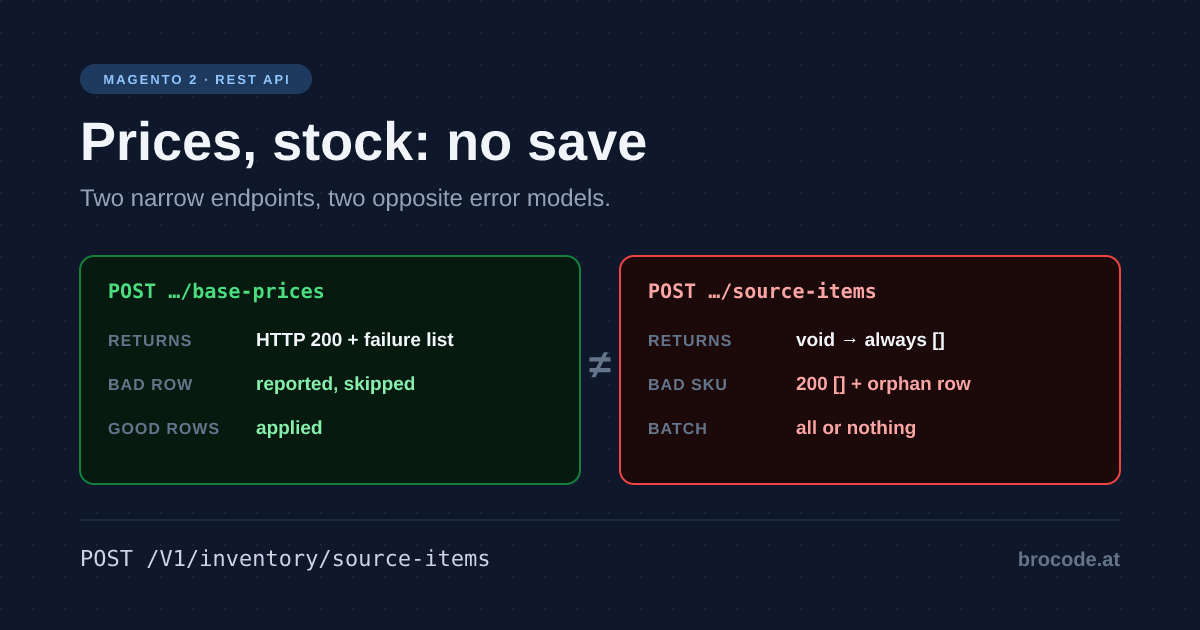
This article leads with the most expensive habit in a Magento feed. Once the catalog is loading, the next thing an ERP feed does is send a nightly price file and an hourly stock file, and the obvious way to apply them is the way the catalog was loaded: a product save per SKU. That is the single largest avoidable cost in an integration, on Magento 2 and Adobe Commerce alike, and it is avoidable because prices and stock have their own narrow endpoints that skip the repository entirely.
This is part of the catalog integration set. Product Data via REST covers the structural side, and Magento ERP Integration carries the rules that apply to every family — store-code scope, credentials, throughput, idempotency. This article assumes both.
About the SQL in this document. Every query below is a diagnostic, for an integrator with a database console who is trying to find out what an import actually did. None of it belongs in an integration, a module, a cron job, or anything that runs unattended. Raw SQL against the catalog tables bypasses the repository layer and therefore every indexer trigger, cache invalidation, plugin, and scope rule that makes the data correct — which is the same mistake, one layer down, that this whole document is about. It is also schema-coupled:
row_idversusentity_idalone differs between Open Source and Commerce with staging, and these tables change between releases.Read with SQL when you need the truth fast. Write with the API, always. Where a query here reveals damage, the fix is a data patch or an API call, not an
UPDATE.
TL;DR — Prices and stock are not product data, and pushing them through a product save is the most expensive habit in a Magento feed. Use the narrow endpoints instead — base prices, special prices and source items each have their own route. Their error models are opposites, so a feed has to handle both rather than one. Pick one stock API, MSI or legacy, and stay there. And a variant parent created before its stock exists stays out of stock permanently.
Magento 2 or Adobe Commerce? Tested on Magento Open Source 2.4.8-p5. The REST API is the same in Adobe Commerce on cloud infrastructure and on-premises; only Adobe Commerce modules such as B2B or content staging add or change endpoints. Adobe Commerce as a Cloud Service is a separate, smaller REST surface with IMS authentication, so check its reference before reusing a route from here. The SQL diagnostics are Open Source only: with content staging, Adobe Commerce keys catalog rows on row_id instead of entity_id.
Prices and stock are not product data
The baseline to measure against is the naive implementation: one PUT /V1/products/{sku} per SKU per feed. Everything below compares against that, and the tradeoff each narrow endpoint asks for is a more awkward payload shape in exchange for an order of magnitude less work per row.
Prices do not need a product save
This is the single largest throughput win available and most integrations miss it:
POST /V1/products/base-prices— array of{price, store_id, sku}POST /V1/products/special-price— array, withprice_from/price_toPOST /V1/products/tier-pricesPOST /V1/products/cost
Each accepts many SKUs per request and returns a per-item failure list instead of dying on the first bad row. A nightly price delta that was 6,000 full product saves becomes a handful of requests. Stock does not follow the same pattern — source-items looks similar and behaves very differently, which the samples below cover.
Validated price payloads
Here is a working example of the shape they share. All four take the same envelope — key prices, array of rows — and all four were run on 2.4.8-p5. Field names come from BasePriceInterface, SpecialPriceInterface, TierPriceInterface and CostInterface.
# base price
curl -s -X POST "$BASE/rest/all/V1/products/base-prices" \
  -H "Authorization: Bearer $TOKEN" -H 'Content-Type: application/json' \
  -d '{"prices":[
    {"price":39.90,"store_id":0,"sku":"ERP-1001"},
    {"price":44.90,"store_id":0,"sku":"ERP-1002"}
  ]}'

# special price — note the datetime format, and that both bounds are strings
curl -s -X POST "$BASE/rest/all/V1/products/special-price" \
  -H "Authorization: Bearer $TOKEN" -H 'Content-Type: application/json' \
  -d '{"prices":[
    {"price":29.90,"store_id":0,"sku":"ERP-1001",
     "price_from":"2026-09-01 00:00:00","price_to":"2026-09-30 23:59:59"}
  ]}'

# tier price — website_id 0 = all websites, "ALL GROUPS" is the magic customer_group
curl -s -X POST "$BASE/rest/all/V1/products/tier-prices" \
  -H "Authorization: Bearer $TOKEN" -H 'Content-Type: application/json' \
  -d '{"prices":[
    {"price":35.00,"price_type":"fixed","website_id":0,"sku":"ERP-1001",
     "customer_group":"ALL GROUPS","quantity":10}
  ]}'

# cost — note the field is "cost", not "price"
curl -s -X POST "$BASE/rest/all/V1/products/cost" \
  -H "Authorization: Bearer $TOKEN" -H 'Content-Type: application/json' \
  -d '{"prices":[
    {"cost":18.50,"store_id":0,"sku":"ERP-1001"}
  ]}'
price_type is fixed or discount (TierPriceInterface::PRICE_TYPE_FIXED / _DISCOUNT). Each endpoint has a matching -information reader that takes {"skus":[…]}, and special-price, tier-prices and cost each have a -delete counterpart.
The response is the part worth designing around. All four return HTTP 200 regardless, with a JSON array of failures — [] meaning everything applied:
# two valid rows plus one SKU that does not exist
-d '{"prices":[
  {"price":39.90,"store_id":0,"sku":"ERP-1001"},
  {"price":44.90,"store_id":0,"sku":"ERP-1002"},
  {"price":11.11,"store_id":0,"sku":"NO-SUCH-SKU"}]}'
HTTP 200
[{"message":"Invalid attribute %fieldName = %fieldValue.","parameters":["SKU","NO-SUCH-SKU"]}]Two things follow. First, it is genuinely partial: reading back through base-prices-information confirmed ERP-1001 at 39.9 and ERP-1002 at 44.9 — the bad row cost only itself. Second, the message arrives with its placeholders unresolved. A client that logs .message records Invalid attribute %fieldName = %fieldValue. and nothing about which SKU. Interpolate parameters positionally against %fieldName, %fieldValue before logging, or the failure list is worthless as a retry set.
Validated stock payload — and why it is not the same shape
curl -s -X POST "$BASE/rest/V1/inventory/source-items" \
  -H "Authorization: Bearer $TOKEN" -H 'Content-Type: application/json' \
  -d '{"sourceItems":[
    {"sku":"ERP-1001","source_code":"default","quantity":42,"status":1},
    {"sku":"ERP-1002","source_code":"default","quantity":0,"status":0}
  ]}'
Envelope key sourceItems; fields from SourceItemInterface. Read back with GET /V1/inventory/source-items and a searchCriteria filter on sku.
The signature tells you the story before you run it: SourceItemsSaveInterface::execute(array $sourceItems): void, against BasePriceStorageInterface::update(): PriceUpdateResultInterface[]. There is no per-item result to return, so the response is always [] and it means nothing. Measured consequences, all on 2.4.8-p5:
| Sent | Result |
|---|---|
| a SKU that does not exist | 200 [] — and an orphan row written to inventory_source_item. No product, no error, no trace |
"quantity": -5 | 200 [], persisted as -5.0000. No validation |
an unknown source_code | 400 {"message":"Could not save Source Item"} — and it names neither the SKU nor the source |
a valid row batched with an unknown source_code | whole batch rolled back. The valid row’s quantity stayed at its previous value |
So stock is the inverse of prices on both axes: structural errors abort the entire batch atomically with an opaque message, while data errors — wrong SKU, negative quantity — pass silently. For an ERP feed that means a typo’d SKU in the stock file never surfaces as a failure; it accumulates orphan rows that no product will ever read.
Validate SKUs client-side before sending, keep batches small enough that an all-or-nothing rollback is cheap to retry, and sweep for orphans periodically:
-- stock rows for SKUs that no longer exist (or never did)
SELECT si.sku, si.source_code, si.quantity
FROM inventory_source_item si
LEFT JOIN catalog_product_entity p ON p.sku = si.sku
WHERE p.entity_id IS NULL;
Rule of thumb: full product saves are for structural changes. Price, cost, stock, and status deltas all have narrow endpoints. Use them.
Stock: pick one API and stay there
MSI means there are two stock representations and they do not mean the same thing:
extension_attributes.stock_itemon the product payload — the legacy single-source view. Writes land on the default source. Convenient, and a trap in any multi-source setup.POST /V1/inventory/source-items— the actual MSI write path, array-shaped, one call for many SKU/source pairs.
Add to that: qty is not what the storefront uses. Salable quantity is source quantity minus reservations, and reservations are event-driven. An import that "fixes" quantities by overwriting them from the ERP will happily overwrite the effect of orders placed since the export was generated. Sync source quantities, let Magento own reservations, and if your numbers drift, look at inventory_reservation before you look at the import.
The parent that stays out of stock
The most-reported "import worked but nothing is buyable" symptom. A configurable’s stock status is derived from its children — you cannot set it, and writing extension_attributes.stock_item on a configurable is at best ignored.
Where it goes wrong, in the order integrators hit it:
1. Products created without stock data default to qty 0 / out of stock. If Display Out of Stock Products is No, the entire imported catalog is invisible. This is not a configurable-specific problem, but it is where it usually surfaces first.
2. Import order. A parent created before its children are linked is written in a state core will never move it out of, and no restocking or reindexing brings it back. The single most common cause of the symptom, and the one worth understanding — see below, and the dedicated article it links to.
3. Source quantity ≠ salable quantity. You wrote 42 to warehouse_at, but warehouse_at is not assigned to the stock linked to the product’s website. Salable quantity is 0, every child is unsalable, the parent is out of stock. The source-items call returned success.
4. Disabled or unassigned children. A child with status = 2, or missing the parent’s website in website_ids, does not count toward parent salability. An ERP that exports discontinued variants as disabled silently kills parents once the last active variant goes.
5. Reservations. Source qty 5, open orders reserving 5, salable 0. Restocking the source without reconciling inventory_reservation leaves the parent out of stock against numbers that look correct in the admin grid.
6. Legacy vs MSI disagreement. cataloginventory_stock_status and the inventory_stock_{n} views can diverge when an import mixes stock_item writes with source-items writes. Different storefront paths read different sources, so the product is in stock on the PDP and absent from the category page.
The import order that avoids most of it:
1. create/update simple children  (structural only)
2. write source-items for children (real quantities, status 1)
3. create/update the parent + configurable options + links
4. reindex cataloginventory_stock, inventory, catalog_product_price
Never step 3 before step 2. This is not a preference about latency — a parent created while its children have no stock is permanently stuck out of stock, and step 4 will not repair it. If your ERP feed genuinely forces the wrong order, you need the repair described below, not patience.
Diagnosis, in order — each step tells you which of the six causes you have:
# what the storefront actually thinks is salable
bin/magento inventory:reservation:list-inconsistencies
-- child-level: source qty vs salable
SELECT si.sku, si.source_code, si.quantity, si.status
FROM inventory_source_item si WHERE si.sku IN ('ERP-1001-RED','ERP-1001-BLUE');
-- legacy index disagreeing with MSI
SELECT s.product_id, s.stock_status, e.sku
FROM cataloginventory_stock_status s
JOIN catalog_product_entity e ON e.entity_id = s.product_id
WHERE e.sku = 'ERP-1001';
If source quantity is right and salable is 0, it is reservations or stock-source linkage. If both are right and the parent is still out, it is the indexer — reindex and re-check before touching anything else.
Why it stays out of stock, mechanically
Worth knowing precisely, because the usual explanation — "the indexer has not caught up" — is wrong here, and reindexing will not save you.
A parent’s cataloginventory_stock_item.is_in_stock is a stored flag, not something computed at read time. Magento does maintain it — a child stock write re-derives the parent from its children — but it will only move a parent back into stock when a second column, stock_status_changed_auto, says the current status was set automatically rather than by a person. A parent created by an import can be written with that marker clear, and then nothing will ever move it again.
What decides whether you hit it is whether the parent has its children at the moment it is created, not whether stock exists yet. A parent created together with its links or options is fine; a parent created alone and linked in a second call is latched permanently. That is the whole reason this bug has a reputation for being intermittent.
The fix is a payload change rather than a patch: create parents together with their links or options in a single call, or failing that send the parent with explicit stock data marking it in stock. Either costs one field or one reordered call.
On a multi-source install it is worse rather than milder, because a second defect compounds it and the parent ends up unsalable in every stock.
The mechanism, the measured creation-shape table, the multi-source pair, how to repair a catalogue that is already latched, and the upstream issues and pull requests are all in The Magento Parent Product That Never Comes Back In Stock (2026-11-27).
Putting it in a delta sync
Structural changes go through the bulk path described in the product article. Prices and stock come after it, synchronously, because they are cheap and because you want the per-item errors immediately:
4. Deltas through the narrow endpoints — synchronous, array-shaped, per-item errors.
curl -s -X POST "$BASE/rest/all/V1/products/base-prices" \
  -H "Authorization: Bearer $TOKEN" -H 'Content-Type: application/json' \
  -d '{"prices":[
    {"price":39.90,"store_id":0,"sku":"ERP-1001"},
    {"price":44.90,"store_id":0,"sku":"ERP-1002"}
  ]}'

curl -s -X POST "$BASE/rest/V1/inventory/source-items" \
  -H "Authorization: Bearer $TOKEN" -H 'Content-Type: application/json' \
  -d '{"sourceItems":[
    {"sku":"ERP-1001","source_code":"warehouse_at","quantity":42,"status":1},
    {"sku":"ERP-1002","source_code":"warehouse_at","quantity":0,"status":0}
  ]}'
These two do not behave alike, despite looking alike — see the validated samples above. The price call returns 200 with a per-item failure array and applies every good row; the source-items call returns void and either takes the whole batch or rolls all of it back. Handle them with different error paths: interpolate parameters into %fieldName/%fieldValue for the price failures and feed them to a retry set, and for stock, validate SKUs before sending because nothing downstream will tell you.
What to skip
- Don’t send full product payloads for price or stock changes. This is the whole point of the article; it is the most common source of a ten-fold slowdown.
- Don’t mix
stock_itemandsource-itemswrites. Pick the MSI path and stay on it, orcataloginventory_stock_statusand theinventory_stock_{n}views drift apart and different storefront paths disagree about the same product. - Don’t "fix" quantities by overwriting them from the ERP. Salable quantity is source quantity minus reservations. Overwriting the source silently discards the effect of orders placed since the export was generated.
- Don’t trust a
200fromsource-items. It returnsvoid. Validate SKUs before sending, because nothing downstream will. - Don’t retry validation errors. A
400from a validator fails identically forever. Retry40001, 429, 502/503/504; everything else goes to a dead-letter file for a human.
Verification
Diagnostic queries only — see the note at the top.
-- stock rows for SKUs that no longer exist (or never did)
SELECT si.sku, si.source_code, si.quantity
FROM inventory_source_item si
LEFT JOIN catalog_product_entity p ON p.sku = si.sku
WHERE p.entity_id IS NULL;

-- source quantity vs status, per SKU
SELECT sku, source_code, quantity, status
FROM inventory_source_item WHERE sku IN ('ERP-1001','ERP-1002');

-- is the source even linked to the stock the website sells from?
SELECT * FROM inventory_source_stock_link;

-- legacy index disagreeing with MSI
SELECT s.product_id, s.stock_status, e.sku
FROM cataloginventory_stock_status s
JOIN catalog_product_entity e ON e.entity_id = s.product_id
WHERE e.sku = 'ERP-1001';
# what the storefront actually thinks is salable
bin/magento inventory:reservation:list-inconsistenciesVerification record
Verified 2026-08-25 against magento2-sandbox: Magento Open Source 2.4.8-p5, Luma + sample data, production mode, single MSI source (default), no Commerce staging. Payloads were executed against the running store, including deliberate bad rows; source was read only to explain a result already observed.
Prices — base-prices, special-price, tier-prices, cost: all four take the prices envelope and return HTTP 200 with a JSON failure array, [] on full success. Genuinely partial — a three-row batch containing one nonexistent SKU applied the other two, confirmed by reading back through base-prices-information. Failure messages arrive with placeholders unresolved ("Invalid attribute %fieldName = %fieldValue." plus a parameters array), so message alone is useless in a log.
Stock — source-items: the inverse on both axes, and the signature says so first — SourceItemsSaveInterface::execute(): void against BasePriceStorageInterface::update(): PriceUpdateResultInterface[]. A nonexistent SKU and a negative quantity are both accepted silently and persisted, the bad SKU leaving an orphan inventory_source_item row; an unknown source_code returns 400 "Could not save Source Item" and rolls back the entire batch, verified by batching it behind a valid row that kept its previous quantity.
Not tested here: reservation behaviour under concurrent orders.