This article leads with a question every Magento 2 team building GA4 tracking gets asked sooner or later: "can we only push the dataLayer when the visitor has consented?" It is aimed at the developer who has to answer it, and at the tech lead who has to decide where consent lives in the stack.
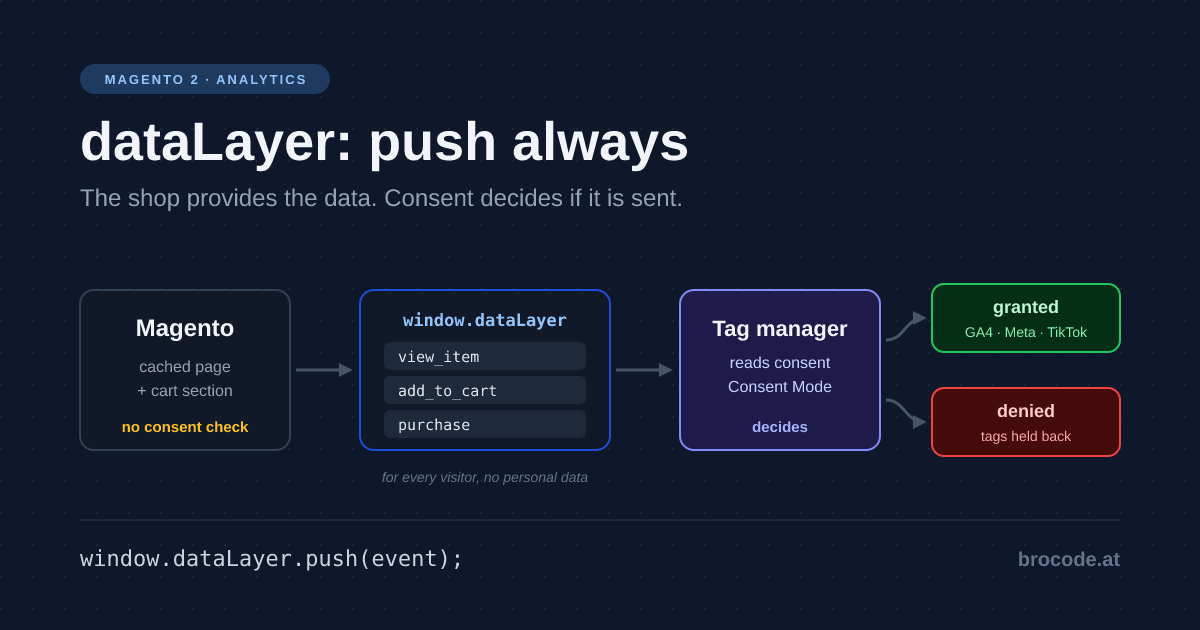
TL;DR — Do not check consent in Magento 2. Push every ecommerce event to the dataLayer unconditionally and let the tag manager decide, through Google Consent Mode, whether anything is sent. A consent check in PHP poisons the full-page cache, because Magento’s cache key ignores consent cookies; a check in the page script loses events and ties the shop to one consent tool. The shop’s one rule: never put personal data in the layer.
Magento 2 or Adobe Commerce? Everything below ran on Magento Open Source 2.4.8-p5 in production mode, Luma theme, built-in full-page cache. The storefront mechanics (layout, customer-data sections, page cache key) are the same in Adobe Commerce. The Hyvä parts were checked against Hyvä 1.5.2 source. The production pattern for cart events comes from a live Magento store with GA4 through Google Tag Manager; it is described here, not copied.
The split: who knows what
A dataLayer has three parties, and only one of them knows whether the visitor consented.
- The shop (PHP, layout, templates) knows the facts: which product is on the page, what the cart holds, what the order totalled. It renders HTML that the full-page cache hands to every visitor.
- The browser (the consent tool and the tag manager) knows the visitor’s decision. The consent banner stores it there, in a cookie or
localStorage, and the tag manager reads it. - The tags (GA4, Meta, TikTok) send data, set cookies and read identifiers. They are the only part that actually tracks anyone.
Pushing an object onto window.dataLayer sets no cookie and sends no request. It writes to an array in the page’s memory. Whether that array ever leaves the browser is decided by the tags, and the tags are what consent gates. So the shop’s job is to provide the data on every page, for every visitor, and the decision whether it is used belongs to someone else. The concept side of that, one GA4-shaped layer translated for every destination, is in Ecommerce dataLayer: One Source, Many Destinations. This article is the Magento implementation.
The baseline: what core Magento does
Core ships Magento_GoogleGtag. With GA4 enabled (google/gtag/analytics4/active plus a measurement ID) it loads gtag.js, calls gtag('config', …) and sends one ecommerce event: purchase, on the checkout success page. There is no view_item, no add_to_cart, no begin_checkout. The rest of the funnel has to be built.
The interesting part is how core handles consent. view/frontend/web/js/google-analytics.js starts like this:
if (config.isCookieRestrictionModeEnabled) {
    allowedCookies = $.mage.cookies.get(config.cookieName);   // user_allowed_save_cookie

    if (allowedCookies !== null) {
        allowedWebsites = JSON.parse(allowedCookies);

        if (allowedWebsites[config.currentWebsite] === 1) {
            allowServices = true;
        }
    }
} else {
    allowServices = true;
}

if (allowServices) {
    // load gtag.js, config, push the purchase
}
Core got one thing right: the check runs in the browser, not in PHP, so the cached HTML stays the same for everyone. It got three things wrong, and they are the reason not to copy it:
1. It reads Magento’s own cookie, user_allowed_save_cookie, which only exists when Cookie Restriction Mode is on. Any real consent tool (OneTrust, Cookiebot, DataReporter WebCare, Usercentrics) stores its decision somewhere else, so core either ignores the visitor’s choice or never fires.
2. When the answer is no, the data is gone. Nothing is pushed, not even to the in-page array. A visitor who accepts the banner on the success page after the check ran produces no purchase, and Consent Mode’s cookieless pings never get anything to send.
3. The data and the decision sit in one function. Change the consent tool and you touch the tracking code; change the tracking and you retest consent.
The tradeoff: three places to put the consent check
In PHP: the template decides
The tempting version: the block reads the consent cookie and renders the <script> only when the visitor said yes. On Magento this breaks on the full-page cache. The built-in cache key is three things: whether the request is HTTPS, the URL (minus about 20 marketing parameters such as gclid and utm_*), and the X-Magento-Vary cookie. A consent cookie is not one of them.
I checked it on the sandbox: one request to the home page without cookies, one with cookieconsent_status=allow and user_allowed_save_cookie set, one with cookieconsent_status=deny. The first created the cache entries, the other two created none, came back in about 0.08 s instead of 0.89 s, and all three responses had the same MD5. Whatever the first visitor’s cookie made the template render is what every later visitor gets, consented or not. Varnish behaves the same way unless you teach the VCL about the cookie.
The fixes are worse than the problem: add the consent state to the vary string and you split the cache for every page, or mark the block uncacheable and the whole page goes with it.
Strengths: easy to read; nothing reaches the browser without consent.
Costs: wrong output under full-page cache, or a split or disabled cache; the server now has to understand every consent tool’s cookie format.
In the page script: every pusher asks the consent tool
Core’s approach. It is cache-safe, but each piece of code that pushes an event has to know the consent tool’s API and its timing. Events from before the banner was answered are lost unless you add a buffer, at which point you have rebuilt the dataLayer. It also rules out Google’s advanced Consent Mode, which needs the tags to see the events even when consent is denied so they can send cookieless pings.
Strengths: cache-safe; no tag manager required.
Costs: coupled to one consent tool; late consent loses events; the same check repeated in every template and JS component.
In the tag manager: the shop always pushes
The shop renders and pushes every event, for every visitor. The consent tool sets the default state first and updates it when the visitor decides. Google Tag Manager, through Consent Mode, holds back or adjusts each tag according to that state. Google describes two ways to run this: in basic mode the tags stay blocked until consent is granted; in advanced mode the tags load and send cookieless pings while consent is denied, which feeds GA4’s modelling. The shop’s output is identical in both. It is also identical for a visitor from a region where no consent is needed, and identical after you switch consent tools.
Strengths: one cached page for everyone; the consent tool can change without a shop deploy; basic or advanced is a tag manager setting.
Costs: the dataLayer exists for visitors who refused, so it must never hold personal data; the order of scripts in <head> matters (below).
That last option is the one to build. The rest of this article is how.
A working example: the Magento 2 dataLayer without a consent check
Here is a working example of the four pieces: the consent default, page-type events, cart events and the purchase.
1. Consent default first, then data
Google’s consent mode guide is blunt about order: the default command has to run before any command that sends measurement data, and "if your consent code is called out of order, consent defaults won’t work". In Magento, the consent tool’s snippet goes into the head.additional container, which renders inside <head>, before anything in the body:
<!-- app/code/Vendor/Tracking/view/frontend/layout/default.xml -->
<page xmlns:xsi="http://www.w3.org/2001/XMLSchema-instance"
      xsi:noNamespaceSchemaLocation="urn:magento:framework:View/Layout/etc/page_configuration.xsd">
    <body>
        <referenceBlock name="head.additional">
            <block class="Magento\Framework\View\Element\Template"
                   name="vendor.tracking.consent.default"
                   before="-"
                   template="Vendor_Tracking::consent-default.phtml"/>
        </referenceBlock>
    </body>
</page>
<?php
/** @var \Magento\Framework\View\Helper\SecureHtmlRenderer $secureRenderer */
$js = <<<JS
window.dataLayer = window.dataLayer || [];
function gtag(){dataLayer.push(arguments);}
gtag('consent', 'default', {
ad_storage: 'denied',
ad_user_data: 'denied',
ad_personalization: 'denied',
analytics_storage: 'denied',
wait_for_update: 500
});
JS;
?>
<?= /* @noEscape */ $secureRenderer->renderTag('script', [], $js, false) ?>SecureHtmlRenderer adds the CSP nonce, so the inline script survives a strict Content Security Policy. Many consent tools ship their own GTM template that sets the default; then this block is not needed, but the rule stays: the default comes before the first ecommerce push. This snippet contains nothing the visitor decided. The update call comes later, from the consent tool, in the browser.
2. Page-type events go into the cached HTML
Product, category and search data are the same for every visitor, so they can be rendered into the page and cached. A product page template:
<?php
/** @var \Magento\Catalog\Block\Product\View $block */
/** @var \Magento\Framework\View\Helper\SecureHtmlRenderer $secureRenderer */
/** @var \Vendor\Tracking\ViewModel\Currency $currency  (your view model) */
$currency = $block->getData('currency_view_model');
$product = $block->getProduct();
$payload = [
    'event' => 'view_item',
    'ecommerce' => [
        'currency' => $currency->getCode(),
        'value' => (float) $product->getFinalPrice(),
        'items' => [[
            'item_id' => $product->getSku(),
            'item_name' => $product->getName(),
            'price' => (float) $product->getFinalPrice(),
            'quantity' => 1,
        ]],
    ],
];
$js = 'window.dataLayer = window.dataLayer || [];'
    . 'dataLayer.push({ecommerce: null});'
    . 'dataLayer.push(' . json_encode($payload, JSON_HEX_TAG | JSON_HEX_AMP) . ');';
?>
<?= /* @noEscape */ $secureRenderer->renderTag('script', [], $js, false) ?>
No if. The live store I looked at does exactly this: it clears the previous ecommerce object with {ecommerce: null}, then pushes view_item with currency, value and the item. Its tag manager stays unloaded until the visitor consents, and the page is the same either way.
One trap: the price in the cached HTML is the price of the cache variant. Customer-group pricing and catalog price rules per group are fine, because Magento already varies the page cache by customer group. Anything priced per customer is not, and belongs in a customer-data section like the cart below.
3. Cart events: queued on the server, delivered by a customer-data section
The obvious hook is Luma’s ajax:addToCart jQuery event. Do not build on it. In catalog-add-to-cart.js it fires with productInfo holding only an id and options, no quantity and no price, and it also fires when the add failed: on the sandbox a failing add returned HTTP 200 with a backUrl, which takes the success path. It also misses every cart change that does not go through that form: the minicart, the cart page, third-party AJAX carts.
The pattern that holds up in production moves the decision to where the truth is, the quote. The server half is the same for Luma and Hyvä:
1. An observer on quote item save compares the stored quantity with the original (getOrigData('qty')), skips child items of configurables and bundles, and queues an add_to_cart or remove_from_cart event with the real SKU, price and quantity delta in the customer session. Each event gets a random event_id (bin2hex(random_bytes(8)) will do); the browser needs it below.
2. A customer-data section, registered under sectionSourceMap in etc/frontend/di.xml the same way core’s Magento_Checkout registers cart, returns the queue and empties it.
3. A small script pushes whatever arrives. This is the only part that differs by theme.
The event now reflects what the quote actually stored, whichever piece of code changed it. Why not read core’s cart section instead? It has each item’s SKU, quantity and price as a number, but no currency code, and comparing two snapshots in the browser to derive a delta is fragile. The queue says what changed, once.
One trap in both themes: section data is cached in localStorage. Both themes keep the last section response in the browser and hand it out again on the next page load until something invalidates it. The server emptied its queue, the browser did not, so a naive listener pushes the same add_to_cart again on every page view. The event_id is what lets the script skip events it has already pushed.
Luma: a RequireJS component on customer-data
In Luma, sections.xml decides which sections a route invalidates, and Magento_Customer/js/customer-data reloads them after each AJAX call:
<!-- etc/frontend/sections.xml -->
<config xmlns:xsi="http://www.w3.org/2001/XMLSchema-instance"
        xsi:noNamespaceSchemaLocation="urn:magento:module:Magento_Customer:etc/sections.xsd">
    <action name="checkout/cart/add"><section name="datalayer-update"/></action>
    <action name="checkout/cart/delete"><section name="datalayer-update"/></action>
    <action name="checkout/cart/updatePost"><section name="datalayer-update"/></action>
    <action name="checkout/cart/updateItemOptions"><section name="datalayer-update"/></action>
    <action name="checkout/sidebar/removeItem"><section name="datalayer-update"/></action>
    <action name="checkout/sidebar/updateItemQty"><section name="datalayer-update"/></action>
</config>
Add the routes of any third-party AJAX cart to the same file, or its changes never reach the browser.
define(['Magento_Customer/js/customer-data'], function (customerData) {
    'use strict';

    return function () {
        var section = customerData.get('datalayer-update');

        function flush(data) {
            var seen = JSON.parse(localStorage.getItem('datalayer-seen') || '[]');

            (data.events || []).forEach(function (event) {
                if (seen.indexOf(event.event_id) !== -1) {
                    return;
                }
                seen.push(event.event_id);
                window.dataLayer = window.dataLayer || [];
                window.dataLayer.push({ecommerce: null});
                window.dataLayer.push(event);
            });
            localStorage.setItem('datalayer-seen', JSON.stringify(seen.slice(-50)));
        }

        flush(section());
        section.subscribe(flush);
    };
});
The production module I looked at solves the replay differently: after pushing, it overwrites the cached section with customerData.set('datalayer-update', {events: []}). That works in Luma, but customerData does not exist in Hyvä, and the event_id check works in both.
Hyvä: a private-content-loaded listener
Hyvä drops RequireJS, Knockout and jQuery, so there is no customer-data module to subscribe to and no ajax:addToCart event either. That makes the server-side queue more useful on Hyvä, not less: the theme-specific part shrinks to one listener. The data flow differs in three ways (checked against Hyvä 1.5.2):
- No per-section invalidation. Hyvä does not read
sections.xml. On page load, and whenever something dispatchesreload-customer-section-data, it compares theprivate_content_versioncookie with its cached copy. Magento sets a new value for that cookie on every POST request, so after any cart change, from any module, Hyvä reloads all sections in onecustomer/section/loadrequest. Your section rides along without configuration. Keepsections.xmlanyway if the shop still uses the Luma checkout fallback. - An event instead of an observable. Every load, from the server or from
localStorage, ends in aprivate-content-loadedwindow event with all sections inevent.detail.data. - Who triggers the reload. Hyvä’s product page submits add-to-cart as a normal form POST, so the next page load picks up the event. Its cart drawer and cart page dispatch
reload-customer-section-dataafter their AJAX calls. A third-party AJAX cart on Hyvä has to dispatch that event itself, or its changes show up one page late.
The listener is an inline script in a template, registered with Hyvä’s CSP helper so it survives a strict policy:
<?php
/** @var \Hyva\Theme\ViewModel\HyvaCsp $hyvaCsp */
?>
<script>
    window.addEventListener('private-content-loaded', function (event) {
        var section = event.detail.data['datalayer-update'] || {};
        var seen = JSON.parse(localStorage.getItem('datalayer-seen') || '[]');

        (section.events || []).forEach(function (item) {
            if (seen.indexOf(item.event_id) !== -1) {
                return;
            }
            seen.push(item.event_id);
            window.dataLayer = window.dataLayer || [];
            window.dataLayer.push({ecommerce: null});
            window.dataLayer.push(item);
        });
        localStorage.setItem('datalayer-seen', JSON.stringify(seen.slice(-50)));
    });
</script>
<?php $hyvaCsp->registerInlineScript() ?>
The last line looks odd but is how Hyvä’s own templates do it: registerInlineScript() must follow the closing </script> directly, and it adds a hash of the script to the CSP header on cached pages, or a nonce on uncached ones. seen.slice(-50) keeps only the last 50 IDs, so the list cannot grow forever.
Add it to before.body.end in the module’s hyva_default.xml, so it only renders on Hyvä pages. The dedupe matters more here than in Luma: Hyvä dispatches private-content-loaded from localStorage on every page load, not only after a reload.
None of this asks about consent either. The queue lives in the session that the cart already needs, and both listeners push for every visitor.
4. The purchase event on the success page
The success page is never served from the full-page cache: checkout_onepage_success.xml marks its blocks cacheable="false". The order data comes from the checkout session, and the success controller clears it on the first visit. On the sandbox the first load returned 200 with the purchase data; a reload returned a 302 to /checkout/cart/. A plain reload does not produce a second purchase. Push it unconditionally, with the order increment ID as transaction_id, which is also what Google uses to recognise a duplicate.
Two details that core’s own purchase event gets wrong, worth not repeating in yours: with multishipping it reports the first order’s totals but the items of all orders, and its item price excludes tax while value is the grand total including tax and shipping. Pick one convention and use it for price and value alike.
Where the shop does own consent
The rule "the shop does not know" holds as long as the browser is the one sending. It stops holding the moment the server sends:
- Server-side tracking. GA4’s Measurement Protocol, Meta’s Conversions API or a server-side GTM container fed from Magento send data without a browser in the loop. Then nobody else can make the decision, so the shop has to store the visitor’s consent (with the order, for example) and respect it.
- Admin orders. Core sends nothing for orders created in the admin; the success page never loads. If you report them through the Measurement Protocol, the previous point applies.
- Personal data. The layer exists for visitors who refused, so it carries product and order facts only: SKUs, prices, an order ID. No email, name, phone or address, not even hashed. Hashed matching for Meta and TikTok is configured in their tags, under consent.
That split is the clean one: data the shop renders for the browser needs no consent logic; data the shop sends itself needs all of it.
What to skip
- Cookie Restriction Mode as your consent tool. It is what core’s GA4 module listens to, and it is not a consent management platform: no categories, no consent record.
if ($consent)in a template. The page cache ignores the cookie, so the first visitor decides for everyone.- Adding the consent cookie to the page cache vary string. It splits the cache for every page to solve a problem the tag manager already solves.
- Building on
ajax:addToCart. It fires on failed adds and carries no quantity or price. anonymize_ipin GA4 config. Core still sets it; GA4 does not log or store IP addresses and ignores the flag.- A "only after consent" queue in the shop. That is the in-page check again, with a backlog.
Verification
1. The page cache stays shared. Request the same product page with and without the consent tool’s cookie and compare: curl -s -H 'Cookie: <cookie>=allow' <url> | md5sum against the plain request. The hashes must match, and the second request must come back at cache-hit speed.
2. Order of the layer. In the browser console on a fresh session, dataLayer[0] should be the consent default arguments, before any object with an ecommerce key.
3. Events exist when consent is denied. Refuse the banner, open GTM Preview (Tag Assistant): view_item, add_to_cart and purchase appear in the event list, and the GA4 tags show as blocked by consent (basic mode) or fire with consent denied (advanced mode).
4. Nothing leaves without consent in basic mode. With the banner refused, the network tab shows no requests to google-analytics.com or googletagmanager.com/g/collect. In advanced mode, the collect requests carry a gcs parameter that reports the denied state.
5. Cart events match the quote. Add a product, change its quantity in the minicart, remove it on the cart page: three events, with quantities matching the cart, and no add_to_cart for an add that showed an error. Then open two more pages: no event may repeat (the localStorage replay). On Hyvä, run the same test through the cart drawer.
6. No duplicate purchase. Reload the success page: 302 to the cart, no second purchase in the layer.
This is not legal advice. Whether advanced Consent Mode is acceptable, and which tags may run before consent, depends on your jurisdiction and your consent tool’s configuration; settle that with a privacy professional. The technical point stands either way: the shop’s output does not have to change for it.
Related reading
- Ecommerce dataLayer: One Source, Many Destinations — the GA4 schema as the shared shape, and the GA4, Meta and TikTok mapping.
- Magento 2 Cookie Banner with DataReporter WebCare — a consent tool in Magento, including the dataLayer events it pushes on consent changes.
- Google: Set up consent mode on websites — order of the default command,
wait_for_update, the four consent types. - Google Analytics Help: About consent mode — basic versus advanced implementation and cookieless pings.