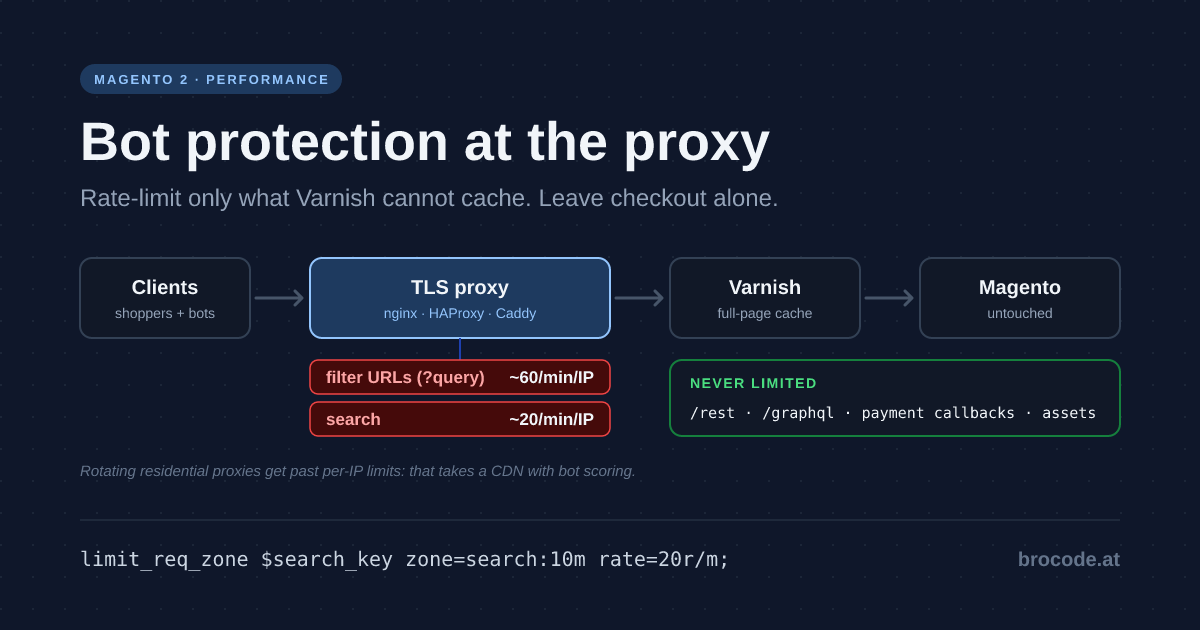
This article leads with the traffic that actually hurts a Magento 2 shop — bots enumerating layered navigation and search — and shows how to stop it at the TLS terminator in front of Varnish, before a cache lookup or a PHP worker is spent on it. It is written for the engineer who owns the proxy config and has to keep checkout, the REST API, payment callbacks and search crawlers working while doing it.
TL;DR — Filter bots at the TLS proxy in front of Varnish, not inside Magento. Limit only the requests Varnish cannot cache: filter URLs with a query string to about 60 per minute per IP, search to about 20. Block self-identifying bad user agents (UAs), and never touch /rest, /graphql, payment callbacks or assets. The setup is one proxy config change, verified with a curl loop. Per-IP limits do not stop scrapers rotating through residential proxies; that takes a content delivery network (CDN) with bot scoring.
Why this matters now
- It is the most common Magento performance problem. Hypernode, which hosts thousands of shops, names excessive bot traffic as the number one reason for bad Magento performance on its platform — typically crawlers stuck in layered navigation, generating millions of filter combinations.
- Roughly a third of web requests are automated. Cloudflare Radar data put bots at about 35% of HTTP requests in mid-2026, and the share keeps rising, driven by AI crawlers and scrapers that ignore
robots.txt. - Peak season is weeks away. Black Friday is 27 November 2026, and most shops freeze code in early November. A proxy rule is small enough to ship before the freeze, and a crawl that doubles OpenSearch load in October will do worse in the week the shop earns the most.
The market has noticed. Hosting platforms ship proof-of-work gateways (Hypernode’s Botstopper is a commercial derivative of Anubis), and Magento extensions add bot blocking inside the application. But blocking inside Magento means every bot request has already passed Varnish and started a PHP process. Blocking at the proxy does not.
The baseline: which requests cost what
The baseline is a standard self-hosted stack: a TLS terminator on port 443, Varnish behind it, nginx and PHP-FPM behind Varnish.
browser ──TLS──▶ terminator :443 ──▶ Varnish :6081 ──▶ nginx :8080 + PHP-FPM ──▶ OpenSearch, MySQL
                 (rules go here)
Not every bot request is expensive. Varnish absorbs most of them:
| Request | Varnish, with Magento’s generated VCL | Cost |
|---|---|---|
| Cached category or product page | HIT | Negligible |
| Category with a filter query string | MISS for every new combination; a repeat of the same URL is a HIT, and reordered parameters share one entry | PHP render plus an OpenSearch query |
/catalogsearch/result/?q=… | MISS, even for the same query twice in a row | PHP render plus OpenSearch, usually the slowest page on the shop |
Only utm_*, fbclid, gclid and similar parameters | HIT — the VCL strips them before the lookup | Negligible |
/customer/section/load | PASS | Small, but on every page view |
/rest/* | Not cached — goes to PHP every time | Varies — checkout, integrations |
GET /graphql | Cacheable: a repeated query is a HIT | Varies — PWA frontends |
/static/, /media/ | PASS — the VCL hands them to nginx, which serves them from disk | Negligible |
How the table came about: every row was measured on 2026-09-30 against a Magento 2.4.9 sandbox behind Varnish 7.6, running the VCL Magento generates itself (bin/magento varnish:vcl:generate --export-version=7), by logging varnishncsa‘s handling for each request type. The only change to the generated file was removing the health probe: on a stock 2.4.9 install with file cache, health_check.php rejects the default cache configuration and the probe would mark the backend sick — covered in the SSL termination article. A VCL you have customised — for example to cache static files — changes the last row, not the conclusion.
That table is the whole case for Magento bot protection at the proxy. The target is narrow: query-string storefront URLs and search. Everything else either costs nothing or is legitimate machine traffic you must not touch. The OpenSearch side of that cost is measured in Magento Elasticsearch tuning with real benchmarks — facet aggregations, the part a filter crawl triggers on every miss, took 52% of query time there.
Measure before you block
Run these against the terminator’s access log, where the client IP is still the real one (combined log format assumed):
# Top user agents on query-string storefront URLs
awk -F'"' '$2 ~ /\?/ && $2 !~ / \/(rest|graphql|static|media)/ {print $6}' access.log \
  | sort | uniq -c | sort -rn | head -20

# Top /24 subnets on the same URLs
awk '$7 ~ /\?/ && $7 !~ /^\/(rest|graphql|static|media)/ {split($1,a,"."); print a[1]"."a[2]"."a[3]".0/24"}' access.log \
  | sort | uniq -c | sort -rn | head -20

# Varnish view: how many misses are query-string URLs
varnishncsa -d -F '%{Varnish:hitmiss}x %U%q' | awk '$1=="miss" && $2 ~ /\?/' | wc -l
If one user agent or a handful of subnets account for most query-string misses, you have your answer and the rules below will work. If the misses spread across thousands of addresses with browser user agents, skip ahead to the CDN section — per-IP limits will not be enough on their own.
Five layers, cheapest first
1. robots.txt — for bots that behave. Disallow filter parameters and search.
2. User-agent blocklist — for bots that identify themselves but ignore robots.txt.
3. Per-IP rate limit on miss-producing URLs — for everything else, including bots that pretend to be Chrome.
4. IP-range or reputation blocking — for known crawler networks. Optional, and scoped carefully.
5. Proof-of-work challenge — an incident switch, not a default.
Layer 1 costs nothing. Set it in Adminhtml under Content → Design → Configuration → Search Engine Robots:
Disallow: /catalogsearch/
Disallow: /*?*color=
Disallow: /*?*size=
Disallow: /*?*price=
# one line per filterable attribute code — not /*? which also blocks ?p= pagination
The exemption list
Every layer from 2 onwards must skip these paths:
/rest/*and/graphql— checkout AJAX, PWA frontends, ERP and PIM integrations- Payment provider callbacks —
/paypal/*plus whatever your payment modules register; these often arrive from cloud IP ranges /static/,/media//customer/section/load/robots.txt,/sitemap*.xml, product feeds- URLs whose query string holds only marketing parameters (
utm_*,fbclid,gclidand the like) — Magento’s generated VCL strips those before the cache lookup, so they are cache hits, not misses
Do not exempt by user agent. "Googlebot" is the most spoofed user agent there is. If you need to allowlist search engines, use the IP range lists Google and Microsoft publish for their crawlers.
Link previews: the bots you want
When someone shares a product link in WhatsApp, Slack, Teams, LinkedIn, Facebook, X, Discord or Telegram, the platform fetches the page to read its Open Graph tags, then fetches the og:image from /media/. No preview, and the share looks broken — on a shop that is lost traffic from the channel that converts best. These fetchers are bots by every definition this article uses, and settings that are too strict catch them:
- Proof-of-work challenges. Preview fetchers do not run JavaScript. Behind a challenge, every share renders as a bare URL.
- Cloud-range blocks. Several platforms fetch from ordinary cloud ranges. Blocking
awsorgcloudwholesale breaks previews along with webhooks. - Cloudflare’s free Bot Fight Mode. It can challenge preview fetchers, and it has no exemptions.
- The query-string rate limit. Shared links usually carry
utm_*orfbclid, and a link that goes around a group chat means many fetches from a few crawler addresses. That is why the configs below exempt marketing-only query strings.
Do not put their user agents on the blocklist, and if you run a challenge during an incident, let facebookexternalhit, LinkedInBot, Slackbot, WhatsApp, TelegramBot, Discordbot and Twitterbot through to product and category HTML. Their user agents can be spoofed too, so allow them past the challenge, not past the rate limit — an honest preview fetcher never comes close to 60 filter URLs a minute.
The tradeoff: nginx, HAProxy or Caddy
All three terminators can do the job. The tradeoff is between what is built in and what needs a plugin or a second service.
| nginx | HAProxy | Caddy | |
|---|---|---|---|
| Per-IP rate limit | Built in (limit_req) | Built in (stick tables) | Plugin (caddy-ratelimit) |
| User-agent blocklist | map | ACL with a -f list file | Built-in header_regexp matcher |
| IP-range blocking | geo with a generated include | ACL with a -f list file | Plugin (caddy-defender, ships predefined AI and cloud lists) |
| Tarpit | No | Built in (http-request tarpit) | Plugin (caddy-defender) |
| Reputation feed | Third-party | Third-party | Plugin (CrowdSec bouncer) |
| Proof-of-work | Separate Anubis service | Separate Anubis service | Plugin or separate service |
| Custom build | No | No | Yes (xcaddy) |
nginx
The default on most Magento hosts, because it is already installed.
- Strengths: no new software;
limit_reqandmapcover rate limits and user agents; the empty-key trick keeps unrelated paths untouched. - Costs: no tarpit; IP-range lists have to be generated into an include file and reloaded; a rule mistake in a
locationblock is easy to miss in review.
HAProxy
The strongest choice when HAProxy already sits in front as a load balancer.
- Strengths: stick tables give per-IP counters with any window you like;
tarpitwastes a scraper’s time instead of refusing it; list files can be swapped at runtime through the admin socket. - Costs: one more service to run if it is not there yet; ACL logic gets dense quickly and needs comments to stay reviewable.
Caddy
The least configuration, at the price of a custom build.
- Strengths:
caddy-defenderships maintained IP lists for AI services and cloud providers;routeblocks keep the order explicit; certificates and HTTP/3 come for free. - Costs: every feature here is a third-party plugin compiled in with
xcaddy;caddy-ratelimitis maintained by Caddy’s author but is not an official module; plugin updates are your job.
What all three share, and what none of them solve
Rate-limit state lives in memory per instance. With two terminators behind a load balancer, each keeps its own counters — halve the budgets, or use HAProxy peers or Caddy’s distributed rate-limit mode.
None of them stop bots on residential proxy networks that rotate through thousands of addresses. Per-IP limits never trigger on those. That is where proof-of-work or a CDN with bot scoring earns its keep.
If you run several web nodes, there is a middle ground between allowing and blocking: route the crawlers you want to keep — verified search engines, AI search bots you decided to allow — to a dedicated backend pool. They still get served, but they cannot starve the nodes serving customers. The routing setup is part of SSL termination for Magento 2 with Varnish.
A working example in all three terminators
Here is a working example for each terminator. The limits are starting points — 60 query-string URLs per minute per IP, 20 searches per minute. A customer clicking through filters does not get close; a crawler enumerating every color × size × price combination does. Tune them against your own logs.
All three configs below were run as the terminator in front of a Magento 2.4.9 sandbox on 2026-09-30, with the verification commands at the end of this article. In HAProxy and Caddy the 61st filter URL and the 21st search within a minute got a 429; nginx, whose limit is a rate plus a burst, let 33 of 80 back-to-back filter URLs through. In all three, REST stayed at 200 for a blocked user agent, that user agent got a 403 on the storefront, and 80 marketing-tagged link-preview fetches in a row all got a 200.
nginx
# --- http context ---

# Self-identifying bots that ignore robots.txt (build this list from your logs)
map $http_user_agent $bad_ua {
    default 0;
    ~*(bytespider|petalbot|megaindex|dataforseobot) 1;
}

# Rate-limit key: client IP for storefront query-string URLs, empty (= not limited) otherwise
map "$uri?$args" $lnav_key {
    default                                                              "";
    ~^/(rest|graphql|static|media|paypal|customer/section/load)([/?]|$)  "";
    ~^/catalogsearch/                                                    "";
    # Only marketing parameters: Magento's VCL strips them, so these are cache hits
    ~\?((utm_[a-z]+|fbclid|gclid|gbraid|wbraid|msclkid|mc_[a-z]+)=[^&]*&?)+$                                               "";
    ~\?.+$                                                               $binary_remote_addr;
}

map $uri $search_key {
    default            "";
    ~^/catalogsearch/  $binary_remote_addr;
}

limit_req_zone $lnav_key   zone=lnav:10m   rate=1r/s;
limit_req_zone $search_key zone=search:10m rate=20r/m;
limit_req_status 429;

# Optional: generated list of crawler ranges, one "CIDR 1;" per line
geo $blocked_range {
    default 0;
    include /etc/nginx/blocked-ranges.conf;
}

# --- server block of the TLS terminator ---
server {
    # ... listen 443 ssl, certificates ...

    if ($request_method = PURGE) { return 405; }   # see the note below the Caddy example

    location / {
        if ($bad_ua)        { return 403; }
        if ($blocked_range) { return 403; }

        limit_req zone=lnav   burst=30 nodelay;
        limit_req zone=search burst=10 nodelay;

        proxy_pass http://127.0.0.1:6081;
        proxy_set_header Host              $host;
        proxy_set_header X-Forwarded-For   $proxy_add_x_forwarded_for;
        proxy_set_header X-Forwarded-Proto https;
        proxy_buffer_size 32k;   # Magento's CSP header alone exceeds the 4k default
        proxy_buffers     8 32k;
    }

    # Machine paths: same upstream, no filtering
    location ~ ^/(rest|graphql|paypal|static|media|customer/section/load|robots\.txt|sitemap)(/|\.|$) {
        proxy_pass http://127.0.0.1:6081;
        proxy_set_header Host              $host;
        proxy_set_header X-Forwarded-For   $proxy_add_x_forwarded_for;
        proxy_set_header X-Forwarded-Proto https;
        proxy_buffer_size 32k;
        proxy_buffers     8 32k;
    }
}
limit_req ignores requests with an empty key, which is what leaves everything outside the target patterns alone. if (…) { return 403; } is one of the safe uses of if inside a location. The regex location wins over the / prefix location, so machine paths never see the user-agent or range checks.
Keep the two proxy_buffer_* lines. On a stock Magento 2.4.9 storefront the response headers are about 4.9 KB — the Content-Security-Policy header alone is 4.3 KB — and nginx’s default 4 KB header buffer turns every such page into a 502. The CSP header size article covers why the header grows.
HAProxy
frontend https
    # ... bind :443 ssl crt ... ...

    acl machine   path_beg /rest/ /graphql /static/ /media/ /paypal/ /customer/section/load /robots.txt /sitemap
    acl search    path_beg /catalogsearch/
    acl has_query query -m found
    acl mkt_only  query -m reg ^((utm_[a-z]+|fbclid|gclid|gbraid|wbraid|msclkid|mc_[a-z]+)=[^&]*&?)+$
    acl bad_ua    req.hdr(user-agent) -i -m sub -f /etc/haproxy/bad-ua.lst
    acl blocked   src -f /etc/haproxy/blocked-ranges.lst

    http-request deny deny_status 405 if { method PURGE }
    http-request deny deny_status 403 if bad_ua !machine
    http-request deny deny_status 403 if blocked !machine

    # Per-IP counters: sc0 for query-string URLs, sc1 for search
    http-request track-sc0 src table st_lnav   if has_query !mkt_only !machine !search
    http-request track-sc1 src table st_search if search
    http-request deny deny_status 429 if has_query !mkt_only !machine !search { sc_http_req_rate(0) gt 60 }
    http-request deny deny_status 429 if search { sc_http_req_rate(1) gt 20 }

    default_backend varnish

backend st_lnav
    stick-table type ipv6 size 1m expire 10m store http_req_rate(1m)

backend st_search
    stick-table type ipv6 size 1m expire 10m store http_req_rate(1m)
An ipv6 table stores IPv4 addresses too. To waste a scraper’s time rather than refuse it, replace a deny with http-request tarpit and set timeout tarpit — HAProxy holds the connection open, then answers with an error.
Caddy
Build Caddy with the two plugins first:
xcaddy build \
  --with github.com/mholt/caddy-ratelimit \
  --with pkg.jsn.cam/caddy-defender
caddy list-modules | grep -E 'rate_limit|defender'
shop.example.at {
@purge method PURGE
respond @purge 405
@badua header_regexp ua User-Agent (?i)(bytespider|petalbot|megaindex|dataforseobot)
@storefront not path /rest/* /graphql* /static/* /media/* /paypal/* /customer/section/load* /robots.txt /sitemap*.xml
route @storefront {
respond @badua 403
# Known AI crawler ranges, from the plugin's predefined lists
defender block {
ranges openai deepseek githubcopilot
}
rate_limit {
zone lnav {
match {
expression `{query} != "" && !{query}.matches("^((utm_[a-z]+|fbclid|gclid|gbraid|wbraid|msclkid|mc_[a-z]+)=[^&]*&?)+$")`
not path /catalogsearch/*
}
key {client_ip}
events 60
window 1m
}
zone search {
match {
path /catalogsearch/*
}
key {client_ip}
events 20
window 1m
}
}
}
reverse_proxy 127.0.0.1:6081
}route executes its handlers in the written order, so no global order directives are needed. The range keys are the plugin’s own names; its README lists the rest (aws, gcloud, azurepubliccloud, mistral and others). Do not add the cloud-provider keys to a shop: payment webhooks and ERP connectors live there.
Run caddy-defender v0.10.1 or later. Earlier versions checked the address of the immediate peer instead of Caddy’s resolved client IP, so behind a CDN or load balancer the blocked ranges walked straight through (CVE-2026-46415, CVSS 8.2). Its lists only cover known ranges either way; crawlers on residential or brand-new cloud addresses get past it.
All three configs refuse PURGE at the edge. When the terminator and Varnish share a host, every public request reaches Varnish from 127.0.0.1 — an address Magento’s default purge ACL allows — so without that line anyone can flush the whole cache through the terminator, and a flushed cache turns every bot request into a miss. Magento sends its own purges straight to Varnish. The mechanism and the test are in SSL termination for Magento 2 with Varnish.
Proof-of-work, for incidents only
Anubis runs as its own reverse proxy and works behind any of the three: route storefront HTML through it, and send the exemption list straight to Varnish. Keep it configured but switched off, and turn it on when the rate limits are not enough. On a shop, a challenge before every product page costs conversions — slow phones, privacy browsers, visitors landing from paid ads — and its policy must let verified search crawlers through, or you lose indexing.
Beyond the proxy: CDN WAF and Sansec Shield
The proxy layer handles load. Two more layers are worth knowing, and they solve different problems:
bots/attacks ─▶ CDN WAF ─▶ TLS terminator ─▶ Varnish ─▶ PHP (Magento + Sansec Shield)
               volume,      per-IP budget,               known Magento
               bot scoring  UA and range blocks          exploit patterns
A CDN with a web application firewall (WAF) and bot scoring
A CDN sees traffic across millions of sites, so it can score bots your proxy cannot identify — including the residential-proxy scrapers that defeat per-IP limits. For Magento the realistic options are Cloudflare, and Fastly, which Adobe Commerce Cloud already includes.
What to know before putting a CDN in front of a shop:
- It does not absorb layered navigation for you. CDNs typically do not cache HTML by default, and filter URLs are misses anyway. The value here is filtering, not caching.
- Cloudflare’s free Bot Fight Mode is domain-wide and cannot be bypassed with custom-rule Skip actions. On a Magento domain that means REST integrations, payment webhooks and uptime checks can get challenged with no way to exempt them. Use Super Bot Fight Mode (Pro and up), which adds verified-bot allowlisting and per-category actions, or skip bot mode and scope custom and rate-limiting rules to storefront paths.
- Your proxy now sees CDN addresses. Every per-IP rule above breaks unless the terminator restores the client IP from the CDN header — and trusts that header only from CDN ranges. In nginx that is
set_real_ip_from <each Cloudflare range>;plusreal_ip_header CF-Connecting-IP;; in HAProxyhttp-request set-src req.hdr(CF-Connecting-IP) if from_cdn, withfrom_cdnmatching a range list; in Caddytrusted_proxiesandclient_ip_headers CF-Connecting-IPin the globalserversblock. Refresh the range lists by cron; the CDNs publish them. - Lock the origin to the CDN. If port 443 on the origin accepts anyone, scrapers find the origin address and skip the CDN. Firewall the origin to the CDN’s ranges, or use an authenticated tunnel or origin pull.
Sansec Shield
Sansec Shield is a Magento-specific WAF shipped as a Composer module, sansec/magento2-module-shield, that runs inside Magento and blocks known Magento attack patterns. Sansec maintains the rules and deploys new ones when Magento vulnerabilities surface — PolyShell (CVE-2026-48356), an unauthenticated file upload through the guest-cart REST API, was one of them. Shield comes with Sansec’s Advanced and Enterprise licences, not the entry plan.
Where it fits here: it is attack protection, not bot load protection. Because it runs inside Magento, every request it evaluates has already passed the proxy and Varnish and started PHP. It will not make a layered-navigation crawl any cheaper. What it does better than a generic layer is recognise Magento-specific exploit traffic, such as REST and GraphQL payloads for known CVEs, which neither a generic CDN rule set nor your proxy config can.
It does not replace patching either. Treat it as cover for the window between disclosure and your deployment. The wider patching and hardening plan is in Magento 2 security hardening.
Which layers to use
| Shop profile | Proxy rules | CDN WAF and bot scoring | Sansec Shield |
|---|---|---|---|
| Small shop, self-hosted, no CDN | Yes | Optional | Recommended |
| Mid-size, recurring scraping incidents | Yes | Yes (paid tier) | Recommended |
| Adobe Commerce Cloud | Limited — no terminator of your own | Fastly, included | Recommended |
| Bot traffic from residential proxies | Not enough on its own | Yes | Does not address it |
What to skip
- Rate-limiting everything. Limits on cached URLs mostly hit real customers behind shared addresses — offices, mobile carrier NAT. Target cache misses only.
- Blocking whole countries. Blunt, and it tends to catch your payment provider, CDN or monitoring.
- Exempting "Googlebot" by user agent. Use the published crawler IP ranges if you need an allowlist.
- Blocking cloud provider ranges wholesale. Payment webhooks, ERP connectors and uptime monitors live there.
- Challenging or blocking link-preview fetchers. Shared product links render as bare URLs, and nobody tells you — the sharer just sees a broken card.
- Blocking SEO tools you use yourself. If your team relies on Ahrefs or Semrush site audits, keep their crawlers off the list.
- Cloudflare’s free Bot Fight Mode on a Magento domain. No path exemptions; sooner or later it challenges an integration.
- Sansec Shield as a bot fix. It runs in PHP and stops exploits, not load.
- A CDN without origin lockdown. Bots find the origin address and go around it.
- A full generic WAF rule set on your own proxy as the first step. Adminhtml and checkout produce a steady stream of false positives; that is a separate project, not a bot fix.
Verification
The rate limit triggers on filter URLs:
for i in $(seq 1 80); do
  curl -s -o /dev/null -w '%{http_code}\n' "https://shop.example.at/women/tops.html?color=$i"
done | sort | uniq -c
# mostly 200, then 429 once the budget is spent
The search limit triggers:
for i in $(seq 1 30); do
  curl -s -o /dev/null -w '%{http_code}\n' "https://shop.example.at/catalogsearch/result/?q=test$i"
done | sort | uniq -c
Machine paths stay open while the limits are exhausted, even for a blocked user agent:
curl -s -o /dev/null -w '%{http_code}\n' https://shop.example.at/rest/V1/directory/countries
curl -s -o /dev/null -w '%{http_code}\n' -A 'Bytespider' https://shop.example.at/rest/V1/directory/countries
# 200 and 200
Link previews still work — a marketing-tagged URL, fetched repeatedly with a preview user agent, never hits the limit:
for i in $(seq 1 80); do
  curl -s -o /dev/null -w '%{http_code}\n' -A 'facebookexternalhit/1.1' \
    "https://shop.example.at/women/tops.html?utm_source=whatsapp&utm_medium=share&fbclid=x$i"
done | sort | uniq -c
# 80 × 200
The user-agent block works on the storefront:
curl -s -o /dev/null -w '%{http_code}\n' -A 'Bytespider' https://shop.example.at/
# 403
Behind a CDN, real addresses arrive and the origin is closed:
# The terminator log should show visitor addresses, not CDN ranges
tail -n 20 /var/log/nginx/access.log | awk '{print $1}'

# A direct hit on the origin must fail (connection refused or timeout)
curl -s -o /dev/null -w '%{http_code}\n' --max-time 5 \
  --resolve shop.example.at:443:203.0.113.10 https://shop.example.at/
The effect after a week: re-run the measurement commands from the baseline. Query-string misses in varnishncsa and PHP-FPM load should drop, and 429 responses in the terminator log should cluster on a few addresses rather than spread across thousands. Check the crawl stats in Google Search Console and Bing Webmaster Tools — a spike in crawl errors means a limit or block is catching a search crawler. Rollback is one config revert and a reload; nothing in Magento changes.
If the flood is already underway and the site is down, the incident side — first ten minutes, firewall blocks, who to call — is in Magento 2 incident recovery.
Related reading
- Hypernode, How to fix performance issues caused by bots and crawlers
- nginx,
ngx_http_limit_req_module - caddy-ratelimit and caddy-defender, plus the CVE-2026-46415 advisory
- Anubis, the proof-of-work proxy
- Cloudflare, Stop malicious bots while allowing legitimate traffic
- Sansec, Shield and the PolyShell research
- Cloudflare Radar data via TechnologyChecker, HTTP protocol adoption 2026 (bot share)