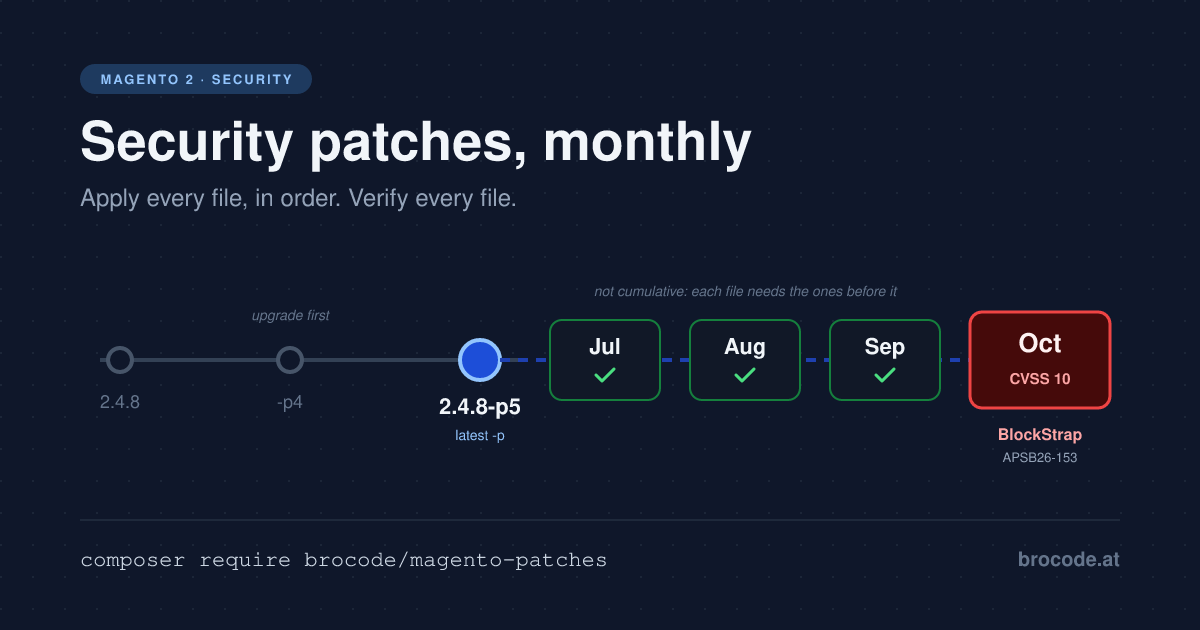
This article leads with a change most Magento 2 teams have absorbed without changing their tooling: Magento security patches no longer arrive only as -p releases a few times a year, but as isolated patch files every month, one set per release line, each one depending on the last. It is written for agencies running the same routine across many shops, and for the developer who runs their company’s one shop next to everything else in IT. Both have to answer one question every month with evidence: is this month’s fix actually in vendor/ on production?
TL;DR — Treat Magento security patches as a monthly dependency update, not an incident. Adobe’s October bulletin, APSB26-153, fixes a Common Vulnerability Scoring System (CVSS) 10.0 unauthenticated code-execution flaw, CVE-2026-103849 ("BlockStrap"), through isolated patch files that only fit the latest -p of each line. Register every file with composer-patches 2.x so a plain composer install reproduces it, then verify vendor/. Patch scripts ending in || true report success when nothing was applied. Cost: one migration branch per shop, then a few minutes per bulletin.
Current Magento security patches (as of 11 November 2026)
The newest Adobe Commerce bulletin is APSB26-153, published 13 October 2026, priority 2, with eleven CVEs scored 4.3 to 10.0. Adobe’s release day on 10 November brought bulletins for other products and none for Commerce, so the October files are still the latest. The next regular release day is Tuesday, 8 December 2026. This section is updated after each one.
| Release line | Base the file needs | October 2026 file | Applied before it | Open Source download |
|---|---|---|---|---|
| 2.4.9 | 2.4.9 | 2-4-9-oct-2026.zip | July, August, September files | Yes |
| 2.4.8 | 2.4.8-p5 | 2-4-8-p5-oct-2026.zip, updated by 16 October under the same file name | July, August, September files | Yes |
| 2.4.7 | 2.4.7-p10 | 2-4-7-p10-oct-2026.zip | July, August, September files | Yes |
| 2.4.6 | 2.4.6-p15 | 2-4-6-p15-oct-2026.zip | July, August, September files | Commerce only |
| 2.4.5 | 2.4.5-p17 | 2-4-5-p17-oct-2026.zip | July, August, September files | Commerce only |
| 2.4.4 | 2.4.4-p18 | 2-4-4-p18-oct-2026.zip | July, August, September files | Commerce only |
Each ZIP holds separate files per component (CE, EE, and B2B where a month includes one); apply only those for what you run. B2B 1.3.3 to 1.5.3 is affected this month.
The 2026 bulletins since the monthly files began:
- July — APSB26-73. The first isolated monthly files. They add Adobe’s Commerce Version Tool,
vendor/bin/patch-status. - August — APSB26-92.
- September — APSB26-138, plus the out-of-band APSB26-146 hotfix for StyleSmuggler (CVE-2026-75650), exploited in the wild. The October file does not contain that hotfix, so it stays a separate patch.
- October — APSB26-153, BlockStrap (CVE-2026-103849, CVSS 10.0), detailed below.
- November — none. No Commerce bulletin on 10 November.
Is your store on the base version in the table? Then apply every month’s file in order. If it is not, read the section on stores that are not on the latest -p, further down, first.
Why this matters now
On 13 October 2026 Adobe published APSB26-153, the October bulletin for Adobe Commerce, Magento Open Source and Adobe Commerce B2B. Its top entry is the one to plan around:
- CVE-2026-103849, "BlockStrap" — improper neutralization of special elements used in a template engine (CWE-1336), arbitrary code execution, rated critical with a CVSS 3.1 base score of 10.0:
CVSS:3.1/AV:N/AC:L/PR:N/UI:N/S:C/C:H/I:H/A:H. - Affected: every line up to its
2026-sepbuild — Adobe Commerce 2.4.4 to 2.4.9, Magento Open Source 2.4.7 to 2.4.9 per the NVD record, B2B 1.3.3 to 1.5.3. The bulletin lists ten more CVEs, among them a 9.8 in B2B. - Fixed in: the
2026-octisolated files for each line (Commerce 2.4.4 to 2.4.9, Open Source 2.4.7 to 2.4.9), and in 2.4.10-alpha1. - Exploitation: Adobe states it is not aware of exploits in the wild and rates the update priority 2. CISA’s assessment in the NVD record reads exploitation: none, automatable: yes, technical impact: total.
Two details change what "patched" means this month. The October KB article states that the hotfix for CVE-2026-75650 (StyleSmuggler, APSB26-146, exploited in the wild in September) is not included in the October file and must stay applied separately. And Magento Open Source 2.4.6 gets no October file at all.
No live attacks are known yet, but Sansec built four attack routes within 24 hours and questions Adobe’s priority 2 rating. For StyleSmuggler, three days passed between first exploitation and Adobe’s hotfix.
The baseline: what Magento security patches look like in 2026
Adobe’s release schedule now describes "individual, non-cumulative security patch files … released independently to enable faster remediation", alongside a full patch release once a year in May. The released-versions list shows what that produced: -p releases on 10 March and 12 May 2026, and none since. The current baseline for each line is the May one — 2.4.9, 2.4.8-p5, 2.4.7-p10, 2.4.6-p15, 2.4.5-p17, 2.4.4-p18. Everything after that ships as files: July (APSB26-73), August (APSB26-92), September (APSB26-138), October (APSB26-153).
The KB articles for those bulletins set the rules, and every one of them matters for tooling:
1. One ZIP per line per month, e.g. 2-4-8-p5-oct-2026.zip, containing one or more files named <version>-<YYYY>-<MM>-<seq>-<COMPONENT> — 246p15-2026-07-001-CE.patch, …-EE, …-B2B for each component you run.
2. Latest -p only. "Isolated security fixes are tested exclusively against that version." A store on 2.4.7-p9 is outside the tested path for every file since July.
3. In order, every month. Each file builds on the earlier ones and none of them contains its predecessors: "merchants must have already applied all previous monthly Isolated security patches". October on 2.4.8-p5 therefore needs July, August and September in place first.
4. No Composer package. Adobe publishes no new package versions with these files — composer update brings you nothing. Adobe’s guide for on-premises installs is patch -p1 < %patch_name%.patch, and "try using -p2" if that does not work. Wiring that into a Composer project is left to you.
5. A status tool rides along. The July file adds the Commerce Version Tool (CVT), php vendor/bin/patch-status, which reports applied and missing monthly patches and a per-CVE PROTECTED / VULNERABLE / UNKNOWN status. Per Adobe, "CVT is only available in the July 2026 Security Isolated patch file." — the August file then rewrites that same vendor/bin/patch-status, so it is part of more than one monthly file.
6. Files change after release. By 16 October, Adobe had published an updated October file for 2.4.8-p5: the Community Edition part had missed an intended defense-in-depth change. The revised file keeps the same file name, 248p5-2026-10-001-CE.patch. Anyone who downloaded on day one holds a different file under an identical name.
On one release line, that looks like this. The monthly files hang off the latest -p only, here 2.4.8-p5, and each one assumes the files before it. A store on 2.4.8-p4 cannot take a 248p5-… file directly: it upgrades to 2.4.8-p5 first, then applies July to October in order.
flowchart TD
  accTitle: Monthly security files on the Magento 2.4.8 release line
  accDescr: 2.4.8 shipped on 8 April 2025, followed by -p1 to -p3 in 2025, -p4 on 10 March 2026 and -p5 on 12 May 2026, the latest -p of the line. The 2026 monthly security files attach to 2.4.8-p5 only and apply in order, July (APSB26-73), August (APSB26-92), September (APSB26-138), October (APSB26-153, BlockStrap). An arrow from 2.4.8-p4 straight to the monthly files is crossed out, because Adobe tests them only against the latest -p; the path from -p4 is to upgrade to -p5 first. The StyleSmuggler hotfix (APSB26-146) is a separate branch on -p5 that the October file does not include, and the October file was re-released under the same name.
  ga["2.4.8 · 8 Apr 2025"] --> p13["-p1 to -p3 · 2025"]
  p13 --> p4["2.4.8-p4 · 10 Mar 2026"]
  p4 -- "upgrade first" --> p5["2.4.8-p5 · 12 May 2026<br/>latest -p"]
  p5 --> jul["Jul · APSB26-73<br/>248p5-2026-07-…"]
  jul --> aug["Aug · APSB26-92"]
  aug --> sep["Sep · APSB26-138"]
  sep --> oct["Oct · APSB26-153 (BlockStrap)<br/>248p5-2026-10-001-CE.patch"]
  p4 --x|"✗ not tested on -p4"| jul
  p5 -.-> hot["StyleSmuggler hotfix<br/>APSB26-146"]
  oct -.- re["re-released,<br/>same file name"]
  classDef latest fill:#e6f2ff,stroke:#1f6feb
  classDef side fill:#fff6e0,stroke:#b7791f
  class p5 latest
  class hot,re side
  linkStyle 7 stroke:#c0392b,stroke-width:2px,stroke-dasharray:6 4
The 2.4.8 line: monthly files attach to the latest -p and apply in order; an older -p upgrades first.
Put together, Magento security patches are now a monthly dependency with ordering constraints, files that can change under a stable name, and no package manager support. Every silent failure compounds into the next month’s file.
Not on the latest -p: where the fixes still come from
Every file above assumes the latest -p of a line Adobe still serves. If that does not describe your store, these are the options as of October 2026:
| Your version | What Adobe offers | What to do |
|---|---|---|
Older -p on 2.4.7 or 2.4.8, e.g. 2.4.8-p4 | Files for 2.4.7-p10 and 2.4.8-p5 only | Upgrade to the latest -p, then apply July to October in order. composer patches:upgrade 2.4.8-p5 carries registered patches over and drops what the release already contains |
| Adobe Commerce 2.4.4 to 2.4.6 | Files for 2.4.4-p18, 2.4.5-p17 and 2.4.6-p15, downloaded with your Composer keys; security fixes until 31 May 2027 (2.4.4, 2.4.5) and 31 May 2028 (2.4.6) | Latest -p of the line, then the files in order; schedule the line upgrade before that date |
| Magento Open Source 2.4.6 or older | For 2.4.6, the July and August files only; from September, Open Source downloads start at 2.4.7 | Upgrade to 2.4.7-p10 or later — there is no Open Source BlockStrap file for 2.4.6 |
A line upgrade is a project, not a patch day: new platform requirements, and every third-party module tested again. It is still the only route that ends with a supported store.
Mage-OS 3.6.0 ports the October file, but it tracks Magento Open Source 2.4.9, and its 1.x and 2.x lines have had no release since May 2026. Moving there is a line upgrade too, just to a different distribution.
Backporting a newer line’s file yourself works for a single fix, and you own the testing. composer patches:security <file> --from-version=2.4.8-p5 runs the same checks, all or nothing. On an Open Source 2.4.6-p15 shop, the October file conflicted in eight files, Filter/Template.php included: not drop-in. Passing checks prove it applies, not that the fix is complete.
The tradeoff: four ways teams apply Magento security patches, and how each fails
I recently went through the patch setups of real Magento 2 installs on 2.4.4 to 2.4.9, Open Source and Commerce with B2B. Most combined two or more of the mechanisms below — typically composer-patches 1.x for custom fixes plus a script for Adobe’s files. Each has a way of reporting success while leaving vendor/ unpatched.
Patch scripts in "post-install-cmd"
The most common shape: a scripts entry that runs patch -p1 -N --no-backup-if-mismatch -r /dev/null < composer-patches/248p5-2026-07-001-CE.patch || true after every install.
Strengths: it follows Adobe’s instructions literally, needs no plugin, and runs on every composer install.
Costs: || true exists so the second run doesn’t fail on hunks that are already there, and it swallows every other failure with them. In the installs I checked, that hid two real gaps: a monthly file that was not applied at all in a local vendor/ while the script "succeeded", and a VULN hotfix whose root file, pub/errors/processor.php, had been silently left out. The build output looked clean both times.
git apply --reject
The same script with git apply … --reject || true, usually to get past one hunk that doesn’t fit.
Strengths: git apply is stricter about context than patch, and --reject gets a deploy unstuck.
Costs: --reject applies whatever fits and writes *.rej files for the rest. The result is a half-patched vendor/ that looks patched, plus .rej files nobody reads. An --exclude that skips part of a file needs re-checking every month, because the next file builds on the skipped lines.
composer-patches 1.x
cweagans/composer-patches ^1.7 with extra.patches-file pointing at a JSON list — the standard for custom fixes for years.
Strengths: declarative, versioned, and patches re-apply on every install without a script.
Costs: 1.x is generous. It guesses the -p depth and falls back to patch with fuzz, so a hunk can land somewhere its author never intended. In the projects I checked, some custom patches had applied "with fuzz 1" for years.
composer-patches 2.x
The 2.x line applies with git apply, uses one depth, has no fuzz, and fails the install when a patch does not apply. It also writes patches.lock.json. This is the right base — and the migration has its own trap.
Strengths: strict, reproducible, and a failed patch fails the build.
Costs: 2.x reads its patch list from extra.composer-patches.patches-file (configuration docs), and simply ignores the old 1.x key extra.patches-file. Upgrade the constraint without moving that key and every patch in the file stops applying, with no error. Patches that 1.x applied with fuzz or at a guessed depth now fail on the first clean install. And every mechanism above shares one last effect: a vendor/ an old script already patched looks fully patched to any "is this change already there?" check — until the next fresh composer install in CI brings back the unpatched file.
A working example: brocode/magento-patches
Here is a working example of the setup I ended up with. It is my own module, so read it as one implementation of the rules above: brocode/magento-patches is a Composer plugin that adds patch management commands, while the applying itself stays with composer-patches 2.x. A deploy remains a plain composer install — no scripts entries, no second tool on the server.
composer require brocode/magento-patches:^1.2The monthly routine (version 1.2) is:
composer patches:security --refresh
composer patches:security --download=missing
git add patches/ patches.json patches.lock.json && git commit -m "Security patches October 2026"
The first checks Adobe for new bulletins and lists those affecting the installed version (from vendor/composer/installed.json), exit 2 when one is missing; without --refresh it runs offline from the committed data. In a terminal it ends with "Apply these 5 now? [Y/n]". The second fetches each missing file for your version with the keys in auth.json, oldest first, splits it per package, validates and registers it, and stops at the first that does not fit. Running it twice changes nothing.
If you run many shops, the routine is identical in every one. Bulletin data and downloads are committed, so a patch month is a reviewable diff per shop, and CI enforces it (see Verification). If you run one shop, it is two commands a month, and a file that does not fit stops the run before anything half-applies. --dry-run previews a single bulletin without changing anything.
The rest of the lifecycle:
| Command | Purpose |
|---|---|
patches:security <file> --id=APSB26-153 | Register a file you downloaded yourself |
patches:security --check-downloads | Re-download stored files and compare sha256 — the case of the replaced 2.4.8-p5 file above |
patches:sync | Register downloads committed to patches/downloads/ — for CI; --check only reports |
patches:quality ACSD-… | Add Quality Patches Tool (QPT) patches matched to installed versions |
patches:add / patches:remove | Your own patches, and removal by id |
patches:upgrade 2.4.x-pN | Upgrade Magento, drop what the release contains, re-validate the rest |
patches:status | Check every entry is really applied in vendor/; list old patch mechanisms |
What makes the "silent" cases above loud is the order of checks each file change goes through before anything is written:
1. Reverse check. An already-present change is skipped only when a registered patch or the pristine package explains it. Otherwise vendor/ was patched outside composer-patches, and the plugin reports a conflict naming the packages to reinstall.
2. Declaration check. A hunk that adds an existing PHP or JavaScript declaration would duplicate it — legal JavaScript, so no linter catches it.
3. Forward check with git apply; a hunk at an offset only passes if its context is unique in the file.
4. Apply and lint on a scratch copy: php -l, xmllint, node --check, JSON.
It is all or nothing: on any conflict nothing is written, and a later failure restores every file and reinstalls the packages. A successful run ends with a check that vendor/ is byte-identical to the validated result. vendor/bin/patch-status is left out, because no package owns vendor/bin.
Requirements: PHP 8.1+, Composer 2.3+, git, ext-zip and ext-dom. MIT licence, source at https://github.com/brosenberger/magento-patches, package on Packagist.
Migrating an existing setup
The repository’s MIGRATION.md covers each old mechanism. The order never changes, and skipping a step is how fixes go missing:
- Switch to composer-patches 2.x and move
extra.patches-filetoextra.composer-patches.patches-file. - Delete the old
patch,git applyormagento-patches applyentries inscripts. - Rebuild a pristine
vendor/withrm -rf vendor && composer install— where fuzz-only 1.x patches fail first. - Register the monthly files oldest first (
--download=missingkeeps that order), then runcomposer patches:status.
What to skip
|| trueon a patch command. If a second run would fail, the fix is a tool that knows what is already applied, not one that ignores every exit code.- Trusting
vendor/on a developer machine as evidence. A tree patched once by hand or by script stays patched until the next fresh install. Verify on a cleanvendor/, the way CI and production build it. - Skipping a month because the next file "will include it". The files are not cumulative. October on 2.4.8-p5 assumes July is already in place.
Verification
The proof that a patch is in place is a fresh build, not the run that registered it:
rm -rf vendor && composer install
composer patches:status
find vendor app lib pub setup -name '*.rej'
git status --short
patches:status exits 0 only when every entry is really applied, no old patch mechanism is left and the lock is current. The find should return nothing; git status catches root copies such as pub/errors/processor.php that an old script patched in place.
In CI, the same checks run as a gate:
composer install --no-interaction
composer patches:sync --check
composer patches:security
patches:sync --check exits 1 on a committed download nobody registered or a stale lock; patches:security (offline) exits 2 when the committed bulletin data shows a fix this install is missing. Where Adobe’s CVT is still installed, compare its missing_patches list as a second opinion.
Rollback is the normal Git path: revert the commit that registered the bulletin, then rebuild with rm -rf vendor && composer install and run composer patches:status again.
Related modules
If you want the registration and checks as a drop-in, see brocode/magento-patches.
Related reading
- Magento Attack Surface: Don’t Ship Code You Don’t Need — the StyleSmuggler incident.
- Magento 2 Security Hardening: 9 Layers, Owned and Costed — patching as one layer of many.
- Magento 2 Incident Recovery: 6 Scenarios and a Runbook — when the patch came too late.
Sources & References
- Adobe Security Bulletin APSB26-153
- NVD — CVE-2026-103849
- Sansec — BlockStrap: Magento and Adobe Commerce RCE
- Adobe KB — Security update available for Adobe Commerce, APSB26-153
- Adobe KB — Updated October 2026 isolated security patch for 2.4.8-p5 — the revised file under the same name.
- Adobe KB — How to apply an isolated security patch file — Adobe’s own
patch -p1/-p2instructions. - Adobe KB — APSB26-92 and APSB26-138
- Adobe KB — APSB26-73
- Adobe — Release schedule and Released versions
- Adobe — Lifecycle policy
- Mage-OS 3.6.0 release notes
- Adobe KB — APSB26-146 (CVE-2026-75650)
- composer-patches 2.x configuration
Disclaimer
Versions, dates and CVE details reflect Adobe’s pages as of 11 November 2026; Adobe revises them, so check the bulletin before acting. The failure cases come from real Magento 2 installs on 2.4.4 to 2.4.9 and describe patterns, not a statistic. Run any migration in a branch against a fresh vendor/ before production.