Every guide to integrating an external system with Magento is organised by entity: here is how you create a product, here is how you create a customer, here is how you place an order. That is a reasonable way to write a reference and a poor way to run a project, because it answers a question nobody is blocked on.
The question people are actually blocked on is what to build first. An integration is not one deliverable, it is a sequence, and the sequence decides when the designer, the content team and the search consultant stop working against sample data. Get it right and four workstreams unblock off the first wave. Get it wrong and the integrator finishes in the same number of weeks while everyone else waits.
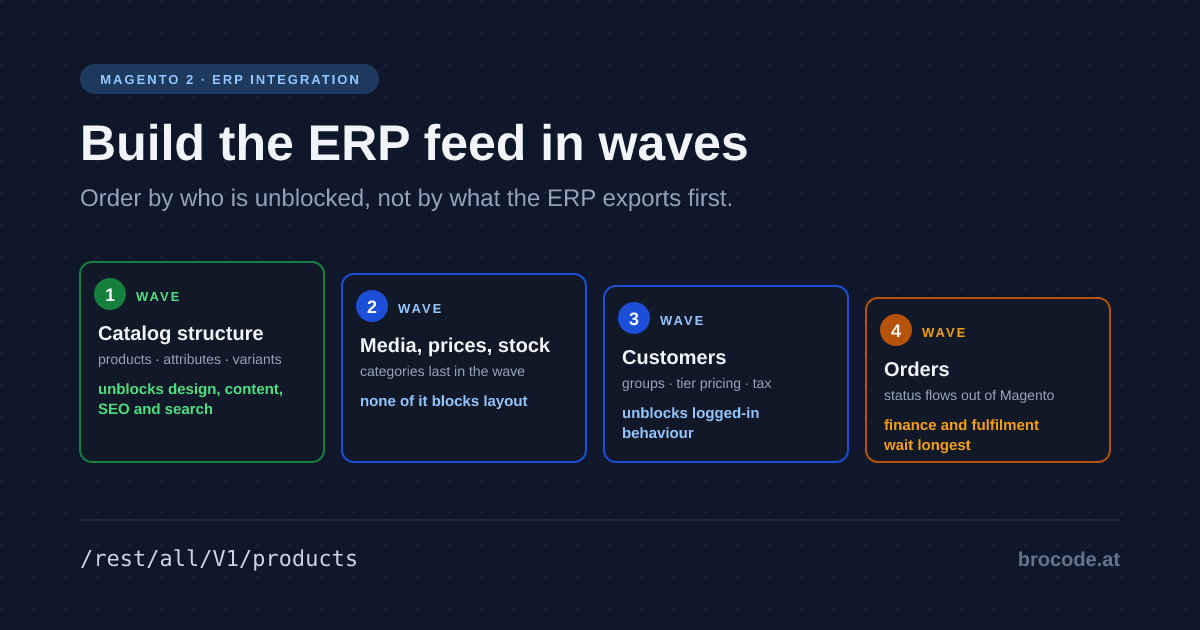
TL;DR — Build a Magento ERP integration in wave order: catalog structure, then media, prices, stock and categories, then customers, then orders. Catalog first is the only wave that unblocks design, content, SEO and search at once, so the shop looks like a shop while the integrator is still working. The cost you accept: finance and fulfilment wait longest, because orders come last. Budget separately for seven failure modes every endpoint family shares — the expensive one: one path segment decides whether a product write is global or a store-view override.
So this article leads with the ordering argument, then covers the failure modes that recur in every endpoint family regardless of entity. The per-family detail lives in the cluster pages it links to — the structural half in Product Data via REST, the commercial and taxonomy halves in Prices and Stock via REST and Magento Categories via REST.
Build the waves by who is unblocked
Not by what the external system exports first, and not by what is easiest.
Wave 1 — catalog structure. Products, their attributes, their variants. This unblocks design, content, SEO and search configuration simultaneously, which no other wave does. A themer cannot lay out a listing page against three sample SKUs; every decision made against sample data gets redone when the real catalog arrives with forty-character product names, missing images and four-deep category trees. Finish this one properly rather than quickly.
Wave 2 — media, prices, stock, categories. All separable from wave 1, and none of them blocking layout. Media deliberately runs on a slower cadence than everything else, because photographs do not change nightly. Prices and stock are the highest-frequency feeds and the ones most often built wrong, as a full product save per SKU. Categories come last in the wave: a catalog can be loaded, laid out and reviewed flat, and the tree attached afterwards without redoing any of it.
Wave 3 — customers. Unblocks behaviour that only exists when logged in. Customer groups drive tier pricing and tax class, so wave 2’s pricing work cannot be validated without them. Largely independent of the catalog, so it can overlap given a second integrator.
Wave 4 — orders. Depends on both preceding waves and blocks nobody on the shop side. It is also where the traffic reverses: everything above pushes data into Magento, while orders are mostly Magento pushing status out to the external system. Different code, different failure modes, different monitoring.
The tradeoff this ordering accepts is explicit: finance and fulfilment wait longest, because orders come last. That is the right trade on almost every project — they are waiting on a system that is not yet selling anything, while design, content, SEO and search are all blocked on data wave 1 delivers.
The quiet part, and the reason this ordering is worth arguing for: it is chosen so that the shop starts looking like a shop while the integrator is still working. That is a scheduling argument backed by API facts rather than an architectural one.
What every family gets wrong differently
Seven behaviours recur across every endpoint family, and each one has cost somebody a day. Treat them as the baseline every integration starts from, before any entity-specific work begins.
Here is a working example of the first and most expensive one:
# writes the GLOBAL value
curl -X PUT "$BASE/rest/all/V1/products/SKU-1" -d '{"product":{"name":"Chair"}}'

# writes a STORE-VIEW OVERRIDE on the default store -- and looks identical
curl -X PUT "$BASE/rest/V1/products/SKU-1"     -d '{"product":{"name":"Chair"}}'
Nothing in either response tells you which one happened. All were executed against a running install rather than taken from documentation — see the verification note at the end.
1. Scope is decided by the route, silently. The single most expensive default in the API.
2. There is no API-wide error contract. Some families report per-item failures and apply the good rows; some take the whole batch or none; some accept bad data silently and persist it. Prices and stock are the clearest illustration — two endpoints that look alike and behave in opposite ways on both axes. Establish the model per family before writing retry logic.
3. A success status is not proof of storage. Several endpoints accept a payload, return 200, and write nothing: an attribute outside the entity’s attribute set, an option reference that does not resolve, a price on a product type that does not own one. Read back what matters.
4. Idempotency is per-endpoint, not per-API. POST /V1/categories/{id}/products upserts; DELETE on the same pair fails if the assignment is already gone; POST .../child on a variant parent fails if the child is already linked. Retry handling has to be written per call.
5. Error messages arrive with placeholders unresolved. %fieldName, %1 — the values sit in a separate parameters field. A client logging message alone records Invalid attribute %fieldName = %fieldValue. and nothing about which entity.
6. Acceptance is not completion. A queued batch returns a receipt. Poll for terminal status; failed operations are not retried indefinitely on their own.
7. There are no cross-resource transactions. Structure, media, prices and stock are separate writes with no shared rollback. Design for partial state and resumability rather than atomicity.
Scope: the fallback rule that creates overrides you never asked for
The store code in the route is not cosmetic. Adobe’s own rules:
- No store code on create → the object is created with values set globally for every scope.
- No store code on update → by fallback, values are written to the default store only, not globally.
allstore code → values are written for all store scopes that do not yet have their own value.
So POST /rest/V1/products followed by PUT /rest/V1/products/{sku} is not symmetric. The create writes global; the update silently writes a default-store override. Six months later the German store view shows the English name because someone’s translation sits at global scope and the default-store row wins for the store view that inherits it.
Verified on 2.4.8-p5 rather than taken from the docs. Creating a product through /rest/all/V1/products with name: "Global Name" produced exactly one row in catalog_product_entity_varchar, at store_id = 0. A follow-up PUT /rest/V1/products/{sku} — no store code — with a different name left that global row untouched and added a second row at store_id = 1, the default store view. One scopeless update is all it takes, and nothing in the response says so.
Rules that hold up:
- Write everything untranslated through
/rest/all/V1/.... - Write translated attributes only through
/rest/{store_code}/V1/..., and only the attributes that are actually store-scoped. - Never let the client fall back to a scopeless route because the store code lookup returned null. Fail the row instead.
The async/bulk path now behaves identically — magento/magento2#23142 is fixed. That issue (the store code from the route not reaching the queue message) is the reason this section used to end in a warning. Tested on 2.4.8-p5 against a product whose name was global-only:
| Route | Where the value landed |
|---|---|
POST /rest/zurich_view/async/bulk/V1/products | store_id = 2 — the correct store view |
POST /rest/async/bulk/V1/products (scopeless) | store_id = 1 — a default-store override, exactly like the scopeless sync PUT |
Both operations completed at status 1, and the global row at store_id = 0 was untouched in both cases. So async is symmetric with sync, including in the trap: the scopeless async route creates the same silent default-store override, at bulk scale. Every rule above applies unchanged to /async/bulk — put the store code in the route there too.
Resetting a store-view value: the thing REST cannot express
Once an override exists, REST has no way to remove it. This is the direct consequence of the previous section and the reason accidental overrides are so expensive.
In the admin, every store-scoped field has a Use Default Value checkbox. Ticking it does not write a value — it deletes the row from catalog_product_entity_{varchar,int,decimal,text,datetime} for that store, restoring inheritance from scope 0. There is no equivalent in the product payload. custom_attributes has an attribute_code and a value, and no third state.
What integrators try, and what actually happens:
Sent to /rest/de_at/V1/products/{sku} | Result |
|---|---|
| attribute omitted | previous override kept, untouched |
"value": "" | override rewritten as an empty string — the storefront now shows blank, not the global value |
"value": null | stripped by the serializer or rejected as a type error, depending on backend type |
| the global value repeated | override still exists, now coincidentally equal — changes to the global value stop propagating |
That last row is the one that quietly rots. Somebody "fixes" a wrong German name by pushing the English one to the store view. Six months later marketing changes the global name and one store view keeps the old text forever, with no visible reason.
/rest/all/V1/... does not repair this either: the all store code fills scopes that do not yet have their own value. Existing overrides win. There is no route that means "make this attribute inherit again".
Options, in the order I would reach for them:
1. Don’t create the override. The cheapest fix by an order of magnitude. Maintain an explicit allowlist of store-scoped attribute codes in the integration and refuse to write anything else through a store-code route. Every attribute not on that list goes to all.
2. A custom endpoint for the reset. There is no dedicated "reset" method to call — the admin does it with a sentinel value, and that is what your endpoint should copy. Magento\Catalog\Controller\Adminhtml\Product\Initialization\Helper\AttributeFilter::prepareDefaultData() sets the attribute to boolean false for varchar / text / datetime backends (and null for the numeric ones), and Magento\Eav\Model\Entity\AbstractEntity::_processSaveData() turns that into a row DELETE rather than a write. Verified end to end on 2.4.8-p5:
// store 2 has an override; we want it to inherit again
$product = $productRepository->get($sku, false, 2, true);
$product->setStoreId(2);

// AttributeFilter does this first — the save-time validator rejects the
// sentinel on a required attribute otherwise
$attributes = $product->getAttributes();
$attributes['name']->setIsRequired(false);

$product->setData('name', false);
$productRepository->save($product);
Before: rows at store_id 0 ("Global") and store_id 2 ("Zurich Override"). After: the store_id 2 row is gone and get($sku, false, 2) resolves "Global" — real inheritance restored, not a copied value. Skip the setIsRequired(false) and the save throws on validation instead, which is the trap worth knowing before you build the endpoint.
Two details that are not obvious, and that cost real time to find. The reset value is not uniform: the product form substitutes boolean false for varchar/text/datetime backends, while Controller\Adminhtml\Category\Save uses null for everything. Send the wrong one and nothing fails — it writes a NULL row, which pins "no value" on that scope instead of restoring inheritance, and reads back as an empty field. And a category reset cannot be hooked on CategoryRepositoryInterface at all: that repository serialises the incoming object, then replaces it with a freshly loaded one and repopulates from the array, so a repository-level plugin mutates something that is discarded. Hook the resource model instead.
If you would rather not build this yourself, BroCode_ScopeReset does exactly the above for products and categories, keyed on the CSV importer’s own __EMPTY__VALUE__ constant so an integration learns one sentinel whichever way it loads data.
3. A data patch for a one-off cleanup after a botched import — repeatable, reviewable, and in version control, which raw SQL against production is not. Deleting rows directly is an incident response, not a remedy, and never safe without a reindex and cache flush afterwards.
-- find the damage first: attributes overridden per store view
SELECT a.attribute_code, v.store_id, COUNT(*) rows_
FROM catalog_product_entity_varchar v
JOIN eav_attribute a ON a.attribute_id = v.attribute_id
WHERE v.store_id <> 0
GROUP BY a.attribute_code, v.store_id ORDER BY rows_ DESC;

-- overrides that are byte-identical to the global value: pure noise, safe to drop
SELECT v.value_id
FROM catalog_product_entity_varchar v
JOIN catalog_product_entity_varchar g
  ON g.entity_id = v.entity_id AND g.attribute_id = v.attribute_id AND g.store_id = 0
WHERE v.store_id <> 0 AND v.value <=> g.value;

-- empty-string overrides created by a "clear the field" attempt
SELECT v.value_id, a.attribute_code, v.store_id
FROM catalog_product_entity_varchar v
JOIN eav_attribute a ON a.attribute_id = v.attribute_id
WHERE v.store_id <> 0 AND (v.value = '' OR v.value IS NULL);
row_id vs entity_id: the queries here use entity_id, which is what Open Source has — checked against SHOW COLUMNS on 2.4.8-p5 for catalog_product_entity_varchar, catalog_category_entity_varchar and catalog_product_entity_media_gallery_value, all of which key on entity_id. Commerce with staging enabled replaces it with row_id on the versioned tables; swap the join column there. Getting this backwards produces Unknown column rather than wrong data, so it fails safely.
The same trap has two relatives worth knowing. Status and visibility are store-scoped integers, so disabling an entity in one store view during an import leaves a permanent row that re-enabling globally does not clear — the most common form of "it is enabled, why is it a 404 on that shop". And configuration values are not resettable over REST at all: no core endpoint writes them, and the CLI can set but not unset a scoped value.
Indexer mode is the difference between one hour and nine
Update on Save with a REST import means every single save triggers reindex for that entity across price, EAV, stock, category-product, and search. It is the single worst configuration for import throughput.
bin/magento indexer:set-mode scheduleThen the MView _cl change-log tables accumulate during the import and cron drains them. Consequences to plan for:
- The
_cltables can grow to millions of rows during a large run. They are trimmed after processing, but disk and cron time have to be there. - For a full catalog replacement, it is often faster to set indexers to
realtime-off entirely, import, and runbin/magento indexer:reindexonce. - Cache invalidation lands at the end regardless. Expect an FPC purge; schedule imports away from traffic peaks and warm afterwards.
Throughput: async/bulk, and the consumer nobody started
Prefix a synchronous route with /async/bulk and you get array input, one request, and queued processing:
POST /rest/all/async/bulk/V1/productsThe response is immediate and contains a bulk_uuid. The catch is everything downstream of it — and how much is downstream of it is the subject of its own article, Magento Async Bulk API: What the 202 Doesn’t Tell You, which covers the response contract in full: the receipt carrying no entity, validation splitting into a synchronous all-or-nothing half and a deferred per-item half, and the permission the status routes need that your integration credential almost certainly does not have. The infrastructure half stays here:
- RabbitMQ is not required — this is the most repeated wrong thing about async/bulk.
Magento\WebapiAsync‘setc/queue_consumer.xmldeclaresasync.operations.allwith noconnectionattribute, so it inheritsMagento\Framework\MessageQueue\DefaultValueProvider, which returns'db'unlessqueue/amqp(orqueue/stomp, or an explicitqueue/default_connection) is set inenv.php. Verified end to end on 2.4.8-p5 with no broker configured at all:POST /rest/all/async/bulk/V1/productsreturned202with abulk_uuid, both operations sat inmagento_operationat status4(OPEN),bin/magento queue:consumers:start async.operations.alldrained them to status1(COMPLETE), and both products existed afterwards. Rabbit was required in 2.3; assuming it still is has people blocking imports on infrastructure they do not need. It is still the better broker under real load — just not a precondition. async.operations.allmust be running. On PaaS/on-prem, cron starts consumers by default; manually started consumers die with the terminal session. Run them under Supervisor with--max-messagesso they recycle.- Failures are silent from the client’s perspective. A 202 means "queued", not "saved". Poll
GET /V1/bulk/{bulk_uuid}/statusand treat anything other than a fully-complete bulk as an incident — and check first that the credential can read that route, because it is guarded by an action-log resource unrelated to the entity you wrote. - Failed operations sit in
magento_operationand nothing retries them. Not after a retry count, not ever: there is no REST route to retry an operation, and the only retry surface in the platform is the admin grid under System → Action Logs → Bulk Actions. Somebody has to look at them, or the client has to re-send the item itself.
This is exactly the failure mode a queue monitor exists for — a stalled async.operations.all consumer looks identical to a slow import for hours. See the AMQP Queue Monitor module.
Also: async/bulk gives up per-item HTTP status codes. You trade immediate error feedback for throughput. That is usually the right trade for imports and the wrong trade for anything user-facing.
Tokens, deadlocks, and the boring infrastructure failures
Token expiry mid-run. Admin bearer tokens expire (default 4 hours, Stores > Configuration > Services > OAuth > Access Token Expiration). Confirmed in Magento_Integration‘s etc/config.xml on 2.4.8-p5: oauth/access_token_lifetime/admin is 4 and .../customer is 1, both in hours. A seven-hour import authenticated with an admin token dies at hour four with 401s that look like a permissions problem. Use an integration instead, and sign every request with OAuth 1.0a. Activating an integration under System > Integrations generates four values — consumer key, consumer secret, access token, access token secret — and they do not expire. Sign with HMAC-SHA256: on 2.4.8-p5 a request signed with HMAC-SHA1, still the default in some OAuth clients, comes back 400 Signature method %1 is not supported. Do not send the integration’s access token as a plain bearer token. Since 2.4.4 Magento ignores it unless Allow OAuth Access Tokens to be used as standalone Bearer tokens is switched on, and the request then runs as a guest — the 401 names a missing permission rather than a rejected token. Adobe ships that switch off on purpose, because a never-expiring token in a bearer header is a long-lived secret that leaks easily, and recommends against turning it back on. If an admin token is unavoidable, cache it rather than requesting a new one per call — token generation is itself an expensive bcrypt-backed request.
Deadlocks under parallelism. Parallel writers touching catalog_product_entity_, catalog_product_index_, and url_rewrite produce SQLSTATE[40001] and lock-wait timeouts.
Honest note on this one: it is the only claim in this document that resisted verification. A deliberate attempt to provoke it on 2.4.8-p5 — 8 concurrent workers × 8 passes × 4 deliberately overlapping SKUs, 256 saves each rewriting name, price and category_links — produced 256 × HTTP 200 and not one 40001, with nothing in exception.log or system.log. That is not evidence the problem is gone. A single-container DDEV box with four contended SKUs and no concurrent indexer or url_rewrite churn is nothing like 48k SKUs against a real database, and deadlocks are load- and timing-shaped. Treat the advice below as sound practice that this pass could not reproduce a failure for, rather than as measured.
Fixes, in order of effectiveness:
Partition work by entity hash so a given entity is only ever touched by one worker; cap concurrency low (4–8) and measure, because more workers past the deadlock threshold reduces throughput; retry 40001 with jittered backoff, since unlike a validation 400 it is legitimately retryable; and never run two imports of the same catalog concurrently — take a lock.
Worker starvation. /rest shares the PHP-FPM pool with the storefront unless you separate it, so a hot import can take the shop down while every Magento metric looks healthy. Give the API its own pool.
No transactions across sub-resources. Product save, media upload, source-items, and prices are separate requests. There is no rollback spanning them. Design for partial state: make every step idempotent, record per-SKU progress, and make re-running a failed batch safe rather than trying to be atomic.
The cluster
Per-family detail, each verified the same way:
- Product Data via REST — the structural import: partial-update semantics, variants, product types, links, reproducing a listing.
- Product Attributes via REST — types, options, translations, swatches, and why third-party attribute properties are unreachable.
- Magento Product Media via REST — duplication, the gallery/role scope split, deletion refusals.
- Prices and Stock via REST — the narrow endpoints and their opposite error models.
- Magento Categories via REST — an entity with no natural key.
Customers and orders are not written yet, and deliberately so: nothing about them here has been executed against an install, and an unverified claim in this series would be worse than an absent one.
The test that matters
Whatever wave you are in: run the sync twice and diff.
A correct integration’s second run is a no-op — no new media files, no new rewrite rows, no new category assignments, no new gallery entries. If the second run is not a no-op, the first one was not idempotent, whatever it reported. That single check catches more integration defects than any amount of reading, and it works on every version.
Verification note
Every behavioural claim in this article was executed against Magento Open Source 2.4.8-p5 — Luma sample data, production mode, one website with four store views, MySQL message queue with no broker installed, OpenSearch 2.19.1 with Elasticsuite. Source was read only to explain a result already observed.
That distinction matters more than it sounds. Several claims here contradict advice that is widely repeated and was correct when it was written; the platform changed and the advice did not. Where this article and a forum answer disagree, the reason is usually a version boundary rather than an error — which is also why these claims need re-testing after a major upgrade rather than being trusted indefinitely.