lead
Almost every Magento developer has run bin/magento indexer:reindex, watched it take eleven minutes, and never asked what it was actually doing. That works right up until an indexer sits in working forever, or a price change takes forty minutes to reach the storefront, or a _cl table quietly grows to nine million rows and takes the database with it. Magento 2 indexers are not complicated — they are a materialized-view system with MySQL triggers underneath — but the mechanism is completely hidden by the CLI, and you cannot debug what you cannot picture.
This is the picture, plus the operational consequences: what changed in 2.4.8, why "Update on Save" is a trap on any store with real catalog volume, and the specific diagnostic sequence for an indexer that has stopped moving.
TL;DR — On Magento 2.4.8 the default changed: new indexers are "Update by Schedule" rather than "Update on Save." That is the right default and it moves the work into cron, so a store upgrading to 2.4.8 can find that a broken or under-provisioned cron — previously a cosmetic problem — is now the reason the storefront shows stale prices. Check cron before blaming the indexer. Once you can read mview and the changelog tables, an indexer stuck in working stops being mysterious at 3am.
baseline: what an indexer actually is
An index is a denormalised table that exists because the normalised one is too slow to query. Magento’s catalog is EAV — a product’s price lives across catalog_product_entity_decimal, tier price tables, rule tables and website scope. Answering "show me products in this category under €50, in stock, sorted by price" from those tables directly would join half a dozen of them per request. So Magento precomputes the answer into catalog_product_index_price and friends, and the category page reads one flat table.
That trade is the whole subject: reads get fast, writes get expensive, and the gap between them has to be managed. Everything below is about managing that gap.
Two files declare it. etc/indexer.xml defines the indexer itself:
<indexer id="catalog_category_flat" view_id="catalog_category_flat"
         class="Magento\Catalog\Model\Indexer\Category\Flat">
    <title translate="true">Category Flat Data</title>
    <description translate="true">Reorganize EAV category structure to flat structure</description>
</indexer>
And etc/mview.xml declares which tables, when changed, should mark that index stale:
<view id="catalog_category_product" class="Magento\Catalog\Model\Indexer\Category\Product" group="indexer">
    <subscriptions>
        <table name="catalog_category_entity" entity_column="entity_id" />
        <table name="catalog_category_entity_int" entity_column="entity_id" />
    </subscriptions>
</view>
That <subscriptions> block is the important one, and it is where the machinery becomes visible.
mview, in one paragraph
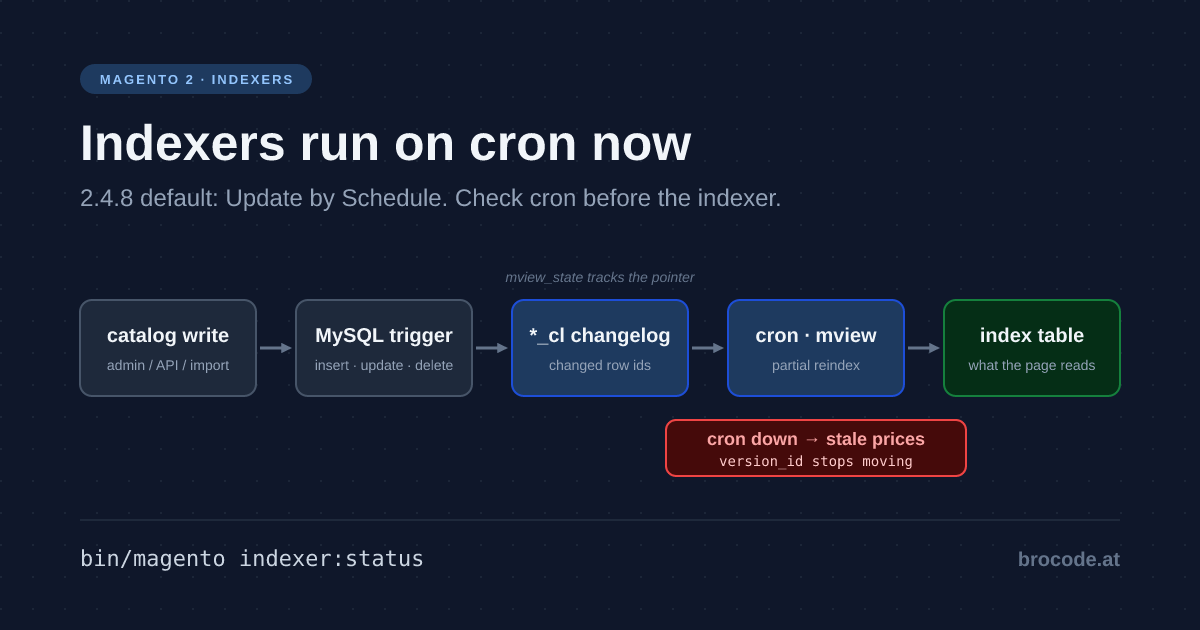
For every subscribed table, Magento creates MySQL triggers — insert, update and delete — that write the changed row’s id into a changelog table. The changelog is named after the view id plus a suffix that Magento\Framework\Mview\View\Changelog defines as the constant NAME_SUFFIX = 'cl', so catalog_category_product gets catalog_category_product_cl. Cron then reads new entries since the last processed version_id, hands that id list to the indexer for a partial reindex, and advances its pointer. Two tables track all of it: mview_state holds each view’s mode, status and version pointer; indexer_state holds each indexer’s status.
That is the entire system. Triggers write ids, cron drains them, state tables remember where you were.
Which means three things you can now check directly:
# Are the triggers actually there?
ddev exec bash -c 'mysql -udb -pdb -h db db -e "SHOW TRIGGERS LIKE \"catalog_product_entity\""'

# How far behind is each view, and is it stuck?
ddev exec bash -c 'mysql -udb -pdb -h db db -e "SELECT view_id, mode, status, version_id, updated FROM mview_state"'

# How big has the backlog grown?
ddev exec bash -c 'mysql -udb -pdb -h db db -e "SELECT COUNT(*) FROM catalog_product_price_cl"'
A changelog with millions of rows and a version_id that has not moved in hours is not a mystery any more — it is cron not draining, and you now know exactly which table proves it.
tradeoff: on save versus on schedule, and why the default moved
The two modes are the same indexers with completely different failure characteristics.
Update on Save reindexes inline, inside the save transaction. A product save writes the entity and recomputes its index rows before returning. The storefront is never stale. The cost is paid by whoever hit save — and by everything else waiting on the same row locks.
Update by Schedule writes an id to a changelog and returns. Cron reindexes later. The save is fast and predictable; the storefront is stale for up to a cron cycle.
| Update on Save | Update by Schedule | |
|---|---|---|
| Storefront freshness | Immediate | Up to one cron cycle |
| Save latency | Slow, and worse as catalog grows | Fast, constant |
| Bulk import behaviour | Pathological — reindexes per row | Batches into one drain |
| Failure mode | Admin timeouts, deadlocks | Silent staleness if cron dies |
| Requires healthy cron | No | Yes, absolutely |
The reason 2.4.8 flipped the default to schedule is the bulk-import row. On save, importing ten thousand products means ten thousand inline reindexes, each taking locks on shared index tables, which is how a routine import becomes a two-hour outage with admin users staring at gateway timeouts. On schedule, the same import writes ten thousand changelog rows and cron drains them in a handful of batched passes.
The honest cost of the better default: you have traded a visible failure for an invisible one. On save, a broken indexer shows up as an angry admin user immediately. On schedule, a broken cron shows up as prices that are silently wrong on the storefront, and nobody notices until a customer buys at the old price. If you run on schedule — and you should — then cron monitoring stops being optional infrastructure hygiene and becomes a revenue control. That belongs in the same alerting tier as the rest of your incident tooling.
The one legitimate case for Update on Save: a genuinely small catalog on a store with no reliable cron and no appetite to build one. That is a smaller set of stores than the number currently running that way.
working_example: a price change that never arrives
The report is always the same shape. "We changed a price in admin two hours ago and the category page still shows the old one." Here is the sequence that finds it, in the order that costs least.
1. Is the index even marked stale?
ddev exec php bin/magento indexer:statusReindex required means mview did its job and cron has not caught up — go to step 3. Ready on an index you know is wrong is the more interesting answer: the change never got recorded, which means triggers, so go to step 2.
2. Did the trigger fire?
ddev exec bash -c 'mysql -udb -pdb -h db db -e "SHOW TRIGGERS LIKE \"catalog_product_entity_decimal\""'No triggers on a subscribed table is the classic cause, and it has a classic origin: someone imported a database dump taken with --no-create-info or restored without triggers, or ran a migration that recreated the table. Triggers are not part of the schema Magento recreates on setup:upgrade. The fix is to make mview rebuild them:
ddev exec php bin/magento indexer:set-mode realtime          # drops triggers
ddev exec php bin/magento indexer:set-mode schedule          # recreates them
ddev exec bash -c 'mysql -udb -pdb -h db db -e "SHOW TRIGGERS LIKE \"catalog_product_entity_decimal\""'
This is worth adding to your restore runbook. A dump restore that silently loses triggers gives you a store that looks completely healthy and stops updating prices.
3. Is cron draining the changelog?
ddev exec bash -c 'mysql -udb -pdb -h db db -e "SELECT view_id, status, version_id, updated FROM mview_state WHERE view_id LIKE \"%price%\""'
ddev exec bash -c 'mysql -udb -pdb -h db db -e "SELECT MAX(version_id) FROM catalog_product_price_cl"'
If mview_state.version_id is far below the changelog max and updated is stale, cron is the problem — either not running, or running as the wrong user, or the indexer cron group is disabled. Check cron_schedule for jobs stuck in running with old executed_at values; those are usually the corpses of a process that was killed mid-run.
4. Is the indexer stuck in working?
ddev exec bash -c 'mysql -udb -pdb -h db db -e "SELECT indexer_id, status, updated FROM indexer_state"'A working status with an updated timestamp from hours ago and no running PHP process is a ghost lock — the reindex died (OOM kill is the usual culprit) without clearing its state. Confirm no process is genuinely running before touching anything:
ddev exec bash -c 'ps aux | grep -c "[i]ndexer:reindex"'If that returns 0, clear the lock and rerun:
ddev exec bash -c 'rm -rf var/locks/*'
ddev exec php bin/magento indexer:reset catalog_product_price
ddev exec php bin/magento indexer:reindex catalog_product_price
indexer:reset marks it invalid rather than deleting data, so this is safe to run. If it OOMs again, that is the actual bug — raise the memory limit for the run and then go find why one index needs that much:
ddev exec php -d memory_limit=4G bin/magento indexer:reindex catalog_product_price5. The one that looks like a bug and is not. A changelog table that keeps growing after you switched an indexer to realtime is a known wart: unsubscribing does not always drop the _cl table, so it lingers with stale rows and no consumer. It is harmless to query and confusing to look at. Confirm the view’s mode in mview_state before concluding anything from changelog size.
"One or more indexers are invalid": what the admin message means
One or more indexers are invalid. Make sure your Magento cron job is running.
Magento shows this admin message (Magento\Indexer\Model\Message\Invalid) whenever at least one indexer has the status invalid, which indexer:status prints as Reindex required. It is not an error by itself. Magento repairs an invalid indexer on its own: the cron job indexer_reindex_all_invalid, in the index cron group, runs every minute and does a full reindex of each invalid indexer that is not suspended. On a healthy store the message disappears within a minute or two.
When it stays, the repair is not happening. One query tells you why:
ddev exec php bin/magento indexer:status
ddev mysql -e "SELECT status, scheduled_at, executed_at, finished_at, messages
  FROM cron_schedule WHERE job_code = 'indexer_reindex_all_invalid'
ORDER BY schedule_id DESC LIMIT 5"- No rows, or only
pendingrows that never run: cron is not running, or not for theindexgroup. That is what the message means by "make sure your Magento cron job is running". Fix cron; reindexing by hand only clears the message until the next invalidation. errorrows: the full reindex fails every minute, usually for memory. Themessagescolumn holds the reason, and the out-of-memory case above applies.successrows, and the indexer is still invalid: check whether it is suspended (indexer:statusshows it), because suspended indexers are skipped.
Reproduced on Magento 2.4.8-p5: indexer:reset customer_grid turned the message on, one bin/magento cron:run --group=index ran indexer_reindex_all_invalid with success, the indexer went back to Ready, and the message was gone.
Keeping them healthy
Three habits prevent most of the above.
Never reindex everything when you mean one thing. indexer:reindex with no argument rebuilds all of them, which on a large catalog is an hour of load for a change that touched prices. Name the indexer.
Watch the changelog depth, not just the indexer status. indexer:status reports Reindex required whether the backlog is fifty rows or five million. A SELECT COUNT(*) per _cl table, alerted above a threshold you pick from normal traffic, catches a stalled drain hours before a human notices stale content. This is the single highest-value indexer alert.
Understand shared_index before you optimise. Several indexers declare a shared index in indexer.xml, meaning invalidating one invalidates its partners. This surprises people who reindex one thing and watch three go stale. It is by design, not a bug.
On deploys, the ordering that avoids a stale window: put the store in maintenance, deploy, run setup:upgrade, reindex what the release actually invalidated, then come out. Reindexing after traffic returns means serving stale data during the busiest moment of a release.
verification: is the pipeline actually flowing?
A five-minute check, worth running after any restore, migration or major upgrade.
# 1. Every indexer on schedule, and none invalid
ddev exec php bin/magento indexer:status
ddev exec php bin/magento indexer:show-mode

# 2. Triggers exist on a representative subscribed table
ddev exec bash -c 'mysql -udb -pdb -h db db -e "SELECT COUNT(*) AS trg FROM information_schema.triggers WHERE trigger_schema = DATABASE()"'

# 3. No changelog backlog is running away
ddev exec bash -c 'mysql -udb -pdb -h db db -N -e "SELECT table_name FROM information_schema.tables WHERE table_schema=DATABASE() AND table_name LIKE \"%_cl\"" | while read t; do printf "%-45s %s\n" "$t" "$(mysql -udb -pdb -h db db -N -e "SELECT COUNT(*) FROM $t")"; done'

# 4. mview is advancing: run twice, a minute apart, and compare version_id
ddev exec bash -c 'mysql -udb -pdb -h db db -e "SELECT view_id, status, version_id FROM mview_state ORDER BY view_id"'
Then the end-to-end proof, which is the only one that really counts: change a price in admin, wait one cron cycle, and confirm it appears on the category page. If it does not, you now have four places to look and a query for each.
Pass criteria: every indexer Ready or draining, mode is Update by Schedule for all of them, triggers present on subscribed tables, no _cl table growing without bound, mview_state.version_id advancing between samples, and cron running under the right user. A store that passes all six will not surprise you at 3am — and the ones that do surprise you almost always failed one of them silently, days earlier.
Related reading
- Magento TTFB: Varnish, Redis and the Backend Cost — indexes exist so category pages are fast; this is the rest of that story.
- Magento Elasticsearch Tuning with Real Benchmarks — the search index is a separate pipeline with the same staleness questions.
- Magento 2 Incident Recovery: 6 Scenarios and a Runbook — where the cron-monitoring argument in the tradeoff section leads.
- Magento Root Cause Analysis: Five Whys That Stick — "restore lost the triggers" is a textbook trigger-versus-cause distinction.
- Magento 2 Module Architecture: Monolith to Modules — declaring your own indexer and mview subscriptions for a custom entity.
- Magento 2 AMQP Monitor Module — the other asynchronous pipeline that fails quietly when its consumers stop.
Sources & References
- Adobe Commerce: indexing overview — indexer types, modes and the CLI surface.
- Adobe Commerce: custom indexer —
indexer.xml,mview.xmlandActionInterface. Magento\Framework\Mview\View\Changelog— theNAME_SUFFIX = 'cl'constant and the version-pointer logic, about two hundred lines invendor/.indexer_stateandmview_stateinvendor/magento/module-indexer/etc/db_schema.xml— the two tables every diagnostic above reads.- MySQL: trigger syntax and limitations — why triggers do not survive certain dump and restore paths.
Disclaimer
Reindex durations depend on catalog size, attribute count and hardware; no timing here is a benchmark for your store. The mysql invocations assume DDEV’s default credentials — substitute your own outside that environment. rm -rf var/locks/* and indexer:reset are safe in the sense that they destroy no catalog data, but confirm no reindex process is genuinely running first, as instructed in step 4: clearing a live lock gets you two concurrent reindexes on the same tables.