What Leads to Scope Confusion
Multi-store Magento 2 setups create a recurring operational friction point: confirming exactly which websites, store groups, and store views exist and which ones are currently active. Without a single authoritative surface, operators cross-reference the scope selector, Stores → All Stores, and Stores → Configuration to piece together context that should be obvious.
Three failure modes repeat themselves on multi-store installations:
- Wrong-scope support tickets. A ticket arrives referencing a symptom visible only on store view B, but the operator investigating it is scoped to store view A. Two hours later the mismatch surfaces.
- Configuration changes applied to the wrong scope. Stores → Configuration shows "Use Default" checkboxes that look identical across scopes. Without a clear ambient indicator of the active scope, a setting lands on the wrong website.
- Onboarding friction. New team members — ops, support, QA — routinely need a guided tour of which URL maps to which website, which store group owns which root category, and which locale corresponds to which store view. Stores → All Stores shows the hierarchy and nothing else: no storefront URL, no locale, no active/inactive state, and no way to open a store view in a new tab from the list.
These failures are not caused by bad processes. They are caused by absent context.
Impact Callout
A read-only admin dashboard widget that renders every website as a card — showing store views, storefront links, active/inactive status, and optional logo — so operators get complete store orientation at a glance without switching tabs.
What the widget shows
The widget injects itself into the admin Dashboard page, directly below the existing dashboard stats block. Each website appears as a card:
| Element | What is shown |
|---|---|
| Card header | Website name, website code |
| Active/inactive | Inactive websites are greyed out with an "inactive" badge |
| Store views | Each store view as an action button: name + code |
| Default store view | Rendered as a primary (filled) button; all others as secondary |
| Storefront link | Active store view buttons link directly to the storefront URL |
| Store logo | Optional — shows the configured header logo per store view |
Websites are sorted alphabetically. When the admin scope switcher is set to a specific website, store group, or store view, the widget narrows its output to match that scope.

Features
Search — a live search input filters visible cards by store name or code as you type. Useful on installations with 20+ store views where scanning manually becomes slow.
Hide inactive websites — a toggle collapses inactive website cards. The initial state is configurable per-installation; the per-user choice persists in localStorage so each operator’s preference survives page reloads.
Store logo display — when enabled, each card renders the header logo configured for that store view. Useful for visually distinguishing white-label or multi-brand setups where names alone are ambiguous.
Configuration
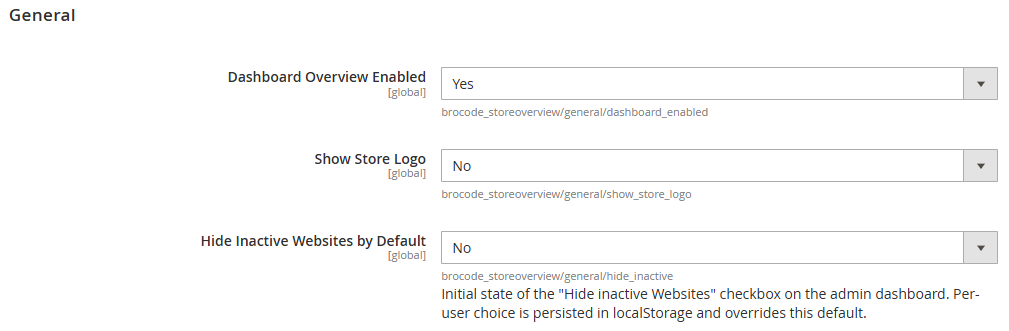
Under Stores → Configuration → Service → BroCode StoreOverview:
| Setting | Default | Effect |
|---|---|---|
| Dashboard Overview Enabled | Yes | Show or hide the widget entirely |
| Show Store Logo | No | Render the store header logo on each card |
| Hide Inactive Websites by Default | No | Initial state of the hide-inactive toggle |
CTA Bar
Who For
- Operations and support teams on multi-store setups who deal with scope confusion daily.
- Developers onboarding to a complex installation who need a reliable orientation surface before touching configuration.
- QA engineers verifying that the correct store view is active during test runs.
Who Skip
- Single-store installations. On a default Magento 2 install with one website, one store group, and one store view, the scope selector already makes context unambiguous.
- Teams that have already solved orientation through a custom dashboard widget or a third-party admin extension.
Installation
composer require brocode/module-store-overview
bin/magento module:enable BroCode_StoreOverview
bin/magento setup:upgrade
bin/magento cache:flush
No database schema changes. The widget appears on the admin Dashboard immediately after installation.
Verification
Reload the admin Dashboard — the store grid should appear in the widget column. The card count should match the website count under Stores → All Stores.
For the REST endpoint:
curl -s \
  -H "Authorization: Bearer <token>" \
  https://your-store.com/rest/V1/storeoverviews/ | python3 -m json.tool
Compatibility
| Magento version | PHP | Status |
|---|---|---|
| 2.4.6 | 8.1 / 8.2 / 8.3 | Stable |
| 2.4.5 | 8.1 / 8.2 | Stable |
| 2.4.4 | 8.1 | Stable |
REST API
The module exposes a read endpoint for external tooling — CI pipelines, smoke test suites, monitoring scripts — that need to discover all store view URLs without maintaining a separate configuration file.
Endpoint
GET /rest/V1/storeoverviews/Authentication
Requires an authenticated admin-scoped call. Create an integration under System → Integrations, grant it access to the Magento store configuration resources, and sign requests with its OAuth 1.0a credentials.
Note that passing an integration’s access token as a plain Authorization: Bearer header is disabled by default on current versions — the platform deprecated it — and fails with a 401 that blames the ACL rather than the setting. The examples below show the header form for brevity; on a default install, authenticate the integration properly rather than enabling that setting store-wide.
Response shape
Returns an array of website objects. Each website contains its store views as children:
[
  {
    "id": 1,
    "name": "Main Website",
    "code": "base",
    "url": "https://your-store.com/",
    "logo": "https://your-store.com/media/logo/stores/1/logo.png",
    "default": true,
    "active": true,
    "children": [
      {
        "id": 1,
        "name": "Default Store View",
        "code": "default",
        "url": "https://your-store.com/",
        "logo": "https://your-store.com/media/logo/stores/1/logo.png",
        "default": true,
        "active": true,
        "children": null
      },
      {
        "id": 2,
        "name": "German",
        "code": "de",
        "url": "https://your-store.com/de/",
        "logo": "https://your-store.com/media/logo/stores/2/logo-de.png",
        "default": false,
        "active": true,
        "children": null
      }
    ]
  }
]
Smoke test example
After a deploy, verify that all static assets (CSS, JS) referenced by each storefront are reachable. The failure mode this catches: a missed cache flush leaves the HTML referencing assets at the old versioned path (/static/version<old>/...) while those files no longer exist — resulting in silent 404s that break rendering without the storefront going down.
flowchart TD
    A[Deploy completes] --> B[GET /rest/V1/storeoverviews/]
    B --> C[Extract active store base URLs]
    C --> D[For each store URL]
    D --> E[Fetch homepage HTML, extract static asset paths]
    E --> F{All assets 200?}
    F -->|Yes| G[Store OK]
    F -->|No 404| H[Alert: missed cache flush or incomplete static deploy]
    G --> J{All stores checked?}
    H --> J
    J -->|No| D
    J -->|Yes| K[Smoke test complete]
The script fetches all active store view URLs from the instance (no hardcoded list), loads the homepage HTML for each, and HEAD-checks every /static/ asset path found:
#!/usr/bin/env bash
set -euo pipefail

BASE_URL="${1:?usage: smoke.sh <base-url> <token>}"
TOKEN="${2:?}"

store_urls=$(curl -sf \
  -H "Authorization: Bearer ${TOKEN}" \
  "${BASE_URL}/rest/V1/storeoverviews/" \
  | python3 -c "
import json, sys
for website in json.load(sys.stdin):
    if not website.get('active'):
        continue
    for store in (website.get('children') or []):
        if store.get('active'):
            print(store['url'])
")

failed=0
while IFS= read -r store_url; do
  printf '\n[%s]\n' "${store_url}"
  asset_urls=$(curl -sf --max-time 15 -- "${store_url}" \
    | python3 -c "
import sys, re
html = sys.stdin.read()
hits = re.findall(r'(?:href|src)=[\"'"'"']((?:https?://[^/]+)?/(?:pub/)?static/[^\"'"'"' >]+)[\"'"'"']', html)
seen = set()
for h in hits:
    if h not in seen:
        seen.add(h)
        print(h)
")
  if [ -z "${asset_urls}" ]; then
    printf '  no static assets found\n' >&2
    failed=$((failed + 1))
    continue
  fi
  while IFS= read -r asset; do
    case "${asset}" in
      http://*|https://*) full_url="${asset}" ;;
      *) full_url="${BASE_URL%/}${asset}" ;;
    esac
    status=$(curl -so /dev/null -w '%{http_code}' --max-time 10 -X HEAD -- "${full_url}")
    if [ "${status}" = "200" ]; then
      printf '  OK    %s\n' "${asset}"
    else
      printf '  FAIL  %s  (%s)\n' "${asset}" "${status}" >&2
      failed=$((failed + 1))
    fi
  done <<< "${asset_urls}"
done <<< "${store_urls}"

printf '\n%s static asset(s) failed\n' "${failed}"
exit "${failed}"
Run as a post-deploy step:
bash smoke.sh https://your-store.com eyJhbGci...Exits non-zero and lists every 404 asset path.
FAQ
Does this module affect store performance?
No. The widget is rendered only on explicit admin requests to the Dashboard page. It reads the store configuration tree once per page load — no external calls, no scheduled tasks, no frontend impact.
Can I control which scope the widget reflects?
Yes. When you switch the admin scope selector to a specific website or store view, the widget narrows its output to that scope. At global scope it shows all websites.
Does it work with custom website or store group names?
Yes. The widget reads from StoreManagerInterface directly, so any customisations to website name, store group name, or store view code are reflected automatically.
Is there a multi-instance version?
Not currently. The widget is scoped to the Magento instance it is installed on. A cross-instance aggregation would require a separate service outside Magento.
Related reading
- AMQP Monitor module — another operator-first dashboard extension for Magento 2.