Most Magento 2 social share extensions lead with a row of network buttons on the product page, one per network, often with a script from each network or from a share-widget service. This module does Magento 2 social share the way phones already do it: one Share button that opens the device’s own share sheet through the browser’s Web Share API, so a customer shares to WhatsApp, Messages, AirDrop, Signal or any installed app with the contacts they already use. Where a browser has no share sheet, the same button opens a small panel of share links that you configure in the admin.
Typical impact: one Share button instead of a row of network icons, zero third-party scripts, cookies or CSP entries, and every installed messenger reachable from a single tap on a phone.
Who it is for
- Stores with mostly mobile traffic. The native share sheet reaches whatever the customer actually uses, WhatsApp, Telegram, Signal, Messages or AirDrop, instead of the four networks a button row has room for.
- Merchants who cut third-party scripts for page speed, privacy or a strict Content Security Policy. The module loads nothing from outside the store: no share widget, no tracking pixel, no consent banner entry.
- Stores that lost their share buttons when a share-widget service went away, as AddThis did when Oracle shut it down on 31 May 2023.
- Multi-store-view setups that need a different share text or a different set of networks per country. Every setting is store-view scoped.
Who should skip it
- Stores that want share counters or network-branded buttons with logos. This module shows one Share action and plain text links.
- Hyvä storefronts. The frontend is a RequireJS component for Luma-based themes; Hyvä needs a small compatibility template that is not included.
- Stores that need share analytics inside a vendor dashboard. The module fires a browser event for your own tag manager instead.
Why one Share button instead of a Magento 2 social share button row
A button row decides for the customer which networks count. On a phone, the operating system already knows: its share sheet lists the apps and contacts that customer uses most. The Web Share API hands the product URL, the title and a share text to that sheet, and the customer picks where it goes.
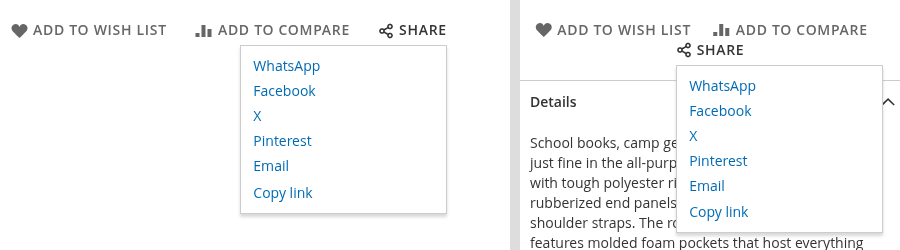
Desktop browsers are where it falls short: support for the native sheet varies, and Firefox on desktop only offers it behind a preference. There the same button opens the fallback panel instead: WhatsApp, Facebook, X, LinkedIn, Pinterest and email by default, each an ordinary link built from a URL template, plus a Copy link action. The links are rendered by the server, so without JavaScript they still work as a plain list.
Where it appears
- Product page: in the wishlist/compare row, with the same grey, uppercase, icon-first styling as Luma’s own actions.
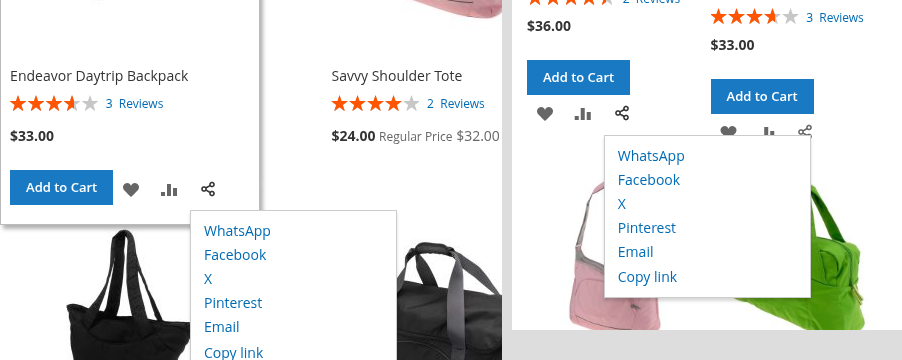
- Product lists: a share icon on every product tile of category pages, quick search and advanced search, next to the wishlist and compare icons. It shares that tile’s product page.
- Category page: below the description, sharing the category’s own URL, without layered-navigation filters or sorting.
- CMS pages and blocks: through the Web Share Button widget, sharing the page it sits on without the query string.
Products and categories always share their own URL, never the address bar, so tracking parameters and filter state never end up in a shared link.
Before and after
Before
- A row of network buttons that covers four networks and misses the messenger the customer actually uses.
- A share-widget script or one script per network, each with its own requests, cookies and CSP entries.
- Shared links that carry tracking parameters or layered-navigation filters from the address bar.
After
- One Share action on product pages, product tiles and category pages, and a widget for CMS pages.
- The phone’s own share sheet, with every installed app and recent contact, from one tap.
- Clean product and category URLs in every share, and no script loaded from outside the store.
Configuration
Stores > Configuration > Catalog > Catalog > Web Share, per website and store view:
- Placement switches for product pages, category pages and product lists.
- Share text, such as
Found this at our shop: {{title}}, sent to the native share sheet and to the share links. Translate it per store view. - Share links, one row each with a label, a URL template and an Active switch. Placeholders are
{{url}},{{title}},{{text}}and{{image}}. Set a row to inactive to hide a network without losing its template, or add one, such as Telegram’shttps://t.me/share/url?url={{url}}&text={{text}}. - Copy link in the fallback panel, shown where the browser offers the Clipboard API.
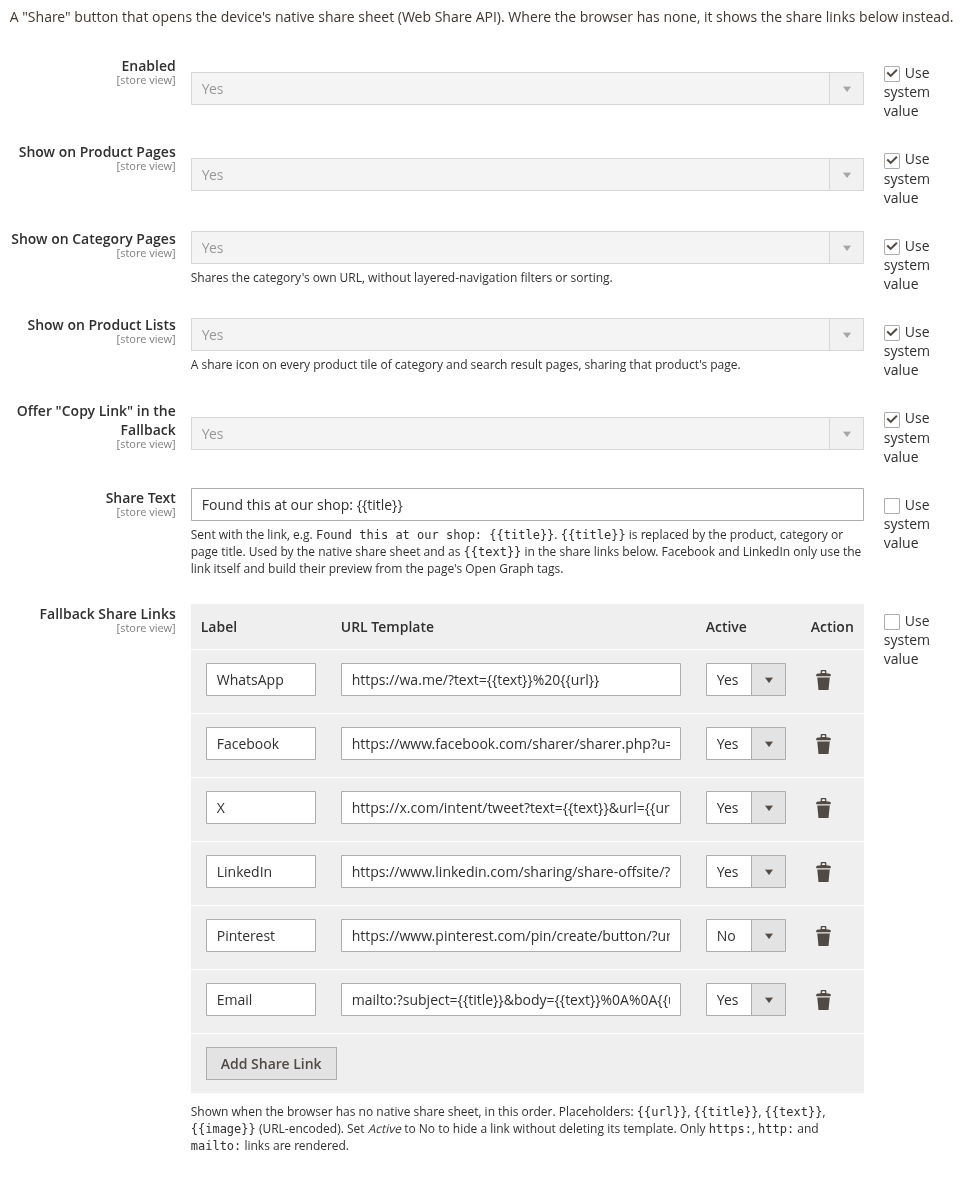
Only https:, http: and mailto: templates are rendered. Anything else, such as a javascript: URL, is dropped instead of being written into a link. Everything can also be set with bin/magento config:set and locked in app/etc/config.php; the README has the commands.
Installation
composer require brocode/module-web-share
bin/magento module:enable BroCode_WebShare
bin/magento setup:upgrade
bin/magento setup:di:compile
bin/magento cache:flush
In production mode, also deploy the frontend static content as usual. The module adds no database tables and sends no data anywhere; every share fires a webshare:share browser event with the method used, which a tag manager can forward to analytics.
Compatibility
- PHP 8.1, 8.2, 8.3, 8.4
- Magento 2.4 Open Source; tested on 2.4.8-p5 with Luma, on desktop and mobile widths, installed from Packagist
- Luma-based themes, including themes on Magento Blank; not Hyvä
- The storefront has to run on HTTPS, because browsers only offer the Web Share and Clipboard APIs on secure pages
FAQ
Does the Magento 2 social share button work on iPhone and Android?
Yes. Safari on iPhone and iPad and Chrome on Android open the device’s own share sheet, which lists WhatsApp, Messages, Telegram, AirDrop and every other installed app that accepts links. Browsers without a share sheet show the configured share links instead.
Which networks are included, and can I add more?
WhatsApp, Facebook, X, LinkedIn, Pinterest and email are included, plus a Copy link action. Any network with a share URL can be added as a new row in the admin, and any default can be switched off per store view.
Does the module load scripts from Facebook, X or other networks?
No. The share links are plain links, and the native share sheet is part of the browser. Nothing is loaded from a third party, so there is nothing to add to the Content Security Policy or to the cookie consent.
Why does Facebook ignore my share text?
Facebook and LinkedIn only take the URL and build the preview from the shared page’s Open Graph tags. Luma’s product pages have those tags; stock category and CMS pages do not, so their previews are thinner. WhatsApp, X, Pinterest, email and the native share sheet use the share text.
Does a shared category link keep the customer’s filters?
No. A category always shares its own URL, without layered-navigation filters, sorting or tracking parameters, so the person who opens it sees the category as the shop set it up.
Does it work with Hyvä?
Not yet. The frontend is a RequireJS component for Luma-based themes. A Hyvä store needs a small compatibility template, an Alpine component around the same logic, which is not included.
Related reading
- Web Share API on MDN: the browser API behind the Share button, and which browsers offer it.
- Screen Wake Lock API: A Keep-Screen-On Button for Shops: another small browser capability for product pages, used the same way, as one button without new content.
- Magento 2 Adminhtml Quick Links Module: another module that adds one control where the store already has similar ones, in the admin instead of the storefront.